challenges5_minute
Committed
desc
Oh no, not again! One of our developers accidentally committed some sensitive code to our GitHub repository. Well, at least, that is what they told us... the problem is, we don't remember what or where! Can you track down what we accidentally committed?
Access this challenge by deploying the machine attached to this task by pressing the green "Start Machine" button. You will need to use the in-browser view to complete this room. Don't see anything? Press the "Show Split Screen" button at the top of the page.
The files you need are located in /home/ubuntu/commited on the VM attached to this task.
Check out similar content on TryHackMe:
solution
cd commited/
ls
commited.zip
unzip commited.zip

cd commited/
# drwxrwxr-x 8 ubuntu ubuntu 4096 Feb 13  2022 .git
# -rw-rw-r-- 1 ubuntu ubuntu  393 Feb 13  2022 Readme.md
# -rw-rw-r-- 1 ubuntu ubuntu  982 Feb 13  2022 main.py
git branch
# dbint
# * mastergit log --oneline
# 28c3621 (HEAD -> master) Finished
# 9ecdc56 Database management features added.
# 26bcf1a Create database logic added
# b0eda7d Connecting to db logic added
# 441daaa Initial Project.
git show <commit_id>
# namun saya tidak menemukan apapun yang mencurigakan disini.git checkout dbint
git log --oneline
# 4e16af9 (HEAD -> dbint) Reminder Added.
# c56c470 Oops
# 3a8cc16 DB check
# 6e1ea88 Note added
# 9ecdc56 Database management features added.
# 26bcf1a Create database logic added
# b0eda7d Connecting to db logic added
# 441daaa Initial Project.
git show c56c470
# flag{a489a9dbf8eb9d37c6e0cc1a92cda17b}saya menemukan flag pada commit dengan pesan "Oops" di branch dbint.
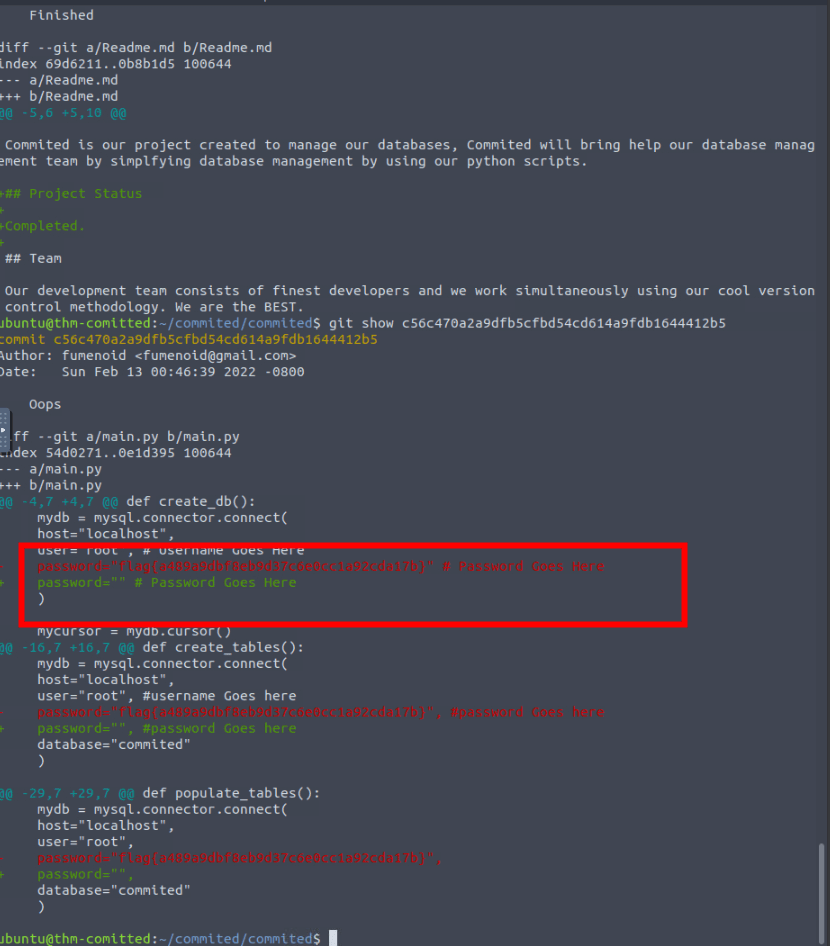
flag
flag{a489a9dbf8eb9d37c6e0cc1a92cda17b}