Linux Fundamentals
Linux Fundamentals Part 1
-
Linux digunakan di mana-mana: website, mobil, mesin kasir (PoS), dan infrastruktur penting
-
Linux ringan & open-source, punya banyak distro (varian)
-
Ubuntu & Debian populer, bisa dipakai server atau desktop (Ubuntu Server bisa jalan di 512MB RAM)
-
Research: What year was the first release of a Linux operating system?
1991
echo TryHackMe
ls -la
ls folder4
# note.txt
cat folder4/note.txt
cd /home/tryhackme/folder4- If we wanted to output the text "TryHackMe", what would our command be?
echo TryHackMe
- What is the username of who you're logged in as on your deployed Linux machine?
tryhackme
- On the Linux machine that you deploy, how many folders are there?
4
- Which directory contains a file?
folder4
- What is the contents of this file?
Hello World!
- Use the cd command to navigate to this file and find out the new current working directory. What is the path?
/home/tryhackme/folder4
grep "THM" access.log
# 13.127.130.212 - - [04/May/2021:08:35:26 +0000] "GET THM{ACCESS} lang=en HTTP/1.1" 404 360 "-" "Mozilla/5.0 (Windows NT 10.0; Win64; x64) AppleWebKit/537.36 (KHTML, like Gecko) Chrome/77.0.3865.120 Safari/537.36"- Use grep on "access.log" to find the flag that has a prefix of "THM". What is the flag? Note: The "access.log" file is located in the "/home/tryhackme/" directory.
THM{ACCESS}
Shell Operations
- Shell adalah interface command-line untuk berinteraksi dengan OS
- Terminal adalah aplikasi yang menyediakan akses ke shell
- Common shell: bash, zsh, fish
Symbol Operation
> Redirect output to file (overwrite)
>> Redirect output to file (append)
< Input from file
<< Here document (multi-line input)
<<< Here string (single-line input)
| Pipe output of one command to another command
& Run command in background
echo password123 > passwords
echo tryhackme >> passwords- If we wanted to run a command in the background, what operator would we want to use?
&
- If I wanted to replace the contents of a file named "passwords" with the word "password123", what would my command be?
echo password123 > passwords
- Now if I wanted to add "tryhackme" to this file named "passwords" but also keep "passwords123", what would my command be
echo tryhackme >> passwords
Linux Fundamentals Part 2
ssh tryhackme@10.49.132.139
# pass: tryhackme- What directional arrow key would we use to navigate down the manual page?
Down
- What flag would we use to display the output in a "human-readable" way?
-h
- How would you create the file named "newnote"?
touch newnote
- On the deployable machine, what is the file type of "unknown1" in "tryhackme's" home directory?
ASCII text
my myfile myfolder
cat myfolder/myfile
# THM{FILESYSTEM}- How would we move the file "myfile" to the directory "myfolder"
mv myfile myfolder
- What are the contents of this file?
THM{FILESYSTEM}
ls /home
# tryhackme  ubuntu  user2
su user2
# pass: user2- On the deployable machine, who is the owner of "important"?
user2
- What would the command be to switch to the user "user2"?
su user2
- Output the contents of "important", what is the flag?
THM{SU_USER2}
- What is the directory path that would we expect logs to be stored in?
/var/log
- What root directory is similar to how RAM on a computer works?
/tmp
- Name the home directory of the root user
/root
Linux Fundamentals Part 2
ssh tryhackme@10.49.174.71
# Password: tryhackme

nano task3
# THM{TEXT_EDITORS}

python3 -m http.server 8080

# on host
wget http://10.49.174.71:8080/.flag.txt
cat .flag.txt
# THM{WGET_WEBSERVER}- Edit "task3" located in "tryhackme"'s home directory using Nano. What is the flag?
THM{TEXT_EDITORS}
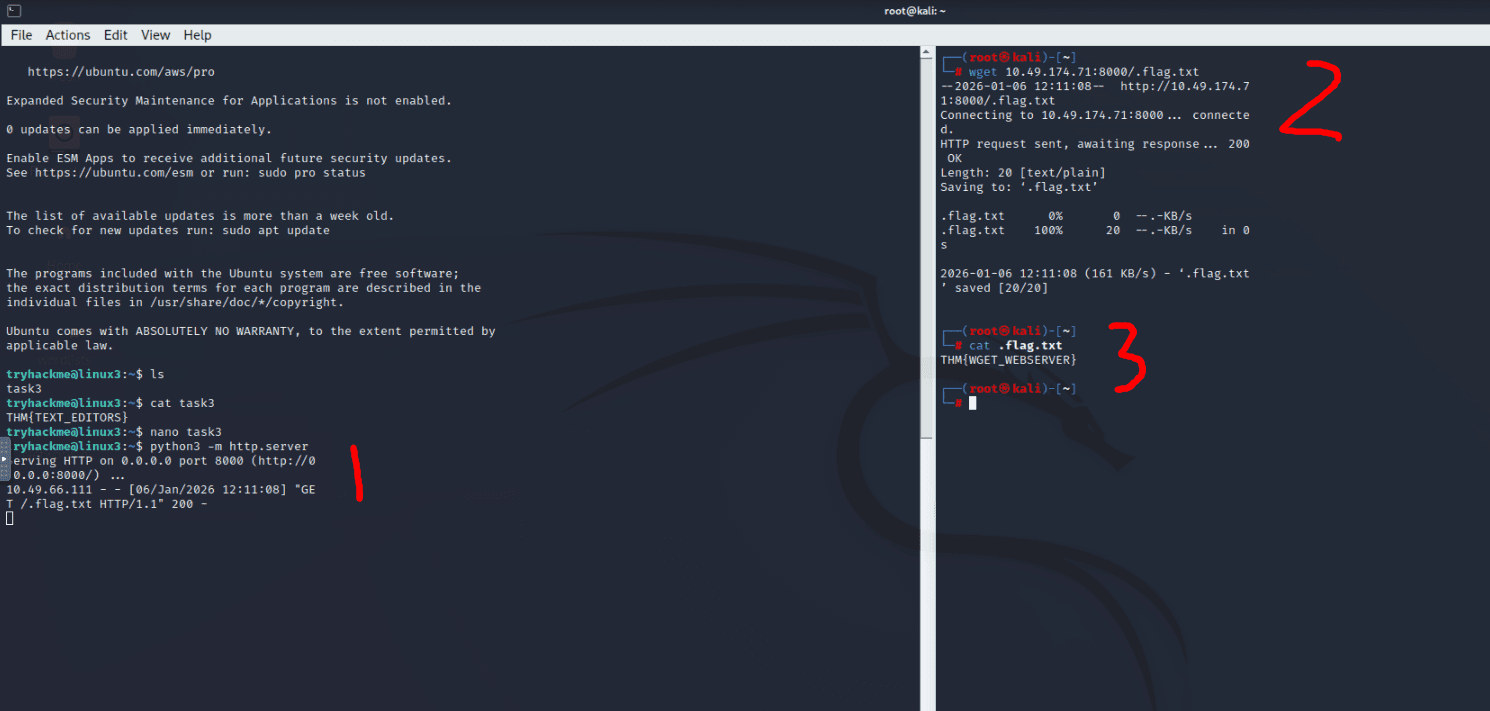
- Download the file http://10.49.174.71:8000/.flag.txt onto the TryHackMe AttackBox. Remember, you will need to do this in a new terminal.
THM{WGET_WEBSERVER}
prosess
-
Proses = program yang sedang berjalan dan punya PID
-
PID adalah ID unik proses dan bertambah sesuai urutan
-
ps melihat proses user, ps aux melihat semua proses
-
top melihat proses secara real-time
-
kill PID menghentikan proses
-
SIGTERM = stop rapi, SIGKILL = stop paksa, SIGSTOP = pause
-
systemd adalah proses utama saat boot
-
Semua proses lain adalah child dari systemd
-
systemctl start/stop/enable/disable untuk service
-
&, Ctrl+Z, dan fg untuk background & foreground
-
If we were to launch a process where the previous ID was "300", what would the ID of this new process be?
301
- If we wanted to cleanly kill a process, what signal would we send it?
SIGTERM
- Locate the process that is running on the deployed instance (10.49.174.71). What flag is given?
THM{PROCESSES}
- What command would we use to stop the service "myservice"?
systemctl stop myservice
- What command would we use to start the same service on the boot-up of the system?
systemctl enable myservice
- What command would we use to bring a previously backgrounded process back to the foreground?
fg
Maintaining Your System: Automation
tryhackme@linux3:~$ crontab -l
# Edit this file to introduce tasks to be run by cron.
# ....
# m h  dom mon dow   command
# @reboot /var/opt/processes.sh- When will the crontab on the deployed instance (10.49.174.71) run?
@reboot
apt update
apt install sublime-text
add-apt-repository --remove ppa:PPA_Name/ppa
# apt remove [software-name-here]
apt remove sublime-text
Maintaining Your System: Logs
cd /var/log/apache2
ls
# access.log  access.log.1  error.log  error.log.1  error.log.2.gz  other_vhosts_access.log

ls -la
# -rw-r-----  1 root      adm          0 Feb  3  2025 access.log
# -rwxrwxrwx  1 tryhackme tryhackme  209 May  4  2021 access.log.1
# -rw-r-----  1 root      adm          0 Feb  3  2025 error.log
# -rw-r-----  1 root      adm        810 Oct 18  2022 error.log.1
# -rwxrwxrwx  1 root      adm        464 May  5  2021 error.log.2.gz
# -rw-r-----  1 root      adm          0 May  4  2021 other_vhosts_access.log

cat access.log.1
# 10.9.232.111 - - [04/May/2021:18:18:16 +0000] "GET /catsanddogs.jpg HTTP/1.1" 200 51395 "-" "Mozilla/5.0 (Windows NT 10.0; Win64; x64) AppleWebKit/537.36 (KHTML, like Gecko) Chrome/90.0.4430.93 Safari/537.36"- What is the IP address of the user who visited the site?
10.9.232.111
- What file did they access?
catsanddogs.jpg