Web Hacking Part 1
Web Application Basics
Web Application Overview
🌍 Analogi Web Application sebagai Planet
Sebuah web application dapat dianalogikan sebagai sebuah planet. Pengguna (seperti astronot) menjelajahi permukaan planet menggunakan web browser. Yang terlihat hanyalah permukaannya, padahal banyak proses penting terjadi di bawah permukaan.
🖥️ Front End (Permukaan Planet)
Front End adalah bagian web yang langsung dilihat dan diinteraksikan oleh pengguna melalui browser.
1. HTML (HyperText Markup Language)
- Berfungsi sebagai kerangka dasar web aplikasi.
- Mengatur apa yang ditampilkan di browser.
- Diibaratkan seperti DNA organisme sederhana:
- Memberi struktur dasar
- Tanpa warna, desain, atau interaksi
- Tanpa CSS & JavaScript → tampilan abu-abu dan statis.
2. CSS (Cascading Style Sheets)
- Mengatur tampilan visual:
- Warna
- Font
- Layout
- Desain
- Dalam analogi DNA:
- Menentukan warna, bentuk, ukuran, dan tekstur
- Membuat halaman web menjadi menarik dan estetis.
3. JavaScript (JS)
- Memberikan interaksi dan logika pada web.
- Memungkinkan:
- Keputusan
- Respon terhadap aksi pengguna
- Perubahan konten secara dinamis
- Dianalogikan sebagai otak organisme cerdas:
- Mampu berpikir
- Bereaksi terhadap lingkungan
⚙️ Back End (Bagian di Bawah Permukaan)
Back End adalah bagian yang tidak terlihat oleh pengguna, namun sangat penting agar aplikasi berjalan.
1. Database
- Tempat untuk:
- Menyimpan
- Mengubah
- Mengambil data
- Contoh data:
- Preferensi pengguna
- Akun
- Riwayat aktivitas
- Analogi planet:
- Peta
- Buku
- Arsip
- Perpustakaan
2. Infrastructure
Meliputi:
- Web server
- Application server
- Storage
- Network
- Sistem pendukung lainnya
Analogi planet:
- Jalan
- Kendaraan
- Bahan bakar
- Sistem transportasi
Tanpa infrastruktur → web aplikasi tidak bisa beroperasi.
3. WAF (Web Application Firewall)
- Komponen keamanan opsional.
- Berfungsi untuk:
- Menyaring request berbahaya
- Melindungi web server dari serangan
- Analogi:
- Lapisan ozon
- Melindungi planet dari radiasi berbahaya
- Which component on a computer is responsible for hosting and delivering content for web applications?
web server
- Which tool is used to access and interact with web applications?
web browser
- Which component acts as a protective layer, filtering incoming traffic to block malicious attacks, and ensuring the security of the the web application?
web application firewall
Uniform Resource Locator
URL (Uniform Resource Locator) adalah alamat web yang digunakan untuk mengakses berbagai konten di internet, seperti:
- Halaman web
- Video
- Gambar
- File atau media lainnya
URL berfungsi sebagai petunjuk arah bagi browser agar dapat menemukan sumber daya yang tepat di internet.
🧩 Anatomi URL (Bagian-bagian URL)
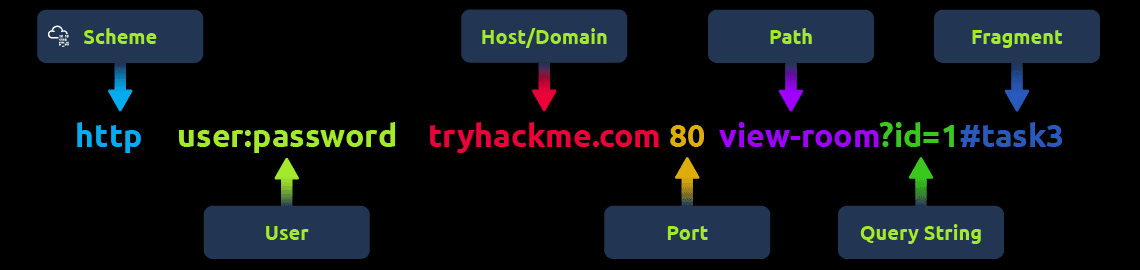
Sebuah URL terdiri dari beberapa komponen penting yang masing-masing memiliki peran berbeda. Memahami bagian-bagian ini berguna untuk:
- Browsing web
- Pengembangan web
- Analisis dan troubleshooting
- Keamanan siber
1. Scheme (Protokol)
- Menentukan cara mengakses website.
- Contoh umum:
httphttps
- HTTPS lebih aman karena menggunakan enkripsi.
- Direkomendasikan oleh browser dan pakar keamanan.
- Banyak website memaksa penggunaan HTTPS demi perlindungan data.
2. User
- Berisi informasi login pengguna (biasanya username).
- Digunakan pada URL yang membutuhkan autentikasi.
- Jarang digunakan saat ini karena:
- Tidak aman
- Bisa membocorkan data sensitif
- Berisiko tinggi dalam keamanan.
3. Host / Domain
- Menunjukkan website yang diakses.
- Setiap domain:
- Unik
- Terdaftar melalui domain registrar
- Dari sisi keamanan:
- Waspadai typosquatting
- Domain palsu yang mirip domain asli
- Sering digunakan dalam serangan phishing
4. Port
- Menentukan layanan mana di server yang digunakan.
- Dianalogikan sebagai pintu masuk komunikasi.
- Rentang port:
1 – 65.535 - Port umum:
80→ HTTP443→ HTTPS
5. Path
- Menunjukkan lokasi file atau halaman tertentu di server.
- Berfungsi seperti petunjuk jalan menuju resource.
- Perlu diamankan agar:
- Resource sensitif tidak bisa diakses sembarangan
- Hanya user yang berwenang yang dapat mengakses
6. Query String
- Dimulai dengan tanda
? - Digunakan untuk:
- Parameter pencarian
- Data form
- Contoh:
?id=10&name=ayu - Karena dapat dimodifikasi oleh user:
- Harus divalidasi
- Harus disanitasi
- Rentan terhadap injection attack jika tidak diamankan
7. Fragment
- Dimulai dengan tanda
# - Digunakan untuk:
- Lompat ke bagian tertentu pada halaman web
- Contoh:
#section1 - Juga dapat dimodifikasi oleh user
- Perlu validasi untuk mencegah:
- Manipulasi data
- Serangan injection
- Which protocol provides encrypted communication to ensure secure data transmission between a web browser and a web server?
HTTPS
- What term describes the practice of registering domain names that are misspelt variations of popular websites to exploit user errors and potentially engage in fraudulent activities?
Typosquatting
- What part of a URL is used to pass additional information, such as search terms or form inputs, to the web server?
Query String
HTTP Messages
HTTP Messages adalah paket data yang dipertukarkan antara:
- Client (user/browser)
- Web Server
HTTP messages sangat penting karena menunjukkan bagaimana request dari pengguna dan response dari server saling berkomunikasi dalam sebuah web application.
🔁 Jenis HTTP Messages
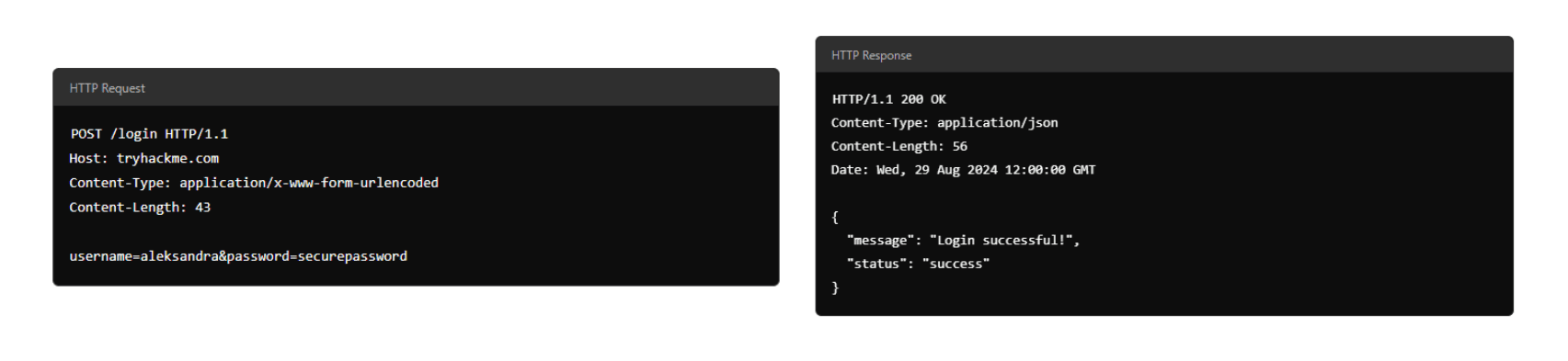
1. HTTP Request
- Dikirim oleh client ke server.
- Digunakan untuk:
- Meminta data
- Mengirim data
- Menjalankan aksi tertentu pada web application
- Contoh:
- Login (POST request)
- Mengambil halaman (GET request)
2. HTTP Response
- Dikirim oleh server sebagai balasan atas request client.
- Berisi:
- Status hasil request
- Data yang diminta user
- Contoh:
- Login berhasil
- Halaman web ditampilkan
🧱 Struktur HTTP Message
Setiap HTTP message (request maupun response) memiliki format yang sama agar komunikasi berjalan dengan baik.
1. Start Line
- Baris pertama dalam HTTP message.
- Menjelaskan jenis pesan:
- Request → metode (GET, POST, dll) + URL
- Response → status code (200, 404, dll)
- Menentukan bagaimana pesan harus diproses.
2. Headers
- Berisi pasangan key-value.
- Menyediakan informasi tambahan tentang pesan.
- Contoh informasi dalam header:
- Security
- Content-Type
- Authorization
- Cookie
- Membantu client dan server memahami cara menangani request/response.
3. Empty Line
- Baris kosong yang memisahkan header dan body.
- Sangat penting agar:
- Header tidak tercampur dengan body
- Pesan tidak salah ditafsirkan
- Tanpa empty line → bisa menyebabkan error komunikasi.
4. Body
- Berisi data utama.
- Pada Request:
- Data form
- JSON
- Payload user
- Pada Response:
- HTML
- JSON API
- File atau konten lainnya
🔐 Mengapa Memahami HTTP Messages Itu Penting?
1. Fungsi Dasar Web
- HTTP messages adalah fondasi komunikasi web.
- Struktur yang benar → web berjalan lancar.
2. Troubleshooting & Performance
- Membantu:
- Mendiagnosis error
- Memahami kegagalan request
- Meningkatkan performa aplikasi
3. Keamanan Web
- Penting untuk:
- Mengamankan data saat transmisi
- Mencegah serangan (misalnya injection, header abuse)
- Dasar penting dalam:
- Web security
- Pentesting
- Secure web development
- Which HTTP message is returned by the web server after processing a client's request?
HTTP response
- What follows the headers in an HTTP message?
Empty Line
HTTP Request: Request Line and Methods
HTTP Request adalah pesan yang dikirim client (user/browser) ke web server untuk berinteraksi dengan web application. Karena ini adalah titik kontak pertama antara user dan server, pemahaman HTTP request sangat penting, terutama dalam cyber security.
🧱 Struktur Dasar HTTP Request
Request Line (Start Line)
Baris pertama yang memberi tahu server jenis permintaan yang diterima.
Format:
METHOD /path HTTP/versionBerisi:
- HTTP Method → aksi yang diminta
- URL Path → resource yang dituju
- HTTP Version → versi protokol
🔧 HTTP Methods (Aksi & Keamanan)
| Method | Fungsi | Catatan Keamanan |
|---|---|---|
| GET | Mengambil data | Jangan kirim data sensitif (token, password) |
| POST | Mengirim data | Validasi & sanitasi input (hindari SQLi, XSS) |
| PUT | Update/replace data | Pastikan user authorized |
| DELETE | Menghapus data | Batasi hanya user berhak |
| PATCH | Update sebagian | Validasi untuk cegah inkonsistensi |
| HEAD | Ambil header saja | Untuk cek metadata |
| OPTIONS | Cek method yang tersedia | Nonaktifkan jika tidak perlu |
| TRACE | Debug request | Biasanya dinonaktifkan (risiko keamanan) |
| CONNECT | Koneksi aman (HTTPS) | Digunakan untuk komunikasi terenkripsi |
📍 URL Path
- Menunjukkan lokasi resource di server
Contoh:
/api/users/123 - Sering menjadi target serangan.
Best practice keamanan:
- Validasi path
- Sanitasi input
- Batasi akses resource sensitif
- Lakukan risk & privacy assessment
🌐 HTTP Version
| Versi | Keterangan |
|---|---|
| HTTP/0.9 | GET saja |
| HTTP/1.0 | Header & caching |
| HTTP/1.1 | Persistent connection, masih paling umum |
| HTTP/2 | Multiplexing, header compression |
| HTTP/3 | QUIC, lebih cepat & aman |
HTTP/1.1 masih banyak dipakai, tapi HTTP/2 & HTTP/3 menawarkan performa dan keamanan lebih baik.
- Which HTTP protocol version became widely adopted and remains the most commonly used version for web communication, known for introducing features like persistent connections and chunked transfer encoding?
HTTP/1.1
- Which HTTP request method describes the communication options for the target resource, allowing clients to determine which HTTP methods are supported by the web server?
OPTIONS
- In an HTTP request, which component specifies the specific resource or endpoint on the web server that the client is requesting, typically appearing after the domain name in the URL?
URL Path
HTTP Request: Headers and Body
Request Headers digunakan untuk mengirim informasi tambahan dari client ke web server terkait request yang dikirim.
Header yang Umum Digunakan
| Header | Fungsi |
|---|---|
| Host | Menentukan web server tujuan |
| User-Agent | Informasi browser / aplikasi client |
| Referer | URL asal request |
| Cookie | Data yang disimpan browser dari server |
| Content-Type | Menentukan format data pada request |
📌 Header membantu server:
- Memahami konteks request
- Mengelola session & autentikasi
- Menentukan cara memproses data
📦 Request Body
Request Body berisi data yang dikirim ke server, biasanya pada:
- POST
- PUT
- PATCH
Format data ditentukan oleh header Content-Type.
🧾 Format Umum Request Body
1. URL Encoded
application/x-www-form-urlencoded
- Format:
key=value&key2=value2 - Karakter khusus di-encode (%)
- Umum digunakan pada form sederhana
Contoh:
name=Aleksandra&age=27&country=US2. Form Data
multipart/form-data
- Menggunakan boundary
- Mendukung data biner
- Digunakan untuk upload file / gambar
Kegunaan utama:
- Upload file
- Kirim banyak tipe data sekaligus
3. JSON
application/json
- Format:
key : value - Menggunakan
{ } - Ringkas dan paling umum di API modern
Contoh:
{
  "name": "Aleksandra",
  "age": 27,
  "country": "US"
}
4. XML
application/xml
- Data dibungkus dalam tag
- Lebih verbose
- Umum pada sistem lama (legacy)
Contoh:
<user>
  <name>Aleksandra</name>
  <age>27</age>
  <country>US</country>
</user>
🔐 Catatan Keamanan Singkat
- Selalu validasi & sanitasi data request body
- Jangan percaya data dari client
- Cookie & header bisa dimanipulasi
- Pastikan Content-Type sesuai data
- Which HTTP request header specifies the domain name of the web server to which the request is being sent?
Host
- What is the default content type for form submissions in an HTTP request where the data is encoded as key=value pairs in a query string format?
application/x-www-form-urlencoded
- Which part of an HTTP request contains additional information like host, user agent, and content type, guiding how the web server should process the request?
Request Headers
HTTP Response: Status Line and Status Codes
HTTP Response adalah balasan dari server terhadap request client. Response ini memberi tahu apakah permintaan:
- Berhasil
- Dialihkan
- Gagal karena client
- Gagal karena server
Setiap response membawa Status Code dan Reason Phrase untuk menjelaskan hasilnya.
🧱 Status Line (Baris Pertama Response)
Status Line berisi 3 informasi utama:
- HTTP Version → versi protokol yang digunakan
- Status Code → kode angka hasil request
- Reason Phrase → penjelasan singkat (human-readable)
Contoh:
HTTP/1.1 200 OK📊 Kategori Status Codes
1️⃣ Informational (100–199)
- Server menerima sebagian request
- Meminta client melanjutkan pengiriman data
2️⃣ Successful (200–299)
- Request berhasil diproses
- Data dikirim sesuai permintaan
3️⃣ Redirection (300–399)
- Resource dipindahkan
- Server memberi lokasi baru (URL)
4️⃣ Client Error (400–499)
- Kesalahan pada request client
- Contoh: URL salah, tidak terautentikasi
5️⃣ Server Error (500–599)
- Kesalahan di sisi server
- Bukan kesalahan client
⭐ Status Codes yang Umum
| Kode | Arti |
|---|---|
| 100 Continue | Server siap menerima request lanjutan |
| 200 OK | Request berhasil |
| 301 Moved Permanently | Resource pindah permanen |
| 404 Not Found | Resource tidak ditemukan |
| 500 Internal Server Error | Error di sisi server |
- What part of an HTTP response provides the HTTP version, status code, and a brief explanation of the response's outcome?
Status Line
- Which category of HTTP response codes indicates that the web server encountered an internal issue or is unable to fulfil the client's request?
Server Error Responses
- Which HTTP status code indicates that the requested resource could not be found on the web server?
404
HTTP Response: Headers and Body
Response Headers adalah pasangan key–value yang dikirim server bersama HTTP response. Fungsinya untuk memberi informasi & instruksi kepada client (browser) tentang cara menangani response.
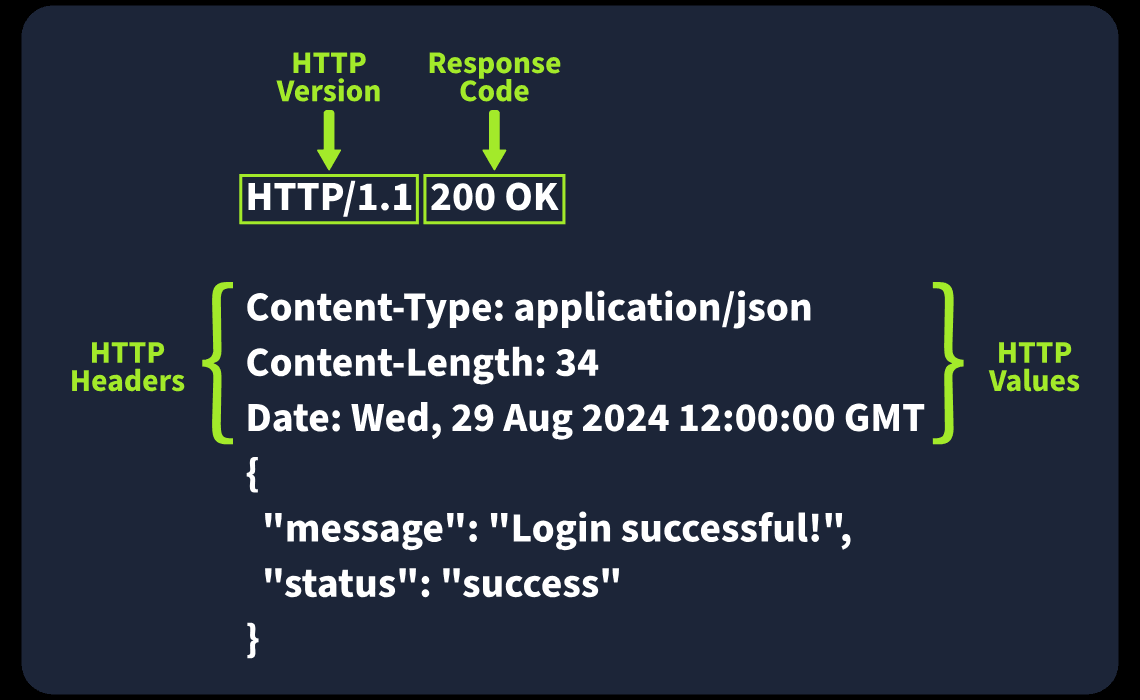
🧱 Response Headers Penting (Wajib)
| Header | Fungsi |
|---|---|
| Date | Waktu response dibuat oleh server |
| Content-Type | Jenis & format konten (HTML, JSON, dll) + charset |
| Server | Informasi software server (sering disembunyikan demi keamanan) |
📌 Catatan keamanan: Header Server bisa membantu debugging, tapi juga bisa membocorkan info ke attacker.
🔧 Response Headers Umum Lainnya
| Header | Fungsi | Catatan Keamanan |
|---|---|---|
| Set-Cookie | Mengirim cookie ke client | Gunakan HttpOnly & Secure |
| Cache-Control | Mengatur caching response | Gunakan no-cache untuk data sensitif |
| Location | Menentukan URL tujuan redirect | Validasi untuk cegah open redirect |
📦 Response Body
Response Body berisi data utama yang dikirim server, seperti:
- HTML
- JSON
- Gambar
- File lainnya
📌 Keamanan penting:
- Selalu sanitize & escape data
- Terutama data dari user
- Mencegah serangan seperti XSS (Cross-Site Scripting)
- Which HTTP response header can reveal information about the web server's software and version, potentially exposing it to security risks if not removed?
Server
- Which flag should be added to cookies in the Set-Cookie HTTP response header to ensure they are only transmitted over HTTPS, protecting them from being exposed during unencrypted transmissions?
Secure
- Which flag should be added to cookies in the Set-Cookie HTTP response header to prevent them from being accessed via JavaScript, thereby enhancing security against XSS attacks?
HttpOnly
Security Headers
🔐 Security Headers
HTTP Security Headers digunakan untuk meningkatkan keamanan web application dengan mengurangi risiko serangan seperti:
- Cross-Site Scripting (XSS)
- Clickjacking
- MIME sniffing
- Data leakage via referrer
Header ini bisa dianalisis menggunakan tools seperti securityheaders.io.
1️⃣ Content-Security-Policy (CSP)
CSP berfungsi sebagai lapisan pertahanan tambahan untuk mencegah serangan seperti XSS, dengan cara membatasi sumber konten yang diizinkan.
Fungsi Utama
- Menentukan domain/sumber tepercaya
- Mencegah eksekusi script berbahaya dari luar
Contoh
Content-Security-Policy:
default-src 'self';
script-src 'self' https://cdn.tryhackme.com;
style-src 'self'
Directive Penting
- default-src → kebijakan default (biasanya
self) - script-src → sumber JavaScript yang diizinkan
- style-src → sumber CSS yang diizinkan
- 'self' → domain website itu sendiri
📌 Semakin ketat CSP, semakin kecil risiko XSS.
2️⃣ Strict-Transport-Security (HSTS)
HSTS memaksa browser selalu menggunakan HTTPS.
Contoh
Strict-Transport-Security: max-age=63072000; includeSubDomains; preloadDirective
- max-age → durasi kebijakan (dalam detik)
- includeSubDomains → berlaku untuk semua subdomain
- preload → masuk daftar preload browser (HTTPS sejak awal)
📌 Mencegah downgrade attack & MITM.
3️⃣ X-Content-Type-Options
Mencegah browser menebak (sniffing) tipe file.
Contoh
X-Content-Type-Options: nosniffDirective
- nosniff → browser hanya percaya
Content-Type
📌 Melindungi dari MIME-type confusion & XSS.
4️⃣ Referrer-Policy
Mengontrol informasi referrer yang dikirim saat user berpindah halaman.
Contoh Policy
Referrer-Policy: no-referrer
Referrer-Policy: same-origin
Referrer-Policy: strict-origin
Referrer-Policy: strict-origin-when-cross-origin
Directive
- no-referrer → tidak kirim info sama sekali
- same-origin → kirim hanya jika satu domain
- strict-origin → kirim origin jika HTTPS → HTTPS
- strict-origin-when-cross-origin →
- same-origin: URL lengkap
- cross-origin: hanya origin
📌 Mencegah kebocoran URL sensitif.
📌 Ringkasan Cepat
| Header | Perlindungan |
|---|---|
| CSP | XSS, injection |
| HSTS | Downgrade & MITM |
| X-Content-Type-Options | MIME sniffing |
| Referrer-Policy | Data leakage |
- In a Content Security Policy (CSP) configuration, which property can be set to define where scripts can be loaded from?
script-src
- When configuring the Strict-Transport-Security (HSTS) header to ensure that all subdomains of a site also use HTTPS, which directive should be included to apply the security policy to both the main domain and its subdomains?
includeSubDomains
- Which HTTP header directive is used to prevent browsers from interpreting files as a different MIME type than what is specified by the server, thereby mitigating content type sniffing attacks?
nosniff
Practical Task: Making HTTP Requests
- Make a GET request to /api/users. What is the flag?
THM{YOU_HAVE_JUST_FOUND_THE_USER_LIST}
- Make a POST request to /api/user/2 and update the country of Bob from UK to US. What is the flag?
THM{YOU_HAVE_MODIFIED_THE_USER_DATA}
- Make a DELETE request to /api/user/1 to delete the user. What is the flag?
THM{YOU_HAVE_JUST_DELETED_A_USER}
JavaScript Essentials
Essential Concepts
- What term allows you to run a code block multiple times as long as it is a condition?
loop
JavaScript Overview
- What is the code output if the value of x is changed to 10?
The result is: 20
- Is JavaScript a compiled or interpreted language?
Interpreted
Integrating JavaScript in HTML
- Which type of JavaScript integration places the code directly within the HTML document?
Internal
- Which method is better for reusing JS across multiple web pages?
External
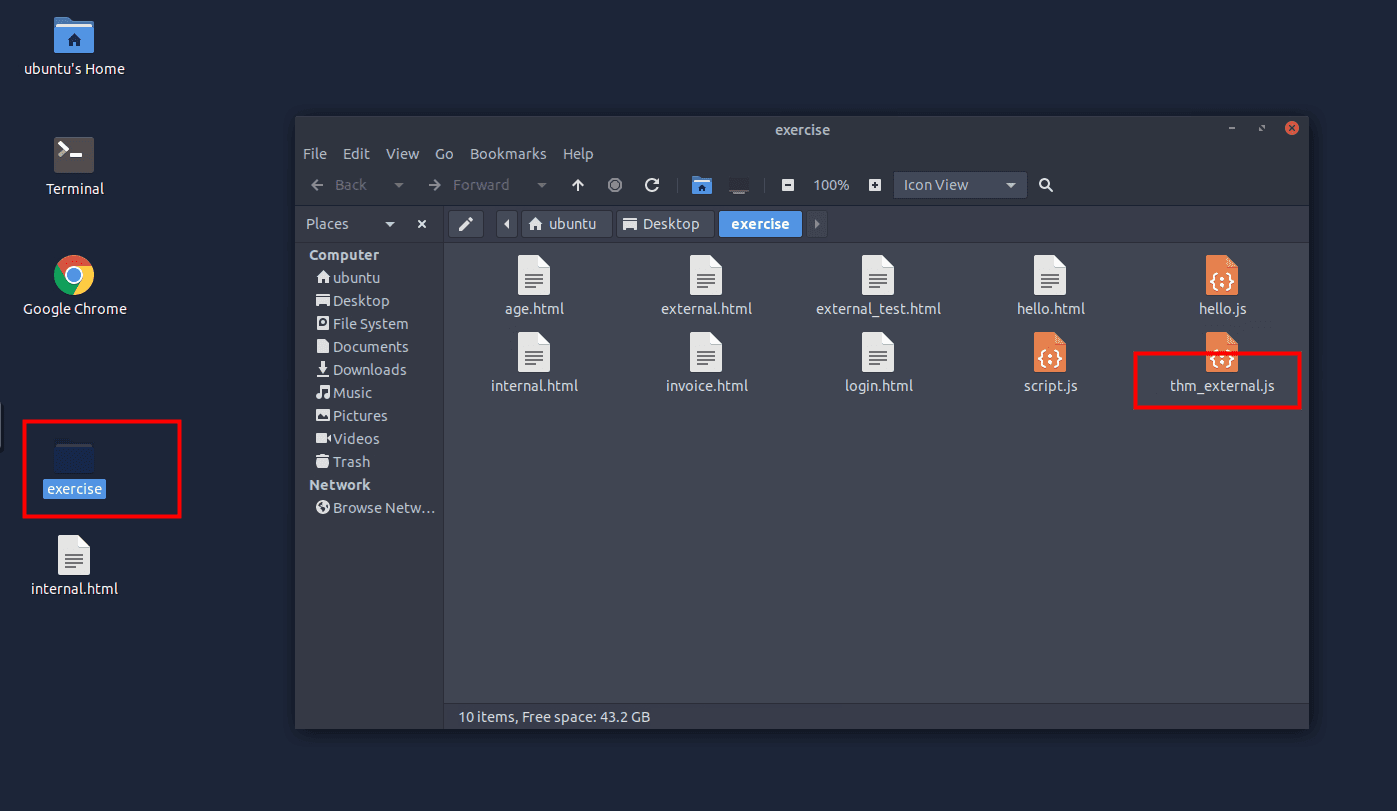
- What is the name of the external JS file that is being called by external_test.html?
thm_external.js
- What attribute links an external JS file in the tag?
src
Abusing Dialogue Functions
- In the file invoice.html, how many times does the code show the alert Hacked?
5
- Which of the JS interactive elements should be used to display a dialogue box that asks the user for input?
Prompt
- If the user enters Tesla, what value is stored in the carName= prompt("What is your car name?")? in the carName variable?
Tesla
Bypassing Control Flow Statements
- What is the message displayed if you enter the age less than 18?
You are a minor.
- What is the password for the user admin?
ComplexPassword
Exploring Minified Files
-
What is the alert message shown after running the file hello.html?
Welcome to THM
- What is the value of the age variable in the following obfuscated code snippet?
- age=0x10x247e+0x35-0x2e+-0x1ae3;
21
Best Practices
- Is it a good practice to blindly include JS in your code from any source (yea/nay)?
nay